

Contents
On this page
Mollie Payments - Plugixa Car Parking
Mollie PRO is a payment method that sends the customer to Mollie’s hosted checkout and brings them back to your site. Customers see it as Online payment (Mollie).
Set it up under Plugixa Car Parking -> Settings -> Mollie. Everything on Payments about the ledger, refunds and booking statuses applies to Mollie payments too.
Setting it up
- In the Mollie dashboard, open Developers -> API keys and copy a key.
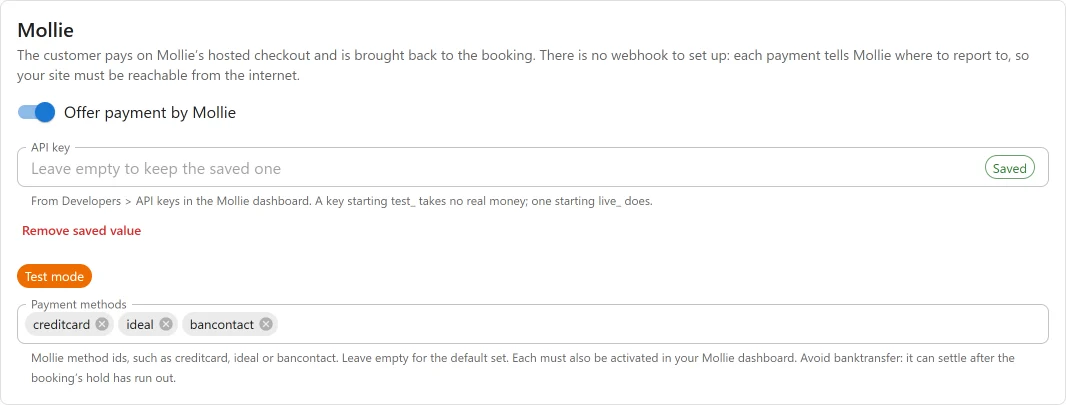
- Open Plugixa Car Parking -> Settings -> Mollie and fill in the fields below.
- In the Mollie dashboard, activate each payment method you want to offer.
- Press Save.
| Field | Key | Default | Notes |
|---|---|---|---|
| Offer payment by Mollie | mollie in enabled_gateways |
Off | The switch that offers Mollie to customers. |
| API key | mollie_api_key |
Empty | Stored encrypted and never sent back to the browser. |
| Payment methods | mollie_methods |
Empty | Mollie method ids. Empty offers the default set: creditcard, ideal, bancontact. |
There is no webhook to add: each payment tells Mollie where to report. Your site
must be reachable from the internet, because Mollie refuses a localhost
address. To test on your own computer, use a tunnel.
Test and live
The key decides. A key starting test_ takes no real money, one starting
live_ does, and the settings screen shows a Test mode or Live mode badge.
To go live, replace the test key with the live key.
Choosing payment methods
Avoid banktransfer. It can settle days later, after the booking’s hold has run
out and its space may have been sold to someone else. Avoid klarna, in3,
billie, billink, riverty and voucher: Mollie requires order lines for them,
which the plugin does not send.
Monthly payments stay with Stripe. See Monthly payments.
How a payment is confirmed
Mollie’s notifications carry only a payment id and are not signed. Nothing in them is believed: for every notification, and on every return, the plugin reads the payment from Mollie’s API with your key.
| Mollie says | What the plugin does |
|---|---|
paid |
Records the payment, with its type (whole, deposit or balance) |
failed |
Records a Failed row; the booking stays unpaid |
canceled, expired |
Nothing recorded; announced as checkout_expired |
open, pending, authorized |
Nothing recorded. A returning customer sees Confirming your payment |
If the plugin cannot reach Mollie while handling a notification, it answers 503 and Mollie sends it again, up to 10 times over about 26 hours.
“Announced” means the action plugixa_carparking_payment_notice fires, so an
add-on or a snippet can email you about it. Mollie’s notification does not say
what changed, so a chargeback or a failed refund can be announced more than
once. Use the id in data to recognise one you have seen.
Refunds
A refund made from the booking’s Payments panel is sent to Mollie first and recorded with Mollie’s refund id. If Mollie refuses it, nothing is recorded and the error is shown.
Mollie can take time to pay a refund out. The refund is recorded when Mollie
accepts it. If Mollie later reports it failed, the refund is marked Failed, the
booking holds the money again, refund_failed is announced and the site is emailed.
A refund made in the Mollie dashboard is recorded once Mollie reports it as
refunded. A chargeback is announced as dispute_opened, the site is emailed once, and
nothing changes in the ledger.
Amounts and currencies
The currency is the booking’s own, and must be one your Mollie account and the
chosen method accept. Most methods take EUR only or a limited list. ISK and
JPY are sent with no decimals, others with two.
What is sent to Mollie
The plugin talks to Mollie from your server. There is no Mollie script on your pages.
| Sent | |
|---|---|
| API key | To sign in |
| Amount and currency | The amount due now |
| Booking reference and payment type | As the payment’s metadata; the reference also in its description |
| Allowed methods | So the checkout offers only those |
| Return, cancel and notification addresses | On your site |
No name, email address, phone number or licence plate is sent by the plugin. What the customer enters at Mollie goes to Mollie directly. See Privacy and uninstall.
If Pro is removed
The encrypted key stays in the settings and is live again when Pro is
reinstalled. Mollie is no longer offered to customers, and existing rows stay in
the ledger with mollie shown as their method.
Quick Links
Share