

Contents
Monthly Payments for Long Stays - Plugixa Car Parking
Monthly payments PRO let a customer pay a long stay month by month instead of all at once. The first month is paid by card when they book. Stripe then charges the same amount on the same day of each following month, until the stay is paid for, or, with a rolling plan, until the customer cancels.
It is made for season parking, commuters and anyone who parks for months: a three-month stay of 1,343.16 becomes 447.72 now and 447.72 a month twice more. The total is not changed. A plan only decides when the money is taken.
Monthly payments were added in version 1.1.0. They run on Stripe, and are turned on for each location on its own.
What you need
| Requirement | Why |
|---|---|
| Pro, with Stripe set up | Stripe holds the schedule and charges each month. Only a card payment through Stripe can be a plan. |
| The Stripe webhook, with four more events | Each month paid, each failed month and each cancellation reaches your site through the webhook. See Stripe webhook events. |
| A location that offers it | A switch on the location. Off by default. |
| A stay that spans at least two calendar months | A stay of one month or less is simply paid. |
A customer who chooses PayPal, or pay on arrival, pays as for any other booking. PayPal refuses a plan with “Paying by the month is only possible by card.”
Turn it on for a location
Open Plugixa Car Parking -> Locations, edit the location and scroll to Monthly payments.
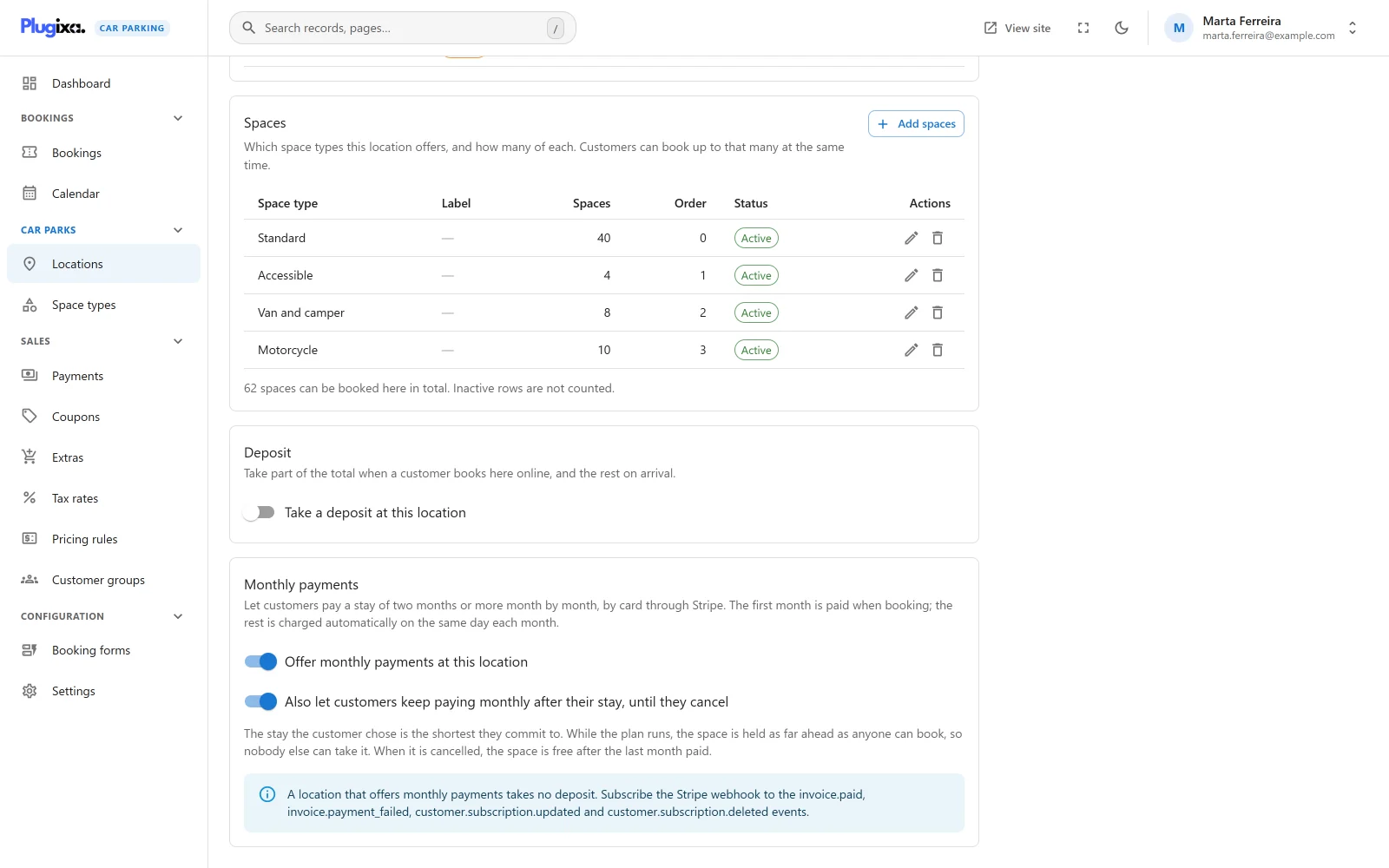
| Switch | What it does |
|---|---|
| Offer monthly payments at this location | Customers booking a stay of two months or more here can pay it monthly. |
| Also let customers keep paying monthly after their stay, until they cancel | Adds a rolling plan, below. It can only be on while the first switch is. |
Press Save. Both are stored in the location’s own settings, as
installments_enable and installments_rolling.
A location that offers monthly payments takes no deposit
A deposit and a monthly plan answer the same question: how much is due now. At a location that offers monthly payments, the deposit is not taken, and the first month is what is due now. The panel says so: “A location that offers monthly payments takes no deposit.”
How a stay is cut into months
The number of payments is the number of calendar months the stay spans. A part month counts as a month: it takes one payment.
| Stay | Payments |
|---|---|
| 1 January to 1 March | 2 |
| 15 January to 20 April | 4 |
| 1 January to 1 January the next year | 12 |
| 3 weeks | No plan: paid in full |
The total is the booking’s price as it always is, with its pricing rules, coupons, extras and taxes. It is then cut into the same amount each month:
- Every month after the first is the same amount, rounded down to the cent.
- The first payment carries the space type’s One-off fee, if it has one, and the few cents left over by the rounding.
For example, 1,000.00 over three months is 333.34 now, then 333.33 twice. 715.00 over six months with a one-off fee of 15.00 is 131.70 now, then 116.66 five times.
Fixed and rolling plans
| Fixed plan | Rolling plan | |
|---|---|---|
| Offered | Always, where the location offers monthly payments | Only with the second switch on |
| Length | The stay the customer chose | The stay chosen is the shortest they commit to. It then carries on |
| When it stops | By itself, once the booking is paid in full | When the customer or you cancel it, at the end of the month already paid |
| The space | Booked for the stay chosen | Held for the customer as far ahead as anyone can book |
What a rolling plan does to the booking
While a rolling plan runs, nobody else can take the space. Its booking ends as far ahead as anyone could book (the site’s Furthest ahead (days), plus a month), and each payment moves that end on. Each month paid beyond the stay the customer chose is added to what the booking costs.
When the plan is cancelled, the booking ends on the last day paid for, and the space is free from then.
If, when the first month comes in, the space is already booked by someone else after the stay, the plan cannot carry on. It becomes a fixed plan for the stay chosen. The customer is emailed (“About your monthly parking”), and so are you.
What the customer sees
On the booking form, once Credit / debit card (Stripe) is the way to pay and the stay spans two months or more, the last step asks How would you like to pay?
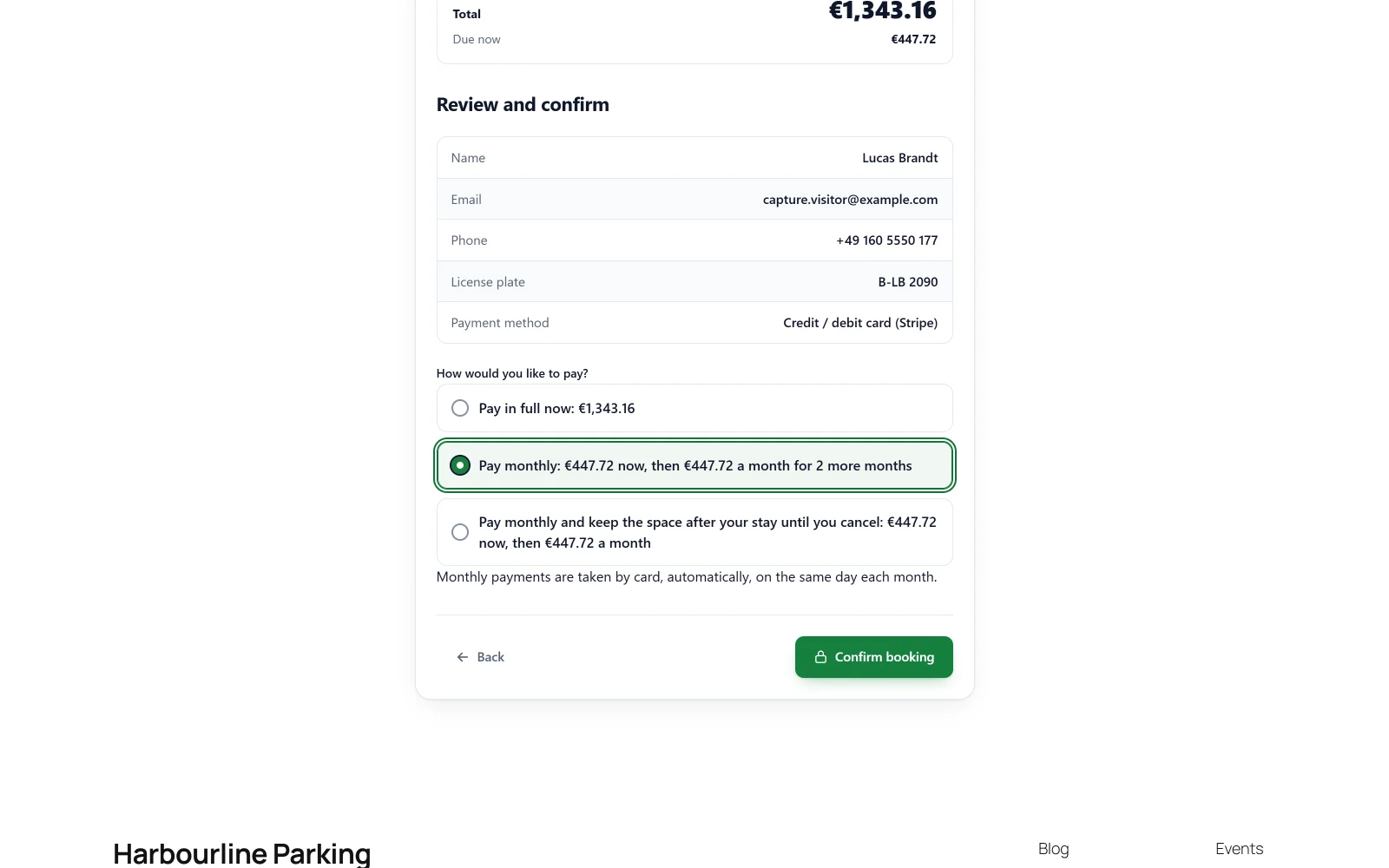
| Choice | Shown |
|---|---|
| Pay in full now: the total | Always |
| Pay monthly: the first payment now, then the monthly amount for the months left | Always |
| Pay monthly and keep the space after your stay until you cancel: the first payment now, then the monthly amount | With the rolling switch on |
The note under the choice reads “Monthly payments are taken by card, automatically, on the same day each month.” The customer then pays the first month on Stripe’s Checkout page and returns to your site as after any card payment. See Coming back from an online payment.
The same choice is offered on the booking’s summary page, for a booking made without paying, as long as nothing has been paid on it yet.
Changing the card, and cancelling
Once a plan is running, the summary page shows a button that opens Stripe’s own billing page for the customer:
- Change the card for monthly payments, for a fixed plan. The customer can change the card. They cannot cancel: the stay is owed.
- Manage monthly payments, for a rolling plan. The customer can change the card and, once the stay they chose is paid for, cancel. The plan then stops at the end of the month already paid.
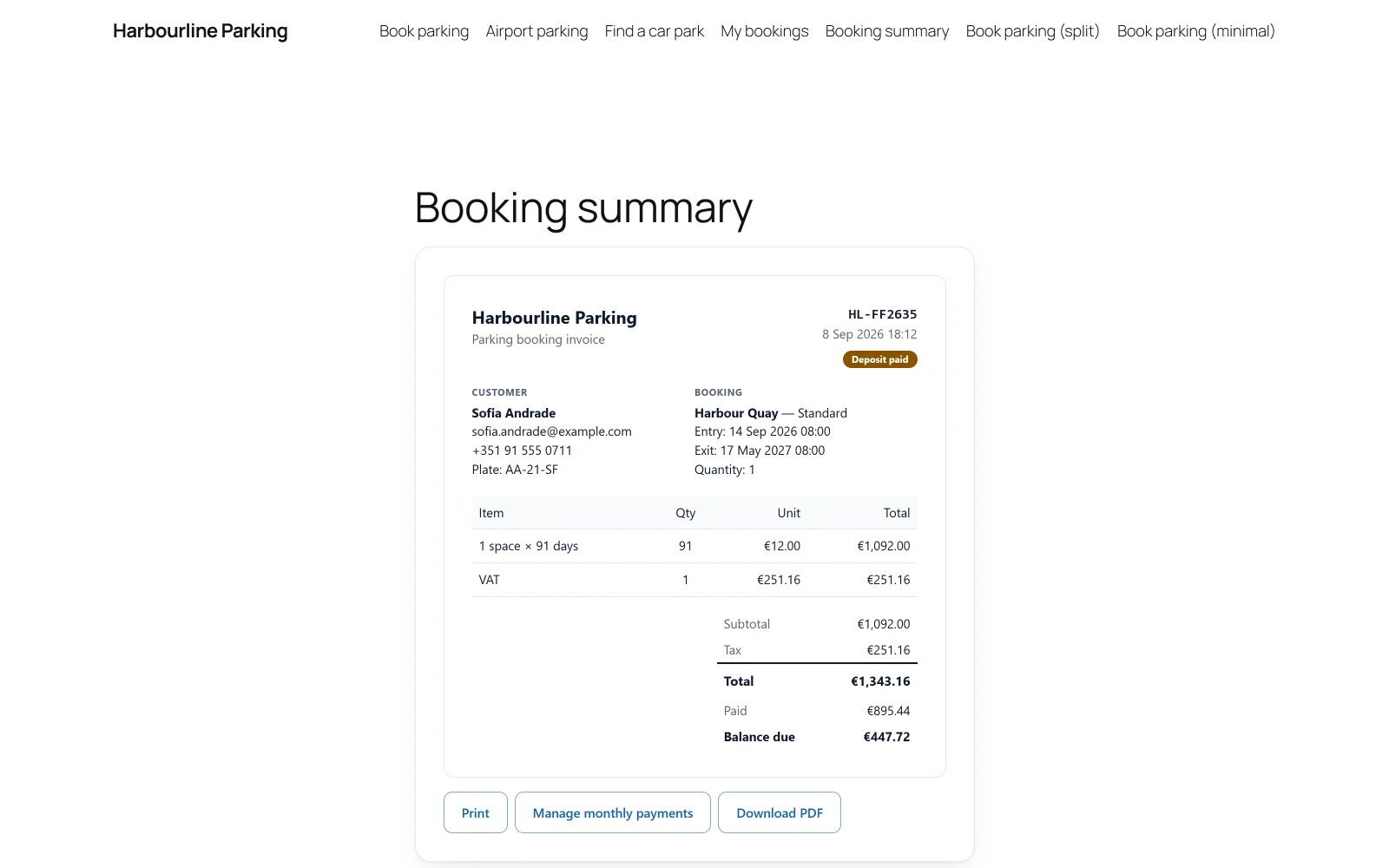
While a rolling plan runs, the summary’s other ways to pay are hidden, and the site refuses any other payment on that booking.
In the admin
A booking paid monthly has a Monthly payments panel beside its details in Plugixa Car Parking -> Bookings.
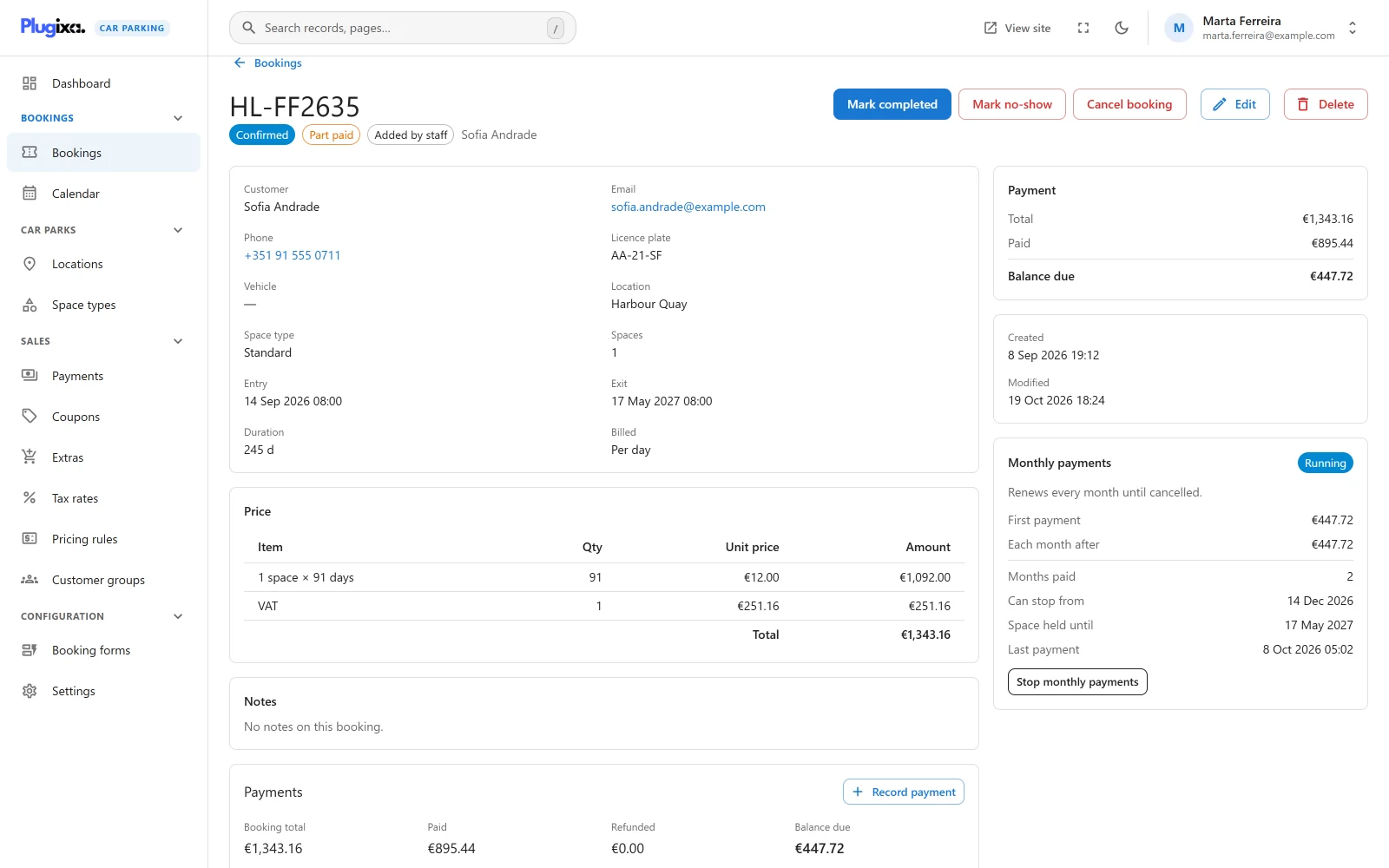
| Line | What it shows |
|---|---|
| Status | Running, Overdue, Ending (a cancellation takes effect at the end of the month paid) or Ended |
| First payment | What was charged when booking |
| Each month after | The monthly amount |
| Months paid | How many have come in, out of how many for a fixed plan |
| Can stop from | Rolling plans: the end of the stay the customer committed to |
| Space held until | Rolling plans: how far ahead the space is kept |
| Payments stop | When a cancellation takes effect |
| Last payment | When the last month was taken |
Each month paid is a row in the booking’s Payments panel and in
Plugixa Car Parking -> Payments, of the type installment. The booking’s
payment status follows the money, as for any payment: Part paid until the
stay is paid for, then Paid.
Stopping a plan yourself
Stop monthly payments ends the plan at Stripe, after a confirmation: “No more months will be charged. Whatever is still owed has to be collected another way.”
- A fixed plan stops at once.
- A rolling plan stops at the end of the month already paid: “The space stays the customer’s until the end of the month already paid, and is free after that.”
When a month cannot be taken
Stripe tries the card again over the next days, and can email the customer about it itself. On your site:
- The booking’s payment status becomes Overdue, in the list, on the booking and in its Monthly payments panel. Its booking status does not change.
- The customer is emailed “Your monthly payment for booking {booking_ref} did not go through”, with a link to their booking page, where they can change the card.
- You are emailed “A monthly payment for booking … failed”.
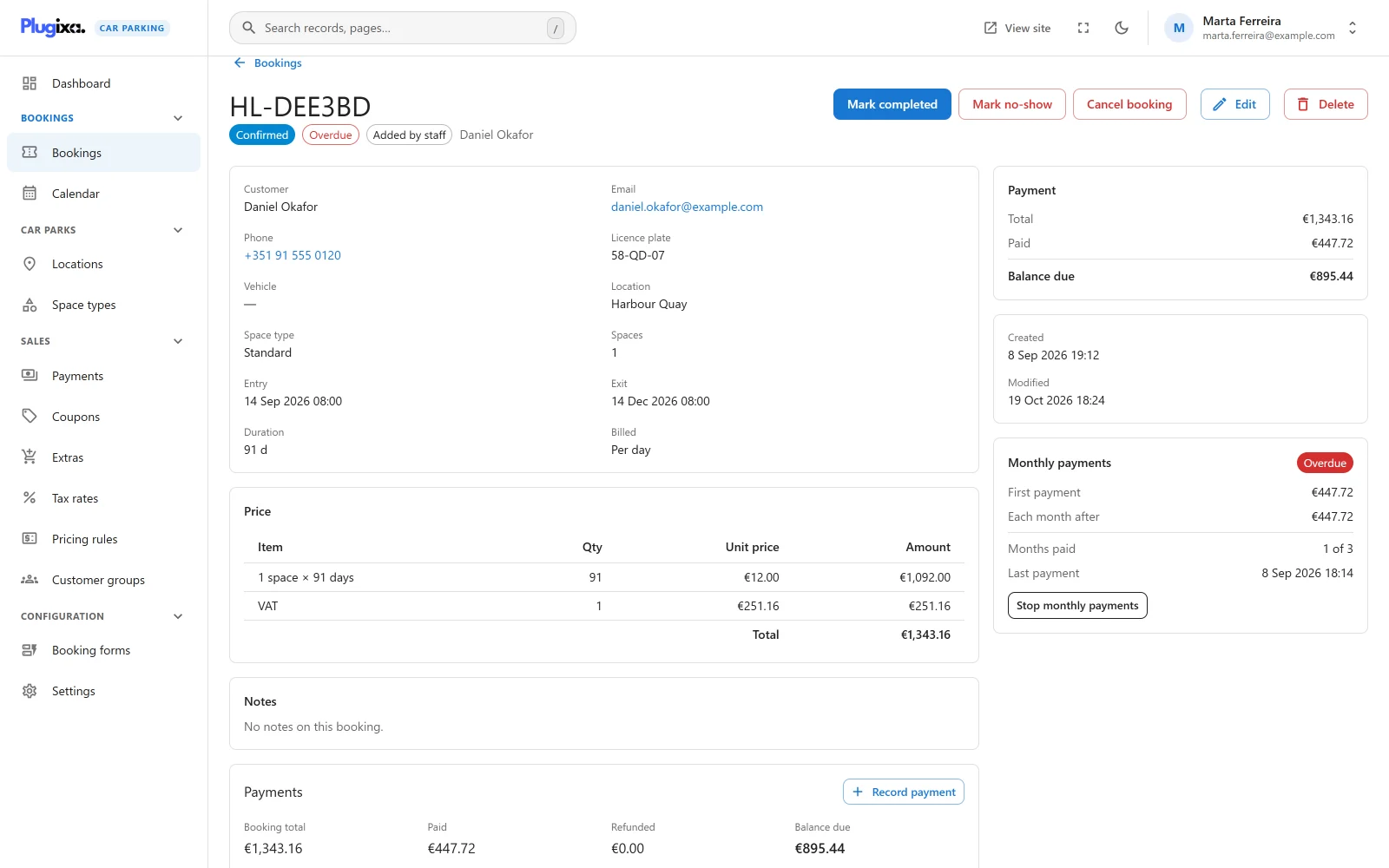
The booking reads Overdue until that month is paid, even when the money paid so far covers its total. When Stripe takes the payment, the status goes back to Part paid or Paid.
Emails
| When | Subject |
|---|---|
| A month could not be taken | Your monthly payment for booking {booking_ref} did not go through |
| A rolling plan is cancelled | Your monthly parking {booking_ref} has been cancelled |
| A rolling plan has ended | Your monthly parking {booking_ref} has ended |
| A rolling plan cannot carry on | About your monthly parking {booking_ref} |
They use the same placeholders as the other
emails. Their wording can be
changed with the plugixa_carparking_email_template filter, with the events
installment_failed, installment_ending, installment_ended and
installment_not_rolling. See Hooks.
Stripe webhook events
A plan sends Stripe’s subscription events to the same webhook endpoint as card payments. Add these four to the endpoint in your Stripe dashboard, next to the ones listed on the Stripe page:
| Event | What the plugin does |
|---|---|
invoice.paid |
Records the month as a payment, and moves a rolling plan’s held space on |
invoice.payment_failed |
Marks the booking Overdue and sends the emails |
customer.subscription.updated |
Follows a cancellation asked for, or taken back, in Stripe’s billing page |
customer.subscription.deleted |
Ends the plan; a rolling plan’s booking ends on the last day paid |
Without them, the first month is still recorded when the customer returns, but the later months, the failures and the cancellations never reach your site.
Questions
Does a plan change the price? No. It is the booking’s total, cut into months.
Can a customer pay part of it by hand? A payment you record counts toward the booking like any other. A fixed plan is ended at Stripe as soon as the booking is paid in full, however that happened.
Can I offer it at one car park only? Yes. It is a setting of each location.
What if the customer changes the dates? A plan already running keeps what the customer agreed to. A change to the stay or to the location’s settings does not change it.