

Contents
Deposits - Plugixa Car Parking
Deposits PRO let a location take part of a booking’s total when the customer pays online, and the rest on arrival. The deposit is a percentage of the total, set separately for each location.
Deposits have no screen of their own and no site-wide setting. The switch is a panel on the location’s form, and the result is a panel on each booking.
A deposit only makes sense with an online way to pay, so it needs Stripe or PayPal to be set up. See When a deposit is offered.
Switching a deposit on for a location
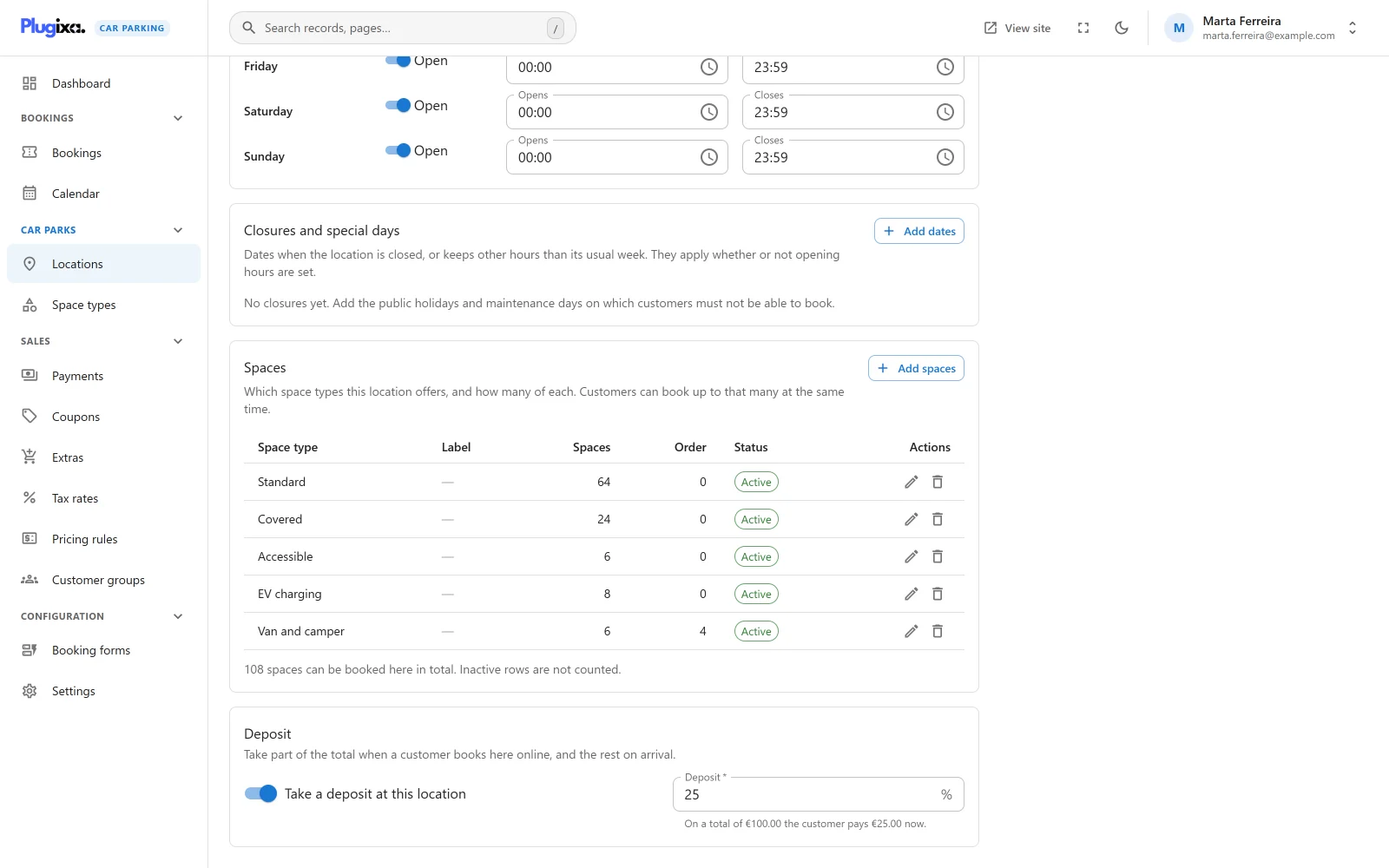
- Open Car Parking -> Locations and edit a saved location.
- Find the Deposit panel, below the location’s own panels. It reads “Take part of the total when a customer books here online, and the rest on arrival.”
- Switch on Take a deposit at this location.
- Enter the percentage in Deposit.
- Save the location. The panel has no button of its own: it saves with the form.
| Field | Notes |
|---|---|
| Take a deposit at this location | Off by default. |
| Deposit | Shown only while the switch is on. Required. A percentage above 0 and below 100, decimals allowed. Anything else is refused with “Enter a percentage above 0 and below 100.” |
With a valid percentage the field shows an example under it, such as “On a total of 100.00 the customer pays 25.00 now.”, written in your currency format. Until then it reads “The share of the total paid when booking.”
The panel appears once the location exists, so save a new location first. A user who cannot edit records sees the panel with its controls disabled.
How the deposit is worked out
The deposit is the booking’s total multiplied by the percentage, rounded to two decimals. The total is the final figure: after pricing rules, extras, any coupon and tax.
Example. A total of 89.90 at a location with a deposit of 12.5% gives 89.90 x 12.5 / 100 = 11.24 due now and 78.66 due on arrival.
The amount is worked out with every quote and stored on the booking when it is created, whichever way the customer goes on to pay. A location with the switch off, or with a percentage of 0 or of 100 and above, has no deposit.
When a deposit is offered
A deposit is money taken now, by an online payment. The rule is applied in the browser and again on the server:
| The customer pays | What happens |
|---|---|
| With an online method | The amount due now is shown and the customer chooses between the deposit and the full amount. |
| On arrival, or with any method that takes nothing online | No deposit is shown or asked for. The whole total is owed in person. A request that asks for a deposit anyway is treated as a payment in full. |
On a site whose only way to pay is on arrival, switching a deposit on changes nothing a customer sees.
What the customer sees
In the booking wizard
Once the customer has chosen an online way to pay:
- The price summary gains a Due now line under the total, with the deposit.
- The last step, Review and confirm, shows a choice headed Amount to pay now with two options: “Deposit: 11.24” and “Full amount: 89.90”. The deposit is selected to begin with.
Choosing the full amount removes the Due now line. Switching to a way to pay that takes nothing online removes both the line and the choice.
See Booking wizard.
On the booking summary page
A customer who has not paid anything yet can pay from the booking’s summary page. Where that page offers an online method and the booking has a deposit, the same choice appears above the payment buttons. If the page also offers a way to pay in person, the choice is headed Amount to pay now, when paying online, and it never applies to the in-person button.
Once any payment has been recorded on the booking, the choice is no longer shown: what is left is the balance.
What a paid deposit does to the booking
A deposit payment is recorded in the payments ledger for the deposit amount,
stored with the type deposit. See
Payments. The booking is then
updated from the ledger:
| Field | Becomes |
|---|---|
| Amount paid | The sum of its payments |
| Payment status | Part paid in the admin. The customer’s pages call it Deposit paid. |
| Booking status | Confirmed |
| Hold | Released from expiry. A booking with money on it no longer lapses as an unconfirmed booking would. |
When the payments reach the total, the payment status and the booking status both become Paid.
The balance is settled at the car park. Record it as a payment on the booking when the customer pays.
The Deposit panel on a booking
A booking that was priced with a deposit shows a Deposit panel at the side of its detail screen, Car Parking -> Bookings, then the booking.
| Row | What it shows |
|---|---|
| Due on booking | The deposit stored on the booking |
| Deposit still owed | The deposit less what has been paid, never below zero |
| Due on arrival | The total less the deposit, or less what has been paid if that is more |
When nothing of the deposit is owed, the panel adds “The deposit has been paid.” Amounts are written in the currency the booking was charged in.
The panel is not shown for a booking with no deposit. A booking keeps its deposit amount even when the customer chose to pay on arrival, so the panel then shows the whole deposit as still owed. That is a record of what the location asks for, not a debt the plugin chases.
Changing the percentage later
The deposit is stored on each booking when it is priced. Changing or switching off a location’s deposit affects new bookings only. A booking that is priced again, for example by a reschedule, gets a deposit worked out from its new total and the location’s current setting.
What is stored
Deposits own no table.
| Data | Where |
|---|---|
| The switch and the percentage | In the location’s own settings, as deposit_enable and deposit_percentage, in {prefix}plugixacarparking_locations |
| A booking’s deposit | The deposit_amount column of {prefix}plugixacarparking_bookings |
| A deposit payment | A row of the payments ledger with the type deposit |
All three tables belong to the free plugin. Without Pro the location keeps its two settings, with no panel to edit them, and nothing works a deposit out: new bookings are stored with a deposit of zero and are paid in full. Existing bookings keep their deposit amount and their payments. See Free vs Pro.