

Contents
SMS and Telegram - Plugixa Car Parking
SMS and Telegram PRO are two extra channels for the messages the plugin already sends by email. A text message goes to the customer. A Telegram post goes to your staff chat. Both are sent for the same events as the emails and are recorded in the message log.
Each channel is silent until its credentials are saved. There is no separate on and off switch: a channel with complete details sends, and one without does not.
When a message is sent
| Event | Text to the customer | Telegram post |
|---|---|---|
| A booking is created | yes | yes |
| The booking becomes paid in full | yes | yes |
| A reminder falls due | yes | yes |
Each channel has one template, used for all three events. The default text
message says “confirmed”, which also goes out with a payment and a reminder, so
word your template to fit every case, or use {status} in it.
The first two events depend on Send booking emails under Car Parking -> Settings -> Notifications. With that switch off, no text and no Telegram post is sent for a new booking or a payment. Reminders have their own switch and are not affected.
Text messages
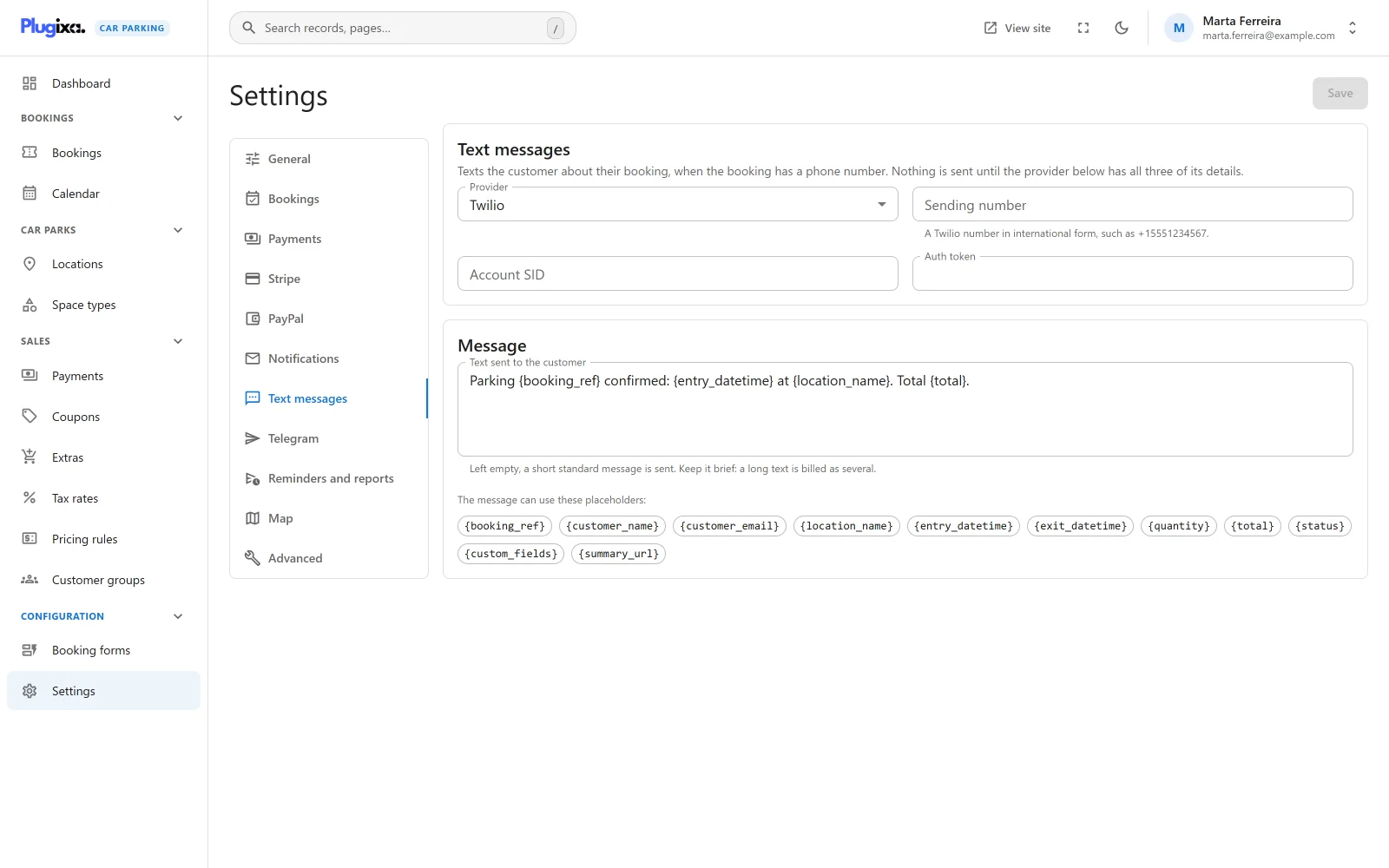
Open Car Parking -> Settings -> Text messages.
The card describes itself: “Texts the customer about their booking, when the booking has a phone number. Nothing is sent until the provider below has all three of its details.”
Provider
| Field | Default | Notes |
|---|---|---|
| Provider | Twilio | Twilio or Vonage. Only the chosen provider’s fields are shown. The other provider’s details stay stored, so switching back does not mean typing them again. |
Twilio
| Field | Notes |
|---|---|
| Sending number | “A Twilio number in international form, such as +15551234567.” |
| Account SID | From your Twilio console. |
| Auth token | Stored encrypted. Once saved it is never shown again. |
Vonage
| Field | Notes |
|---|---|
| Sender | “The name or number the text is sent from.” |
| API key | From your Vonage dashboard. |
| API secret | Stored encrypted. Once saved it is never shown again. |
All three fields of the chosen provider are required. With one missing, no text is sent and nothing is logged.
Message
| Field | Default |
|---|---|
| Text sent to the customer | Parking {booking_ref} confirmed: {entry_datetime} at {location_name}. Total {total}. |
“Keep it brief: a long text is billed as several.” The field takes the same placeholders as the email templates, listed under the field and in Emails.
Who receives a text
The text goes to the phone number stored on the booking. A booking without a phone number gets no text, and nothing is logged for it. So make sure your booking form asks for a phone number.
The number is sent to the provider as the customer typed it:
| Provider | How the number is sent |
|---|---|
| Twilio | Unchanged. Twilio expects international form, such as +15551234567, so a number typed without a country code is likely to be refused. |
| Vonage | With everything except digits removed. The number still needs its country code. |
The plugin does not check or reformat phone numbers. If your customers are in one country, say so in the field’s label on the booking form.
Telegram
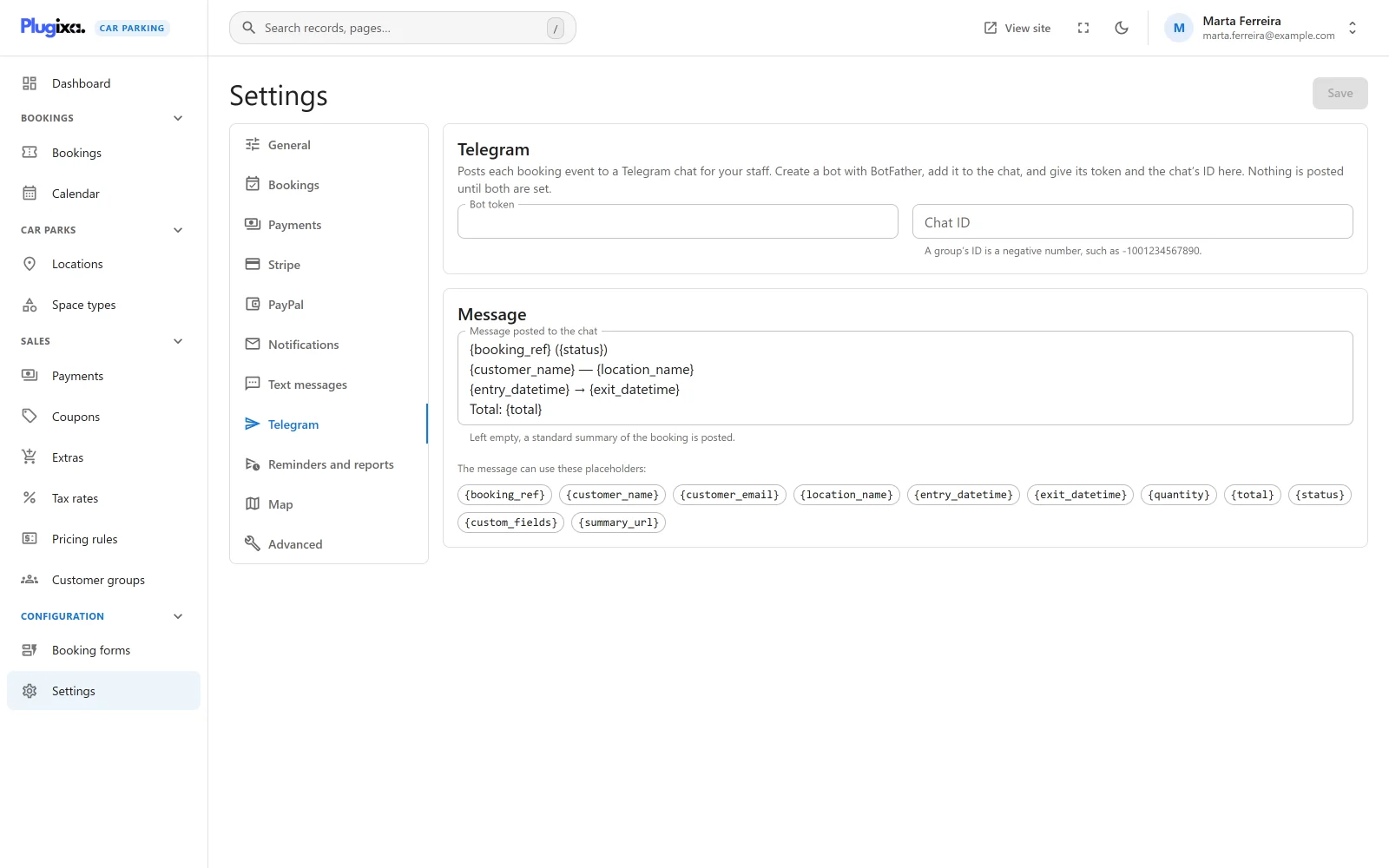
Open Car Parking -> Settings -> Telegram.
The card describes itself: “Posts each booking event to a Telegram chat for your staff. Create a bot with BotFather, add it to the chat, and give its token and the chat’s ID here. Nothing is posted until both are set.”
| Field | Notes |
|---|---|
| Bot token | The token BotFather gives your bot. Stored encrypted. Once saved it is never shown again. |
| Chat ID | “A group’s ID is a negative number, such as -1001234567890.” |
| Message posted to the chat | The template. See below. |
Setting it up
- In Telegram, talk to BotFather and create a bot. Copy its token.
- Add the bot to the chat or group your staff use.
- Paste the token into Bot token and the chat’s ID into Chat ID.
- Click Save.
One chat receives every post. Customers are never messaged on Telegram.
The default message
The default template has four lines:
| Line | Content |
|---|---|
| 1 | {booking_ref} ({status}) |
| 2 | {customer_name} and {location_name}, separated by a dash |
| 3 | {entry_datetime} and {exit_datetime}, separated by an arrow |
| 4 | Total: {total} |
The template takes the same placeholders as the email templates.
The message is sent to Telegram as HTML. You can use Telegram’s own formatting
tags, such as <b> for bold. For the same reason, a stray < or & in the
template can make Telegram refuse the message.
In the message log
| Channel | Recipient shown | Status |
|---|---|---|
| SMS | The customer’s phone number | Sent or Failed |
| Telegram | group |
Sent or Failed |
Sent means the provider accepted the request. Failed means the request could not be made or the provider answered with an error. The reason is not kept for these two channels. Check your provider’s own log for it.
What is sent where
| Service | Address | What is sent |
|---|---|---|
| Twilio | https://api.twilio.com |
Your Account SID and auth token, your sending number, the customer’s phone number and the message text |
| Vonage | https://rest.nexmo.com |
Your API key and secret, your sender, the customer’s phone number and the message text |
| Telegram | https://api.telegram.org |
Your bot token, the chat ID and the message text |
Requests are made from your server, not from the visitor’s browser, and only when a message is due. Nothing is sent to a service whose details are not filled in. See Privacy and uninstall.
Saving and removing credentials
These sections have no button of their own. They are saved with the rest of the settings by the one Save button. There is no “send a test message” button: to test, place a booking with your own phone number and read the message log.
The auth token, the API secret and the bot token are stored encrypted and are never sent back to the browser. A saved one shows as set, with an empty field. Leaving the field empty and saving keeps the stored value. See Settings for how a stored credential is replaced or removed.
To stop a channel, remove one of its required details.
Without Pro
The free edition has neither section and sends email only. The stored details are kept if Pro is removed and are used again when it is reinstalled. See Free vs Pro.