

Contents
Emails - Plugixa Car Parking
The plugin sends three emails about a booking: one to the customer when the booking is placed, one to you at the same moment, and one to the customer when the booking is paid in full. Each has a subject and a message you can rewrite.
Open the settings from Car Parking -> Settings -> Notifications. Every email, sent or failed, is recorded in the message log.
The three emails
| Sent to | Sent when | |
|---|---|---|
| Booking received | The customer | A booking is created |
| New booking notice | Your own address | A booking is created |
| Payment received | The customer | A payment change leaves the booking paid in full |
Booking received
Sent to the email address on the booking as soon as the booking exists. It is sent for a booking made in the booking wizard and for one you create in the admin. A booking with no email address gets no customer email.
With online payment PRO, the booking exists before the customer pays, so this email goes out before the payment is made.
New booking notice
Sent to the address in Send new-booking notices to, at the same moment as the customer’s email. The field takes one address. It starts as the WordPress administrator email of the site.
This is the only email you receive. You are not emailed about payments, cancellations or status changes.
Payment received
Sent to the customer each time a payment change leaves the booking with a payment status of Paid, which means the recorded payments cover the whole total. That includes:
- a payment you record on the booking that settles it
- an online payment confirmed by Stripe PRO or PayPal PRO
- a paid booking that a customer reschedules PRO and that is still paid in full afterwards
A partial payment or a deposit PRO does not send it. See Payments.
What does not send an email
- Changing a booking’s status by hand, including to Confirmed or Cancelled.
- A customer cancelling a booking from the account page.
- A pending booking expiring.
- A refund that leaves the booking less than fully paid.
- Editing, trashing or deleting a booking.
The Email card
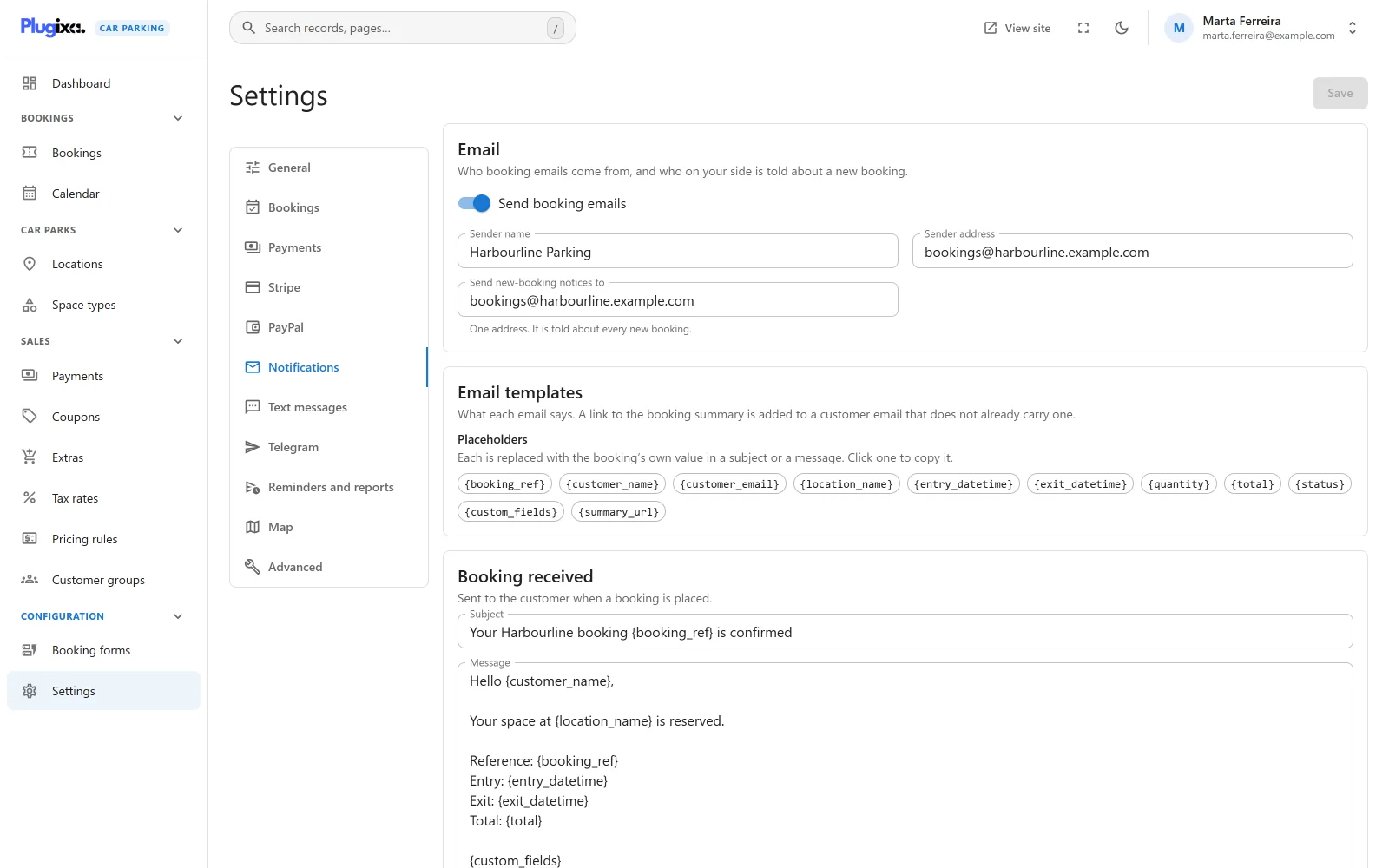
| Field | Default | Notes |
|---|---|---|
| Send booking emails | On | The master switch. “Switched off, no email below is sent, to customers or to you.” |
| Sender name | Your site title | The From name of every email. |
| Sender address | The WordPress administrator email | The From address of every email. |
| Send new-booking notices to | The WordPress administrator email | “One address. It is told about every new booking.” |
Send booking emails does more than its name says. The same switch also stops the text messages and Telegram posts that Pro sends for a new booking and for a payment, because those channels are triggered by the same two events. See SMS and Telegram. Reminders PRO have their own switch and do not depend on this one.
The templates
Each email has a Subject and a Message. These are the defaults.
Booking received
| Field | Default |
|---|---|
| Subject | Your parking booking {booking_ref} is confirmed |
| Message | See below |
Hello {customer_name},

Your booking {booking_ref} at {location_name} is confirmed.
Entry: {entry_datetime}
Exit: {exit_datetime}
Total: {total}

Thank you!
A pending booking is not told it is confirmed
The default wording says “is confirmed”. That is only true of a booking whose status is Confirmed, Paid or Completed. For a booking in any other status, which with the default settings means Pending, the plugin swaps the default wording for this one:
| Part | Sent instead |
|---|---|
| Subject | We have received your parking booking {booking_ref} |
| Message | The same layout, with the second line reading “We have received your booking {booking_ref} at {location_name}. It is awaiting confirmation.” |
The swap applies only while a field still holds the exact default text, and each field is judged by itself. Once you rewrite the subject or the message, that part is sent as you wrote it, whatever the booking’s status. If your own wording says “confirmed”, set Status of a new booking to Confirmed under Car Parking -> Settings -> Bookings, or word it so that it fits both cases.
New booking notice
| Field | Default |
|---|---|
| Subject | New parking booking {booking_ref} |
| Message | A new booking {booking_ref} was placed by {customer_name} at {location_name}. |
Payment received
| Field | Default |
|---|---|
| Subject | Payment received for {booking_ref} |
| Message | See below |
Hello {customer_name},

We've received your payment for booking {booking_ref}. Total: {total}.

Thank you!
Placeholders
A placeholder is replaced with the booking’s own value. All of them work in every subject and every message. On the settings screen, click one in the Placeholders list to copy it.
| Placeholder | Replaced with |
|---|---|
{booking_ref} |
The booking reference |
{customer_name} |
The customer’s name |
{customer_email} |
The customer’s email address |
{location_name} |
The name of the location booked. A location that has since been trashed is still named. |
{entry_datetime} |
When the stay starts, in the form 2027-03-09 08:00:00 |
{exit_datetime} |
When the stay ends, in the same form |
{quantity} |
How many spaces were booked |
{total} |
The total, written with your currency symbol, separators and decimal places |
{status} |
The booking’s status, under the name your site gives it in Status names |
{custom_fields} |
What the customer answered in the fields your booking form adds, one “Label: answer” to a line |
{summary_url} |
A link to the booking summary. Empty when no summary page is chosen. |
The entry and exit are written as they are stored. The Date format and Time format settings do not change them in an email.
{custom_fields} covers the fields you add in
Booking forms. It is not
in any default template, so add it to the New booking notice if you want
the answers in your inbox.
The link to the booking summary
When a Booking summary page is chosen under Car Parking -> Settings -> Bookings, every customer email ends with a link to the booking’s summary. The plugin adds these two lines to the end of the message:
View or manage your booking:
https://example.com/your-summary-page/?...
The lines are added only when the message does not already contain the link. To
place the link yourself, put {summary_url} where you want it in the message
and nothing is appended.
With no summary page chosen, {summary_url} is empty and no link is sent. The
link is not added to the New booking notice, though you can put
{summary_url} in it yourself.
The summary page is the one that holds [plugixa_car_parking_summary]. See
Shortcodes.
How the emails are sent
- Every email is plain text, in UTF-8. HTML in a template is not rendered: the customer sees the tags.
- Emails go through WordPress’s own mailer. An SMTP plugin, if you use one, carries them like any other WordPress email.
- The From line is built from Sender name and Sender address.
- Each attempt is written to the message log as Sent or Failed. For a failure, the log keeps the reason the mailer gave.
“Sent” means WordPress handed the message to the mail server. It does not prove the message reached the inbox.
With Pro
| Pro feature | What it adds to the emails |
|---|---|
| Invoices PRO | Attaches the booking’s PDF invoice to every customer email |
| Reminders and reports PRO | A reminder email before arrival, and a daily report to you |
| SMS and Telegram PRO | A text to the customer and a post to your staff chat for the same events |
For developers
The customer’s subject and message pass through the
plugixa_carparking_email_template filter, attachments through
plugixa_carparking_email_attachments, and other channels attach to the
plugixa_carparking_booking_notify action. See the
Hooks reference.
Translating the templates
The templates are stored in the settings, not in the translation files. On a multilingual site, see Multilingual.