

Contents
Assigned spaces - Plugixa Car Parking
Assigned spaces PRO is a second way for a location to count what it has. Instead of a pool of interchangeable spaces, the location holds spaces that are identified one by one, and a customer can book space A12 rather than “one of the standard spaces”.
The free edition counts every location By capacity. Pro adds two more choices to the location form. Nothing else changes: prices, opening hours and closures work the same in every mode.
Choosing how a location counts
Open a location from Car Parking -> Locations. With Pro installed, the side panel of the form has one more field, Spaces are counted. It is hidden in the free edition, where there is only one way to count.
| Option | How availability is worked out |
|---|---|
| By capacity | The capacity of a space type is the sum of its active rows in the Spaces panel. What is free is that total less the spaces held by bookings that overlap the requested stay. |
| By numbered space | Only rows marked as individually identified count, one space per row. A row is free when no overlapping booking holds that particular space. |
| By capacity, for hourly parking | Counted exactly as By capacity. The option is a label: the same pool calculation runs behind it. |
The mode is saved with the rest of the location when you press Save.
About the hourly option
“By capacity, for hourly parking” does not add time slots or a different inventory. To sell parking by the hour, set the location’s Billing unit to Per hour and give its space types a Per hour price. That works in every mode and in the free edition. See Pricing.
Identified spaces
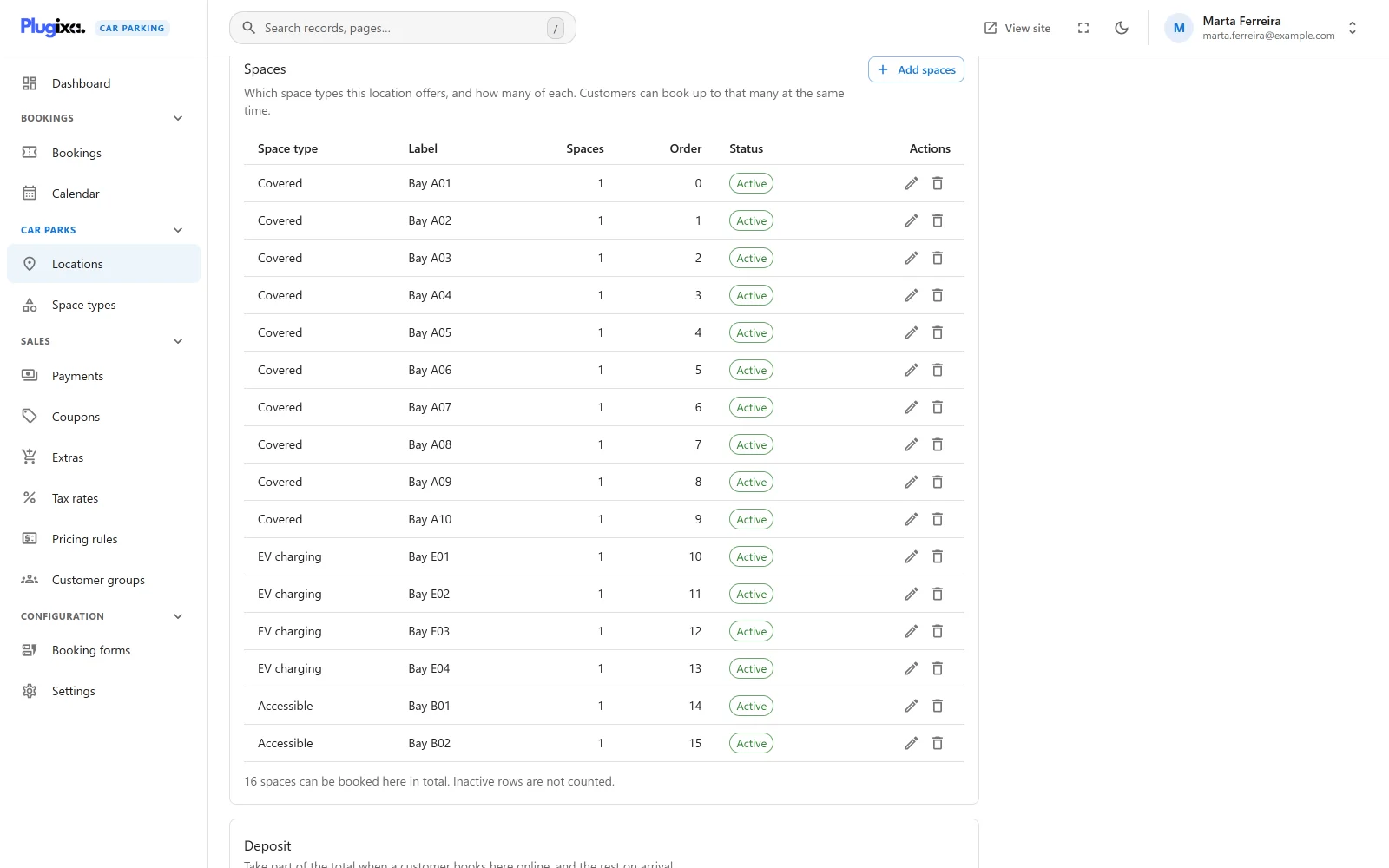
An identified space is a row of the location’s stock that stands for exactly
one space and carries a label, such as A12. It lives in the same table as the
pooled rows of the Spaces panel, with a flag that marks it as individually
identified.
Two rules follow from the code:
- A space can be marked as identified only on a site that has a counting mode that supports it. In the free edition the attempt is refused with “Individually identified spaces need an inventory mode that supports them, and this site does not have one.”
- In By numbered space mode, pooled rows are ignored. “A location switched to this mode may still have a pooled row left over for the same space type, and counting it would offer spaces nobody can pick.”
Creating identified spaces in version 1.0.0
The Spaces panel of the location form adds pooled rows: a space type, a number of spaces, a label, an order and a status. It has no control for marking a row as individually identified.
In version 1.0.0 an identified space is therefore created through the REST API,
by adding a row to the location-spaces collection with is_assigned set to
true, a label, the location_id and the space_type_id. See
REST API. Once created, the row
is listed in the Spaces panel with its label, and its status can be changed
there.
Create the identified spaces before switching a location to By numbered space. A location in that mode with no identified rows reports nothing free, and the booking form shows its space types as unavailable.
What the customer sees
On the space step of the
booking wizard, choosing
a space type at a location counted by numbered space shows one more field,
Pick a space. It lists the spaces of that type that are free for the chosen
dates, each by its label. A space without a label is listed by its number, such
as #42.
The first choice in the list is Any available.
| Customer’s choice | What is booked |
|---|---|
| A named space | The booking holds that space. Nobody else can pick it for an overlapping stay while the booking is in a status that holds a space. |
| Any available | The booking names no space. It is checked and counted as a pool, exactly as in By capacity. |
A space that has been taken in the meantime is caught when the booking is saved: the customer is told “Sorry, those spaces are no longer available for the selected dates.”
The field does not appear at locations counted by capacity.
What you see
The chosen space is saved on the booking. In version 1.0.0 the booking screens, the booking summary and the emails show the space type, not the label of the individual space, and the admin booking form has no field for choosing one.
Which bookings hold a space
A numbered space is held by the same bookings that hold a pooled space: those whose status is listed under Statuses that hold a space in Settings. By default these are Pending, Confirmed, Paid and Completed. A cancelled or expired booking frees its space. See Availability.
Going back to the free edition
Nothing is deleted. Without Pro:
- The Spaces are counted field is gone from the location form.
- A location whose mode was By numbered space or By capacity, for hourly parking is counted as a pool. Its identified rows count as one space each, alongside any pooled rows, so the location stays bookable.
- The Pick a space field is no longer offered.
- Existing bookings keep the space they were saved with.
Reinstall Pro and each location goes back to the mode it was saved with. See Free vs Pro.
What is stored
This feature has no table of its own.
| Where | What |
|---|---|
{prefix}plugixacarparking_locations |
The location’s counting mode. |
{prefix}plugixacarparking_location_spaces |
Pooled rows and identified spaces together, told apart by a flag. |
{prefix}plugixacarparking_bookings |
The identified space a booking holds, when the customer picked one. |