

Contents
Reminders and reports - Plugixa Car Parking
Reminders and reports PRO are two scheduled jobs. The first reminds a customer of a booking that is about to start. The second emails you a short summary of the last day’s bookings. Both are off until you switch them on.
Open Car Parking -> Settings -> Reminders and reports. The section is saved with the rest of the settings by the one Save button.
Reminders
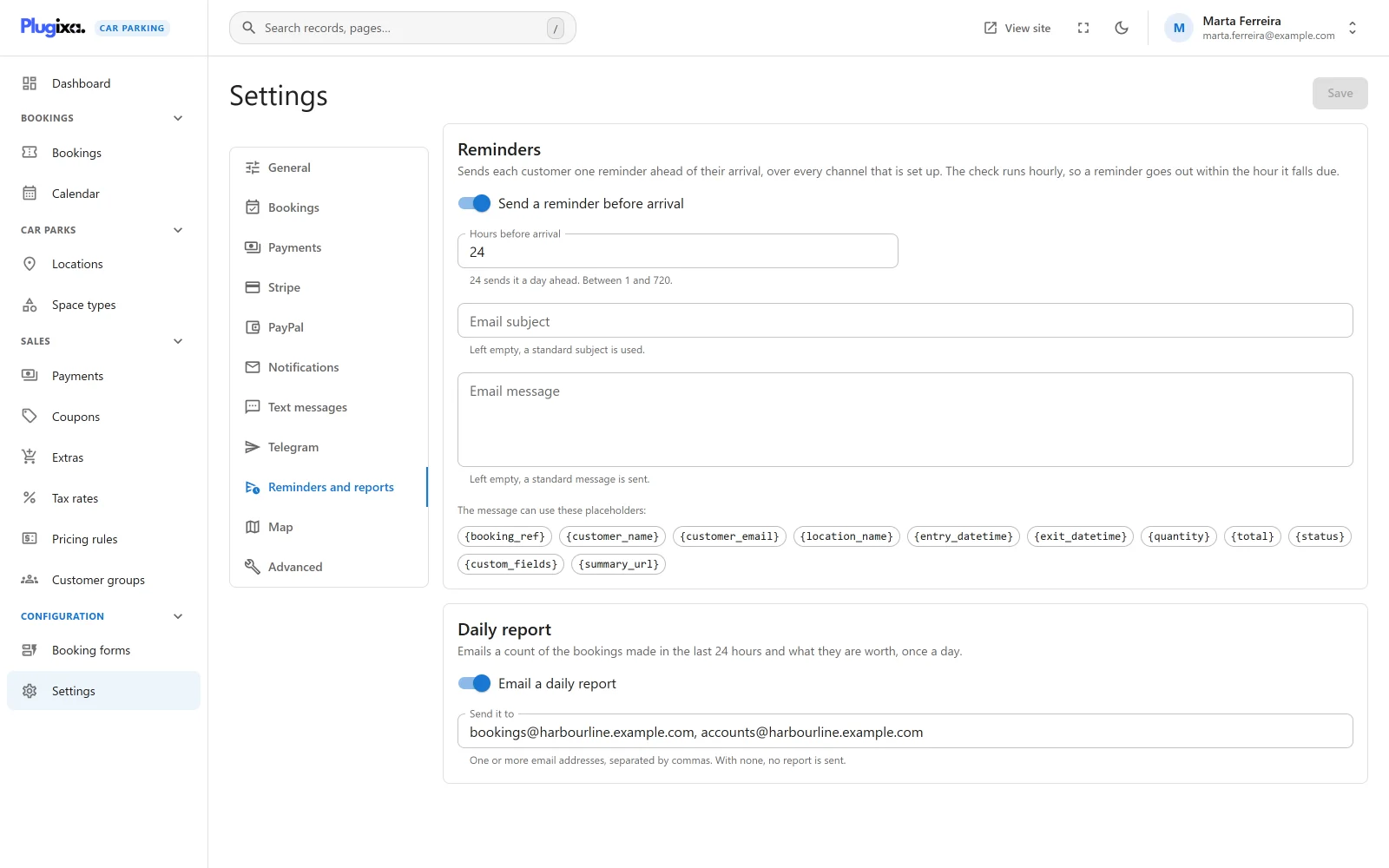
“Sends each customer one reminder ahead of their arrival, over every channel that is set up. The check runs hourly, so a reminder goes out within the hour it falls due.”
Settings
| Field | Default | Notes |
|---|---|---|
| Send a reminder before arrival | Off | The switch. The fields below appear once it is on. |
| Hours before arrival | 24 | A whole number from 1 to 720. “24 sends it a day ahead.” |
| Email subject | Empty | “Left empty, a standard subject is used.” |
| Email message | Empty | “Left empty, a standard message is sent.” |
The standard subject is Reminder: your parking booking {booking_ref}. The
standard message is:
Hello {customer_name},

This is a reminder for your parking at {location_name}.
Entry: {entry_datetime}
Exit: {exit_datetime}

See you soon!
Both fields take the same placeholders as the other email templates. They are listed under the fields and in Emails.
Which bookings are reminded
Once an hour the plugin looks for bookings whose entry time falls in the one-hour window that begins Hours before arrival from now. With the default of 24, a booking that starts tomorrow between 14:00 and 15:00 is reminded by the run that happens today between 14:00 and 15:00.
A booking is reminded when all of these are true:
| Condition | Detail |
|---|---|
| Entry time | Falls inside the current window. Entry times and the window are both on the site’s clock. |
| Status | Is one of the Statuses that hold a space under Car Parking -> Settings -> Bookings. By default: Pending, Confirmed, Paid and Completed. A Cancelled, Refunded, No-show or Expired booking is not reminded. |
| Not in the trash | A trashed booking is skipped. |
| Not reminded before | Each booking is reminded once. |
A booking made with less notice than Hours before arrival never falls in a window, so it gets no reminder. With 24 hours set, a booking placed at noon for that evening is not reminded.
What the customer receives
One reminder goes out over every channel that is set up:
| Channel | Sent when | Wording |
|---|---|---|
| The booking has an email address | The reminder subject and message above | |
| Text message | The booking has a phone number and a provider is set up | The one text template under Text messages |
| Telegram | A bot and chat are set up | The one template under Telegram. It goes to your staff chat, not to the customer. |
The text message and the Telegram post have no reminder wording of their own. They reuse their single template, whose default text says “confirmed”. See SMS and Telegram.
Like every customer email, the reminder ends with a link to the booking summary when a summary page is chosen, and carries the PDF invoice when Invoices is installed.
You do not receive a copy: the new-booking notice address is not sent reminders.
Reminders do not depend on Send booking emails. With that switch off and reminders on, reminders are still sent.
Reminded once
After a reminder has gone out, the plugin writes a marker line to the
message log, with the
channel reminder and the recipient window. A booking with that marker is
never reminded again, even if a run fires late or twice.
The marker is written whether or not the email itself was accepted. A reminder whose email failed is not retried: the log shows the failed Email line and the marker under it.
A booking that is moved to other dates after it was reminded is not reminded a second time.
Daily report
“Emails a count of the bookings made in the last 24 hours and what they are worth, once a day.”
Settings
| Field | Default | Notes |
|---|---|---|
| Email a daily report | Off | The switch. |
| Send it to | Empty | “One or more email addresses, separated by commas. With none, no report is sent.” |
What the report contains
The email is plain text. Its subject is “Parking report” followed by the day’s date. The body has two figures and your site name:
| Line | What it counts |
|---|---|
| New bookings | Bookings created in the last 24 hours, whatever their status. Trashed bookings are left out. |
| Booked revenue | The sum of the totals of those bookings, leaving out the ones that are Cancelled, Refunded or Expired. Written with your currency settings. |
“Booked revenue” is what the bookings are worth, not what has been paid. A pending, unpaid booking counts in full.
The report is sent once a day, from your Sender name and Sender address. There is no weekly or monthly option, and the time of day cannot be chosen: it follows from when the job was first scheduled. A day with no bookings still sends a report, with zeros.
The report is not recorded in the message log, because it is not about one booking.
How the schedule works
Both jobs run on WordPress’s own scheduler, WP-Cron.
| Job | Cron hook | Runs |
|---|---|---|
| Reminders | plugixa_carparking_send_reminders |
Hourly |
| Daily report | plugixa_carparking_scheduled_reports |
Daily |
The two events are scheduled as soon as Pro is active, about five minutes after the first page load, and exist whether or not the switches are on. With a switch off, the job runs and does nothing. Deactivating the plugin removes both events.
WP-Cron only runs when somebody visits the site. On a quiet site an hourly job
can run late, or skip hours altogether. A reminder window that no run covers is
missed: the plugin does not look back for bookings whose window has passed. If
reminders matter to you, have your host call wp-cron.php on a real schedule,
at least once an hour.
A site with DISABLE_WP_CRON set and no replacement schedule sends no
reminders and no reports.
Without Pro
The free edition has neither job and no Reminders and reports section. The settings are kept if Pro is removed and apply again when it is reinstalled. See Free vs Pro.