

Contents
Message log - Plugixa Car Parking
The message log records every message the plugin sends, or tries to send, about a booking. It answers the question behind “I never got the email”: whether one was sent, to which address, and what went wrong if it failed.
The log is read in two places: a panel on each booking, and a screen that lists the messages of every booking.
The panel on a booking
Open a booking from Car Parking -> Bookings. The Message log panel sits in the main column, under Payments.
It shows the latest 10 messages about that booking, newest first. When there are more, a line under the table reads “Showing the latest 10 of 14.” and View all opens the full log narrowed to this booking.
A booking nothing has been sent about shows “No message has been sent about this booking yet.”
The Message log screen
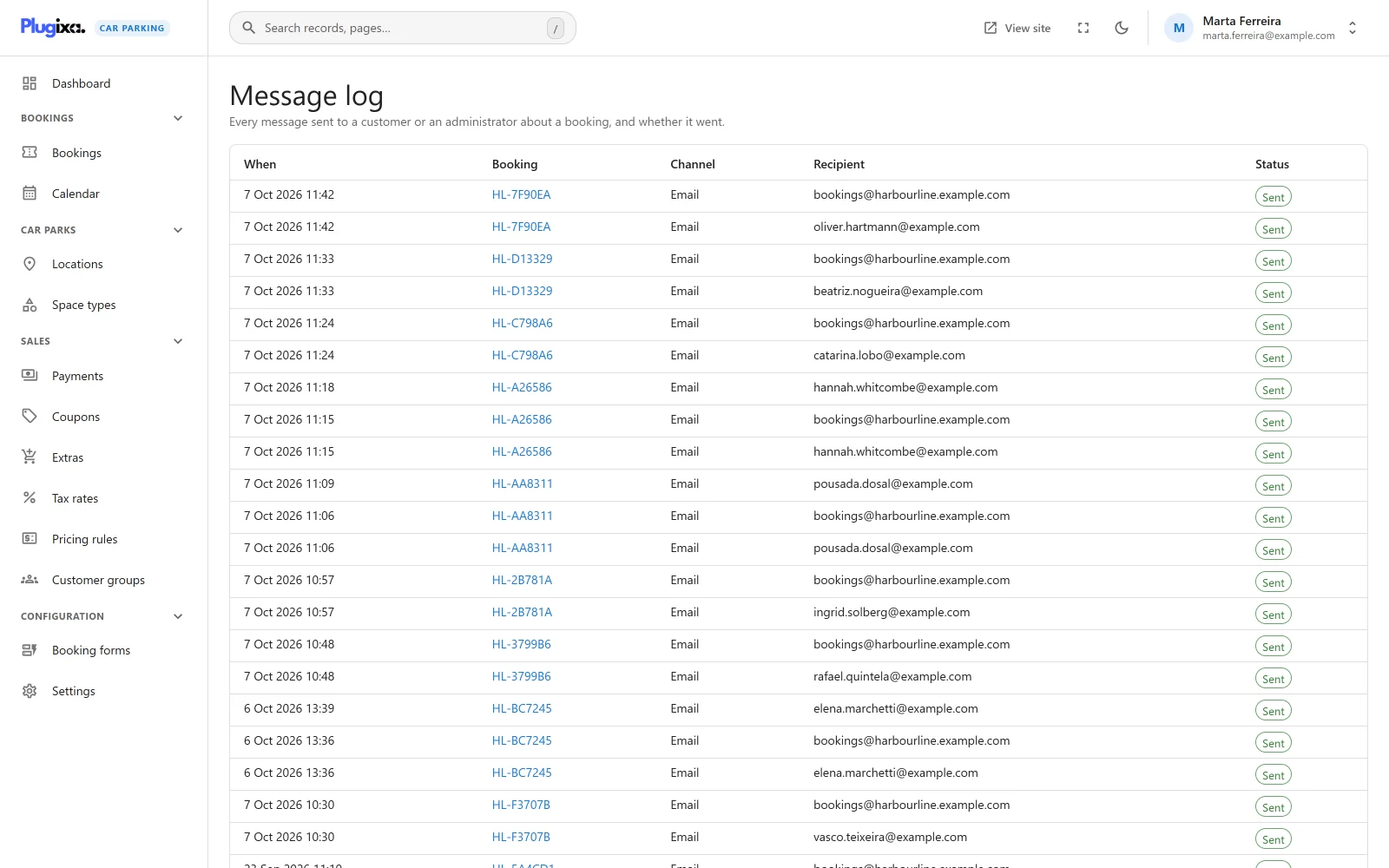
The screen has no entry in the sidebar. Reach it in one of these ways:
- Click View all in the Message log panel of a booking. The button appears once the booking has at least one message.
- Open the address directly:
wp-admin/admin.php?page=plugixa-car-parking#/message-log
It lists “Every message sent to a customer or an administrator about a booking, and whether it went.”, newest first.
Arriving from a booking, the list is narrowed to that booking and a chip above
the table reads Booking followed by its reference. Remove the chip to see
every booking’s messages. The narrowing is part of the address
(#/message-log?booking_id=12), so the browser’s Back button returns to the
booking.
The screen is a plain paged table. It has no search box, no filters and no sortable columns. Choose 10, 25, 50 or 100 Rows per page; it starts at 25.
An empty log shows “No messages yet”.
Columns
| Column | What it shows |
|---|---|
| When | The date and time of the attempt, on the site’s clock |
| Booking | The booking reference, linked to the booking. Shown on the Message log screen only. |
| Channel | How the message was sent |
| Recipient | The address or number it was sent to |
| Status | Sent or Failed. A failed email shows the mailer’s reason in red under the status. |
Channels
| Channel | Recipient shown | Edition |
|---|---|---|
| The customer’s address, or your notice address | Free | |
| SMS | The customer’s phone number | Pro |
| Telegram | group |
Pro |
reminder |
window |
Pro |
The last row is not a message. When a
reminder
PRO has gone out for a booking, the plugin adds a reminder line as
a marker so that the booking is never reminded twice. The reminder’s own email,
text and Telegram post appear as separate lines above it.
A channel added by other code is listed under the name that code gives it, or under its internal id when it gives none.
What is logged
One line is written for each delivery attempt:
| Event | Lines written |
|---|---|
| A booking is created | One Email line for the customer and one for your notice address. With Pro, an SMS line and a Telegram line when those channels are set up. |
| A booking becomes paid in full | One Email line for the customer, plus SMS and Telegram with Pro |
| A reminder falls due PRO | One line per channel, then the reminder marker |
See Emails for exactly when each message is sent, and SMS and Telegram PRO for the Pro channels.
A few things are worth knowing when you read the log:
- Sent means the message was handed over: to the site’s mail server for an email, to the provider for a text or a Telegram post. It does not prove delivery to the inbox or the phone.
- The log does not keep the subject or the text of a message, and it does not say which event caused a line. The time and the recipient tell them apart.
- A failure reason is kept for Email only. A failed text or Telegram post shows Failed with no reason.
- When Send booking emails is off, nothing is sent for a new booking or a payment, so nothing is logged for them either.
- The daily report PRO is not about one booking and is not logged.
What you cannot do here
The log is read-only. A line cannot be edited or deleted, and there is no button to send a message again.
How long the log is kept
Lines are not pruned by age. A booking’s lines stay for as long as the booking does:
- A booking in the trash keeps its log, and has it again when restored.
- When a booking is deleted permanently, its lines are deleted with it.
The log lives in the {prefix}plugixacarparking_notification_log table. See
Privacy and uninstall
for what uninstalling removes.
Who can read it
Anyone who may view bookings may read the log: it needs the
plugixa_carparking_view capability, the same one the bookings list needs. See
the REST API page for the route.