

Contents
On this page
TMDB - Plugixa Stream
TMDB (The Movie Database, themoviedb.org) holds details and artwork for most movies and shows. With your own free TMDB key, you search a title and the plugin fills it in: synopsis, year, genres, age rating, studios, trailer, poster, banner, cast and crew, and a show’s episode titles. You can create a new draft from a search result, or update chosen fields of an existing title.
The plugin never adds video: you add the video, then publish.
1. Add your key
-
On themoviedb.org, open your account’s Settings -> API and copy either the API key or the API read access token. Either one works.
-
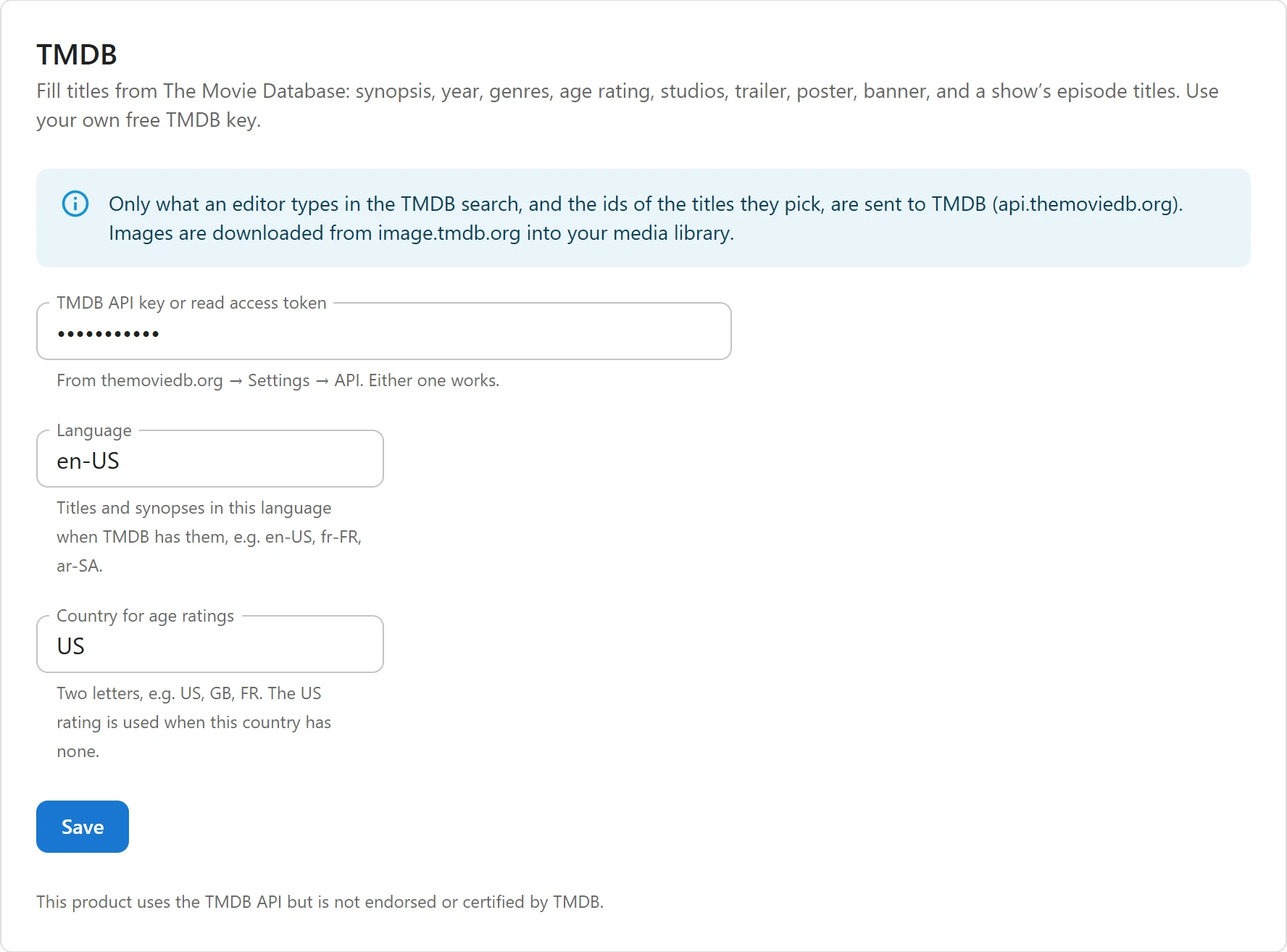
In WordPress, open Settings -> TMDB and fill in:
Field What it is TMDB API key or read access token Your key. Stored encrypted, never sent back to the browser. Language “Titles and synopses in this language when TMDB has them, e.g. en-US, fr-FR, ar-SA.” Empty uses your site’s language. Country for age ratings Two letters, such as US, GB or FR. “The US rating is used when this country has none.” Empty uses the country of your site’s language. -
Click Save.
2. Create a title from TMDB

- Open Series & movies and click Add from TMDB, next to the buttons that create a title.
- Choose Movies or Series, and type in Search TMDB by title. Up to 12 results show, each with its poster, year and summary. “Nothing found. Try another spelling or the original title.” when there is no match.
- Click a result to see what will be imported. For a series, tick the seasons to add under Add episodes as drafts (titles and synopses, no video), and Episode images too to download each episode’s still as its thumbnail.
- Click Create draft. “A draft is created with everything above, the poster and the banner. Add the video, then publish.”
The title opens in the editor when the import is done.
3. Update an existing title
On a saved title, the TMDB panel says which TMDB title it came from (“Imported from TMDB #” and its id). Click Update from TMDB, search and pick the title, then choose:
- Replace these fields: tick the fields to take from TMDB. All are ticked except Title, so your own title stays.
- The seasons to add, for a series.
Click Update. Fields you leave unticked are not touched. A movie stays a movie and a series stays a series.
What gets filled
| Field | From TMDB |
|---|---|
| Title | The title in your chosen language |
| Synopsis | TMDB’s overview |
| Year | The year of release or first air date |
| Genres | TMDB’s genres. Missing genres are created. |
| Age rating | The certification for your country, else the US one, mapped to All ages, 7+, 13+, 16+ or 18+ |
| Original language | The title’s original language, which becomes its Spoken language |
| Studios | The first 3 production companies |
| Ongoing / completed | Series only: ended or cancelled shows become completed, others ongoing |
| Trailer | The best YouTube trailer: an official trailer first, else any trailer or teaser |
| Poster | Downloaded into your Media Library |
| Banner | TMDB’s backdrop, downloaded into your Media Library |
| Cast & crew | Directors and writers (movies) or creators (shows), and up to 15 top-billed actors with their characters |
How ratings are mapped: US labels by name (G and TV-Y are All ages, PG and TV-PG are 7+, PG-13 and TV-14 are 13+, R is 16+, NC-17 and TV-MA are 18+). Elsewhere, the number in the label is the minimum age: “FSK 16” becomes 16+, “12” becomes 7+. A label the plugin cannot read leaves the rating empty rather than guess.
Episodes
Each season you tick adds its episodes as drafts, with their number, title and synopsis, and the still image when you ticked Episode images too. Importing a season again updates those episodes instead of adding them twice. For a movie, the runtime fills the duration of the movie’s video.
Cast and crew
Imported people become records on the Cast & crew page. Each import downloads the TMDB photo of up to 10 people who have no photo yet. A person already on the site, found by TMDB id and then by name, is reused: an actor in ten imported titles is one person with ten titles. Importing cast and crew replaces the title’s credits.
Who can import
Importing needs a user who may create and edit titles and upload files. The TMDB settings need a user who may manage settings.
Privacy and attribution
“Only what an editor types in the TMDB search, and the ids of the titles they pick, are sent to TMDB (api.themoviedb.org). Images are downloaded from image.tmdb.org into your media library.” Nothing is sent before an editor searches, and viewers never contact TMDB. Answers are kept for an hour, so searching and then importing does not ask TMDB twice.
The TMDB tab and dialog carry the notice “This product uses the TMDB API but is not endorsed or certified by TMDB.” The plugin does not add it to your public pages. TMDB’s API terms set how apps must credit TMDB: read them, and add the notice to your site, for example in the footer or on your about page.
Related
Quick Links
Share