

Contents
Activity log - Plugixa Advanced User Role Editor
The Activity log PRO lists every change to roles, people and this plugin’s rules, newest first. It sits in the Safety group of the sidebar, beside History.
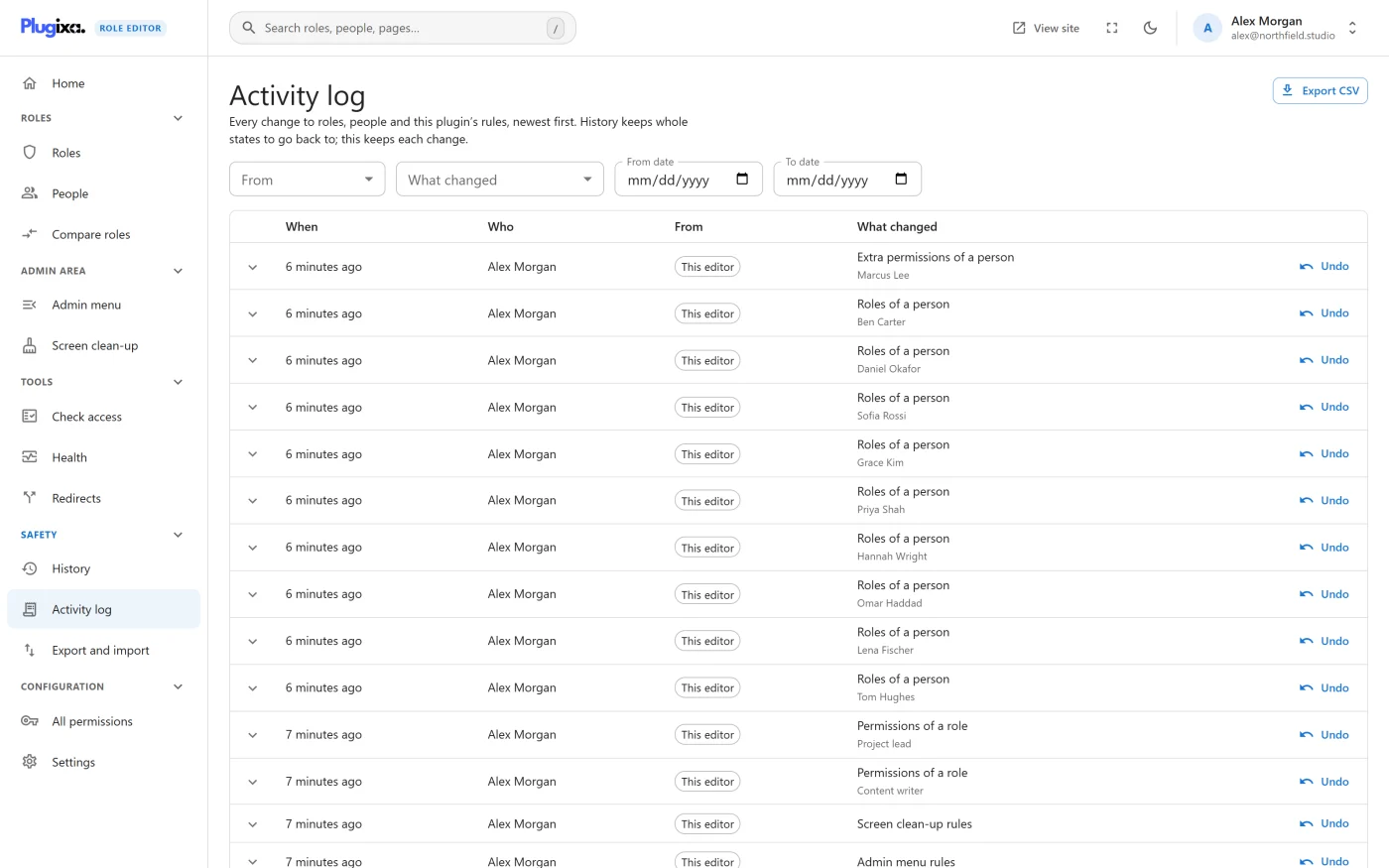
Each row is one change: who made it, when, where it came from and exactly what it changed.
How it differs from History
| History | Activity log PRO | |
|---|---|---|
| Question it answers | What can I go back to? | Who did what, and from where? |
| What it keeps | Restore points: whole states, one per save | Each individual change, with its before and after |
| Going back | Restores a whole point | Undoes one change, leaving later work alone |
| Admin menu and Screen clean-up rules | Not covered by restore points | Logged, and can be undone |
| How long it keeps things | A number of restore points | A number of days, or forever |
The log is an addition to History, not a replacement. An entry that was covered by a restore point shows that point’s number when you open it.
What is recorded
| Shown as | When it is logged |
|---|---|
| Permissions of a role | A role’s permissions were changed |
| Role created | A new role was added |
| Role renamed | A role’s name was changed |
| Role deleted | A role was deleted |
| Permission removed everywhere | A leftover permission was removed from every role |
| Roles of a person | Someone’s roles were changed, or reordered |
| Extra permissions of a person | Permissions set on one account were changed |
| Rescue link used | An account got Administrator back through the rescue link |
| People moved between roles | A background move from one role to another finished |
| Settings | The plugin’s settings were changed |
| Redirects | The redirect rules were changed |
| Features switched on or off | A feature was switched in Settings |
| Admin menu rules | The Admin menu rules were saved |
| Screen clean-up rules | The Screen clean-up rules were saved |
A save that changed nothing is not logged.
The log records changes that go through this plugin. A role changed on WordPress’s own Users screen, or by another plugin, does not pass through it and is not recorded.
Logging starts when Pro is installed. Changes made before that are not in the log.
The columns
| Column | What it shows |
|---|---|
| When | How long ago. Hover for the exact date and time |
| Who | The account that made the change, or “Nobody signed in” when there was none, as with a background task |
| From | The source of the change. See below |
| What changed | The kind of change, with the role or person it was made to underneath |
| (last column) | Undo, or Undone once it has been |
Where a change came from
| Source | Meaning |
|---|---|
| This editor | Saved from one of the plugin’s screens, or by anything else calling the plugin’s own REST API |
| Restore | A restore point was restored from History |
| Import | Roles were imported from a file |
| Undo | An earlier entry in this log was undone |
| Command line | Made through WP-CLI |
| Background task | Made by a scheduled task, such as moving people between roles |
| Rescue link | The one-time rescue link was used |
| REST API | Made during a REST request to a route that is not the plugin’s own |
| WordPress admin | Made through the plugin’s code during an ordinary admin page request |
Filters
Four filters sit above the table and combine with each other:
- From: any source, or one of the sources above.
- What changed: any change, or one of the kinds listed under “What is recorded”.
- From date and To date: both days are included. Days are counted in UTC.
The list shows 25 entries a page, and can show 50 or 100.
Seeing exactly what changed
Click the arrow at the start of a row to open it. Each line is marked:
| Mark | Meaning |
|---|---|
| Added | A permission was granted, or an item was added to a list |
| Removed | A permission or list item was taken away |
| Blocked | A permission was explicitly blocked |
| Changed | A value changed. Before and After are shown next to it |
For rule changes the line names where the change is, for example
roles.editor.items: tools.php.
If the change was covered by a restore point, the last line reads Restore point # and its number, which you can find in History.
Undo
Undo puts one change back exactly as it was before, without touching anything else. The dialog shows what will change before you confirm.
These kinds of change can be undone one at a time:
- Permissions of a role
- Roles of a person
- Extra permissions of a person
- Admin menu rules
- Screen clean-up rules
Every other kind has no Undo button. For those, restore a point from History.
Three things to know about an undo:
- It goes through the same safety checks as any other save. An undo that would lock you out, or leave the site without an administrator, is refused with the reason. See Safety guardrails.
- It is refused if the same role, person or rules have changed again since. Undoing only the older entry would silently throw the later changes away. The message sends you to History, which restores whole states and shows what comes back.
- It is logged as a change of its own, with the source Undo, so it can be undone too. The original entry is marked Undone.
Undoing a role or person change takes a restore point first. Undoing a menu or clean-up rule does not.
The Undo button is shown only to people who may edit roles.
Export CSV
Export CSV downloads the entries that match the current filters, oldest
first, as role-activity- followed by today’s date.
| Column | Contents |
|---|---|
id |
The entry’s number |
time_utc |
When it happened, in UTC |
who |
The account’s display name |
source |
Where it came from |
change |
The kind of change |
target |
The role, permission or account id it was made to |
before |
The state beforehand, as JSON |
after |
The state afterwards, as JSON |
undone_at |
When it was undone, if it was |
Values that a spreadsheet would read as a formula are written so that it will not run them.
Log settings
The Log settings card is under the table. It is shown only to people who may change the plugin’s settings.
| Setting | Choices | Default |
|---|---|---|
| Keep entries for | 30 days, 90 days, 180 days, 365 days, Forever | 365 days |
| Email me when someone is given full control | On or off | Off |
| Send to | An email address. Leave empty to use the site’s admin email | Empty |
Older entries are removed once a day.
The full-control email
When the switch is on, an email is sent whenever a change hands out a permission that controls the whole site, such as installing plugins or editing users, or a role that has one. That covers:
- such a permission being given to a role,
- such a permission being given to one person as an extra permission,
- a person being given a role that has one, including through the rescue link.
The email lists each grant, says who made the change and links to the log. Several grants in one save arrive as one email.
Who can open it
The log names accounts and what was changed on them, so reading it needs the same access as editing roles. View-only access to the editor is not enough.
What to do next
- Go back to a whole earlier state in History and restore.
- Read about the checks an undo passes through in Safety guardrails.
- Read the log from a script: REST API.