

Contents
Login redirects - Plugixa Advanced User Role Editor
WordPress sends everybody to the dashboard after signing in, and shows a bare refusal page to anyone who reaches a screen they cannot open. Plugixa Role Editor -> Tools -> Redirects changes both, role by role.
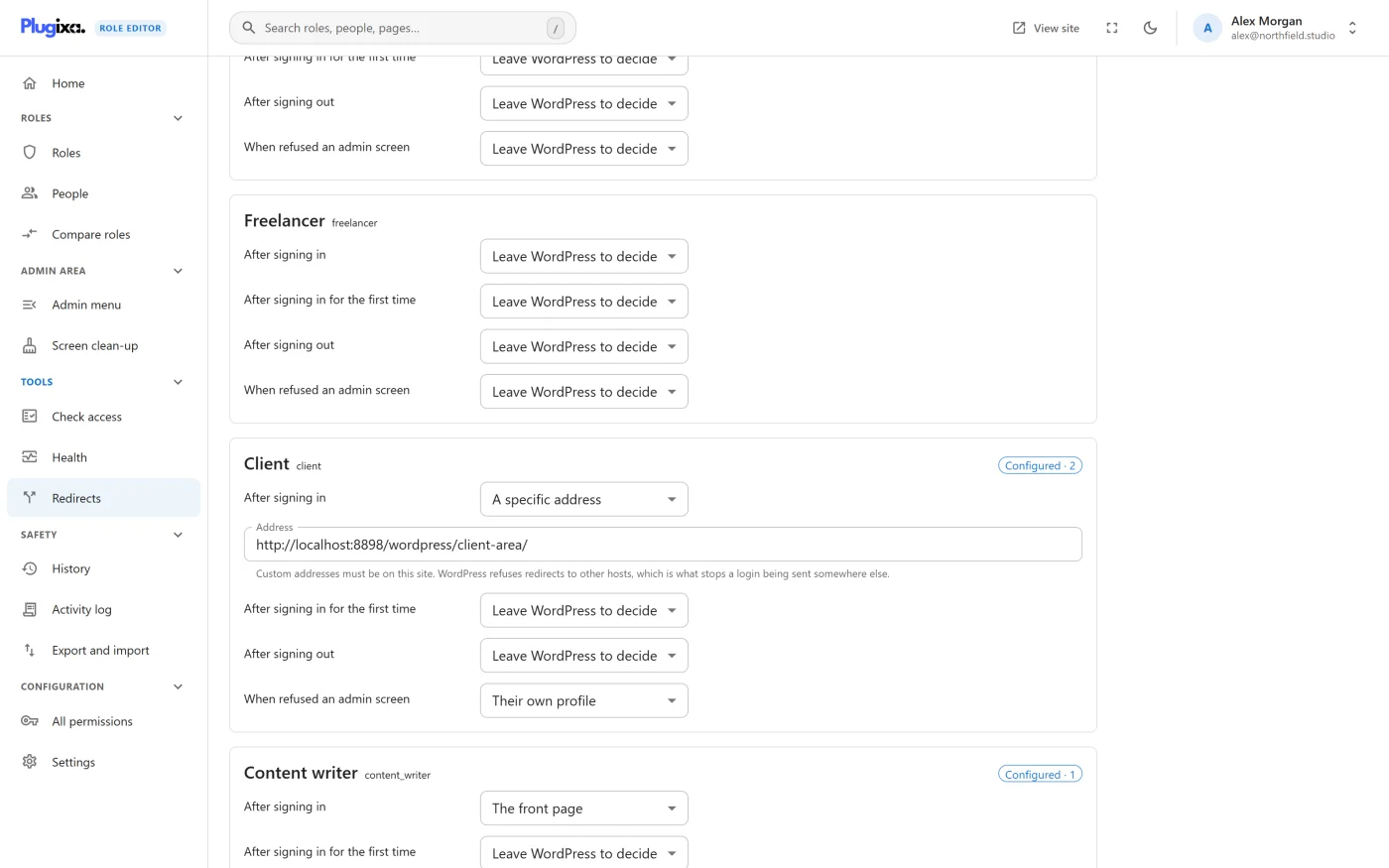
How the screen works
There is one card for each role, and one final card called The whole site. Each card has a row per event, and each row has a destination.
Redirects are saved with the Save redirects button at the top right. They do not go through the unsaved changes bar, and they are not part of a restore point. You need permission to change roles to save them; without it the screen is read-only.
A role with rules shows a Configured badge with the number of events set.
The events
Each role has four:
| Event | When it applies |
|---|---|
| After signing in | Every successful sign-in. |
| After signing in for the first time | Only the first sign-in the plugin sees for that account. |
| After signing out | When the person signs out. |
| When refused an admin screen | When the person opens an admin screen their role cannot open, instead of the “Sorry, you are not allowed to access this page” message. |
The whole site has one more, which is not tied to a role:
| Event | When it applies |
|---|---|
| When a page does not exist | A visitor reaches an address on the front of the site that is not found. The redirect is temporary, so a page that comes back later is not hidden by a cached redirect. |
The destinations
| Choice | Where the person goes |
|---|---|
| Leave WordPress to decide | Nothing changes. This is the default for every event. |
| The front page | The site’s home address. |
| The dashboard | The WordPress admin dashboard. |
| Their own profile | Their profile screen in the admin area. |
| A specific address | An address you type into the Address field that appears. |
Addresses must be on this site
A specific address has to be on this site. The field says so before you save: “Custom addresses must be on this site. WordPress refuses redirects to other hosts, which is what stops a login being sent somewhere else.”
If you save an address on another host, nothing is saved and you see:
“https://example.org/welcome” is not an address this site may redirect to. WordPress only allows redirects to yoursite.com, which is what stops a login being sent somewhere else.
The address is checked a second time at the moment of the redirect. If it is no longer acceptable, the person is simply left where WordPress would have sent them.
A developer can allow another host through WordPress’s own
allowed_redirect_hosts filter. There is no setting for it in the plugin.
Two smaller rules:
- A specific address with the field left empty is treated as Leave WordPress to decide.
- Rules for a role that has been deleted are dropped the next time redirects are read, so they do not come back if a role with the same name is created later.
When a person holds several roles
Only one destination can win. The note at the top of the screen states the rule: “A person can hold several roles, and only one destination can win. The first role in this list that they hold decides.”
The cards are shown in exactly the order the plugin uses. For each event it goes down the list and uses the first role the person holds that has something other than Leave WordPress to decide for that event. So a person with two roles can get their sign-in destination from one and their sign-out destination from the other.
Note that this is the order of roles on the site, not the order of roles on the person’s account.
First sign-in
The first-time rule is a refinement of the ordinary one, not a replacement:
- If the role has a first-time rule, it is used once.
- If it does not, the ordinary After signing in rule is used, also on the first sign-in.
The plugin remembers that an account has signed in by storing a small marker on the account. The marker is set at the first sign-in whether or not a first-time rule exists, so adding a first-time rule later does not suddenly apply to people who have been signing in for months.
Things that are not bugs
“My sign-in rule is ignored when someone follows a link.” If the rule is Leave WordPress to decide, WordPress still honours the page the person was trying to reach. Any other choice replaces it.
“The refused-screen rule did nothing.” If the destination is the same screen the person was just refused, the plugin does not redirect, because that would loop until the browser gives up. This happens when the rule is The dashboard and the role cannot open the dashboard. Choose The front page or Their own profile instead.
“Another plugin sends people somewhere else after sign-in.” This plugin’s rules are applied after other plugins have had their say at sign-in and sign-out. A rule here replaces their destination; Leave WordPress to decide keeps it.
Switching redirects off
Redirects is a feature you can switch off under Settings -> Features. The rules stay saved and apply again when you switch it back on. See Settings.
What to do next
- Narrow what a role can open in Editing a role.
- Hide menu items a role does not need with Admin menu control PRO.
- If a redirect was refused, see Troubleshooting.