

Contents
Plugixa Chauffeur - User Documentation
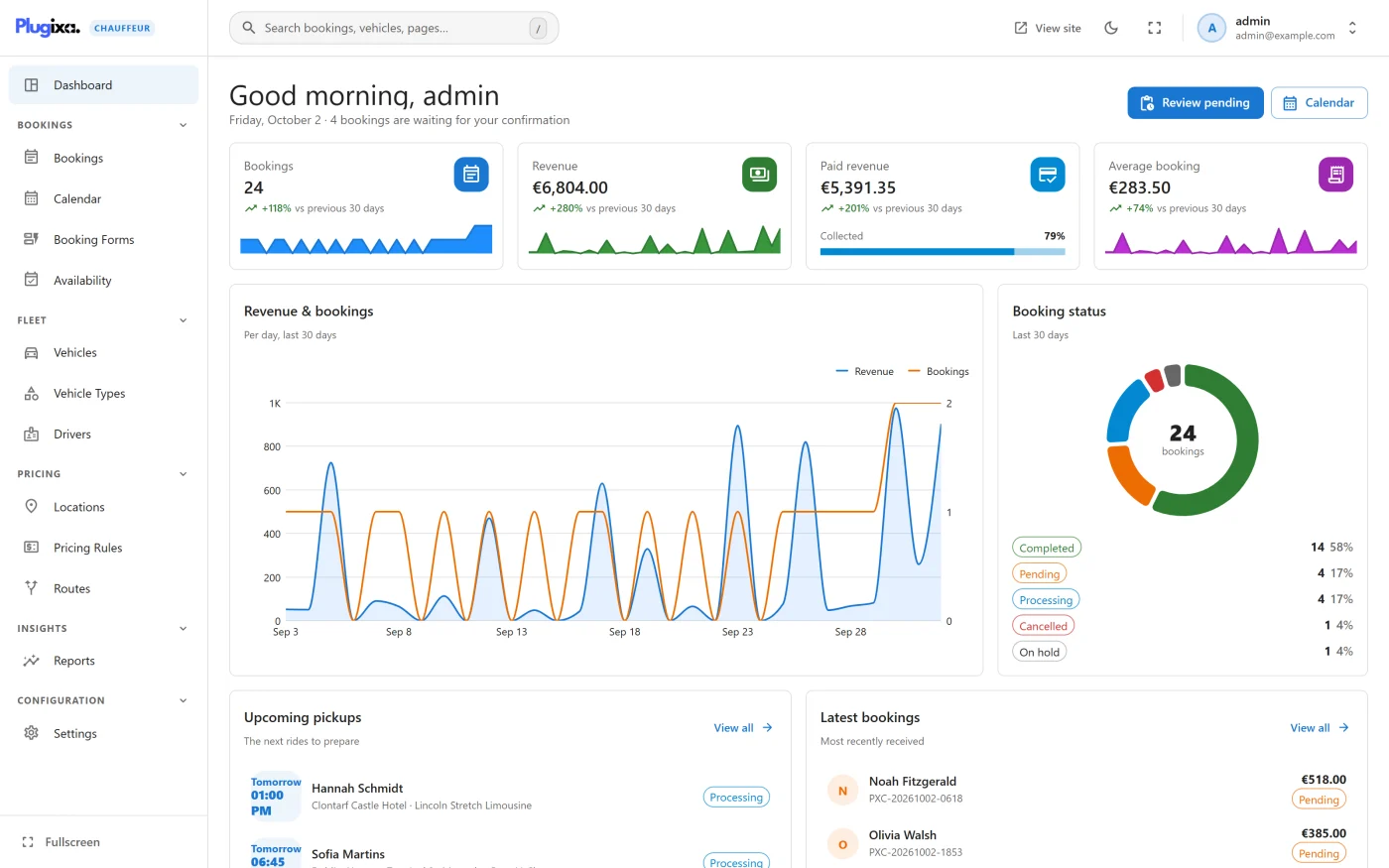
Welcome to the official documentation for Plugixa Chauffeur, a booking plugin for chauffeur, limousine, airport transfer and taxi businesses. Customers book through a four-step wizard that you place on any page with a shortcode. You manage vehicles, booking forms, availability and bookings from a single admin screen in WordPress.
The plugin ships in two editions:
- Free - the booking wizard, distance and hourly service types, one-way and return pricing, vehicles and vehicle types, locations, booking forms, global availability rules, the bookings list and calendar, Stripe Checkout and offline payment methods, and notification emails.
- Pro PRO - everything in Free, plus Drivers, Pricing Rules, flat-rate Routes, Reports and printable Invoices.
Nothing in the free edition is switched off or limited. See the complete Free vs Pro comparison.
What makes it different
A few decisions shape how the plugin behaves. They are worth knowing before you take your first booking.
| Decision | What it means for you |
|---|---|
| The fare is calculated on the server | The price shown in the wizard and the price stored on the booking both come from the same calculation, run on your server from the vehicle’s rates. A price sent by the browser is never used. |
| Only published records reach visitors | A draft booking form shows “Booking form not found.” and a draft vehicle is never offered or bookable. |
| Availability is checked twice | The pickup time is checked when the customer asks for prices and again when the booking is saved. |
| A booking exists before payment | With Stripe, the booking is saved as Pending and Unpaid first. It becomes Paid and Processing only when Stripe confirms the payment on the webhook. |
| One admin screen | The WordPress menu has one item, Plugixa Chauffeur. Every screen is inside it, with its own navigation and search. |
| No mapping service | Version 1.0.0 does not contact any mapping service. Customers type the pickup, the drop-off and the estimated distance. |
Key concepts
| Term | What it is |
|---|---|
| Booking form | A set of choices (service types, return trips, currency, lead time, minimum passengers) that produces one wizard. Each form has its own shortcode. |
| Service type | How a trip is priced. Distance uses the distance rate, Hourly uses the hourly rate. Flat rate PRO uses the price of a predefined route. |
| Transfer type | One way or Return. A return doubles the distance part of a distance fare. |
| Vehicle | Something a customer can book, with a capacity and four prices: base, per distance unit, per hour and minimum. |
| Vehicle type | A category that groups vehicles, such as Sedan or Van. |
| Location | A saved place with an address and optional coordinates. |
| Availability | Site-wide rules for when a pickup may be booked: lead time, horizon, business hours and blackout dates. |
| Booking status | Where the booking stands: Pending, Processing, Completed, Cancelled, On hold, Refunded or Failed. |
| Payment status | Whether the booking has been paid: Unpaid, Paid, Deposit paid or Refunded. |
| Reference | The booking number given to the customer, in the form PXC-20261002-0421. |
Getting started
| Section | Description |
|---|---|
| Getting Started | Install, activate, and take a first test booking |
| Free vs Pro | What each edition contains |
The booking form on your site
| Section | Description |
|---|---|
| Booking wizard | What the customer sees, step by step |
| Shortcodes | The shortcode, its alias and its one attribute |
| Blocks | Using the form in the block editor |
| Booking forms | Create forms and choose what each one offers |
Bookings
| Section | Description |
|---|---|
| Dashboard | The last 30 days, the next pickups and the latest bookings on one screen |
| Bookings | The list, the detail screen, statuses and payment status |
| Calendar | Bookings on a day, week, month or agenda view |
| Availability | When customers are allowed to book a pickup |
| Invoices PRO | A printable invoice for a booking |
Fleet
| Section | Description |
|---|---|
| Vehicles | Capacity, photo and fares for each vehicle |
| Vehicle types | Categories that group vehicles |
| Drivers PRO | Drivers and assigning them to bookings |
Pricing and payment
| Section | Description |
|---|---|
| Pricing | How a fare is calculated, with a worked example |
| Locations | Saved places such as airports and stations |
| Pricing rules PRO | Surcharges and discounts applied on top of the fare |
| Flat-rate routes PRO | Fixed prices for predefined routes |
| Payments | Stripe Checkout, the webhook and offline methods |
| Emails | The notifications sent to customers and to you |
Insights and configuration
| Section | Description |
|---|---|
| Reports PRO | Revenue and booking reports |
| Settings | Currency, units, payments, notifications and data handling |
| Multilingual | Using the plugin with WPML or Polylang |
| Privacy and uninstall | What is stored, what is sent, and what uninstalling removes |
For developers
| Section | Description |
|---|---|
| Hooks Reference | Actions and filters |
| REST API | The plugin’s REST routes |
Support
| Section | Description |
|---|---|
| Troubleshooting | Common problems and their causes |
System requirements
- WordPress: 6.5 or higher
- PHP: 8.2 or higher
- Browsers: a current version of Chrome, Firefox, Safari or Edge. Both the admin screen and the booking wizard are JavaScript applications and need JavaScript switched on.
- REST API: the wizard talks to your site through the WordPress REST API, so it must be reachable by visitors who are not signed in.
Bookings, vehicles, booking forms and locations are stored in the plugin’s own database tables. They stay in place when the plugin is deactivated. See Privacy and uninstall for what happens when it is deleted.
Getting help
- Check Troubleshooting first.
- Read the page for the screen you are using.
- Contact support through your Plugixa account.
License
Plugixa Chauffeur is licensed under the GPL v2 or later. Pro features are part of the Pro build of the plugin, distributed through Freemius.