

Contents
Dashboard - Plugixa Chauffeur
The Dashboard is the screen the admin opens on. It answers three questions without a click: how the last 30 days went, which rides are next, and which bookings are waiting for you.
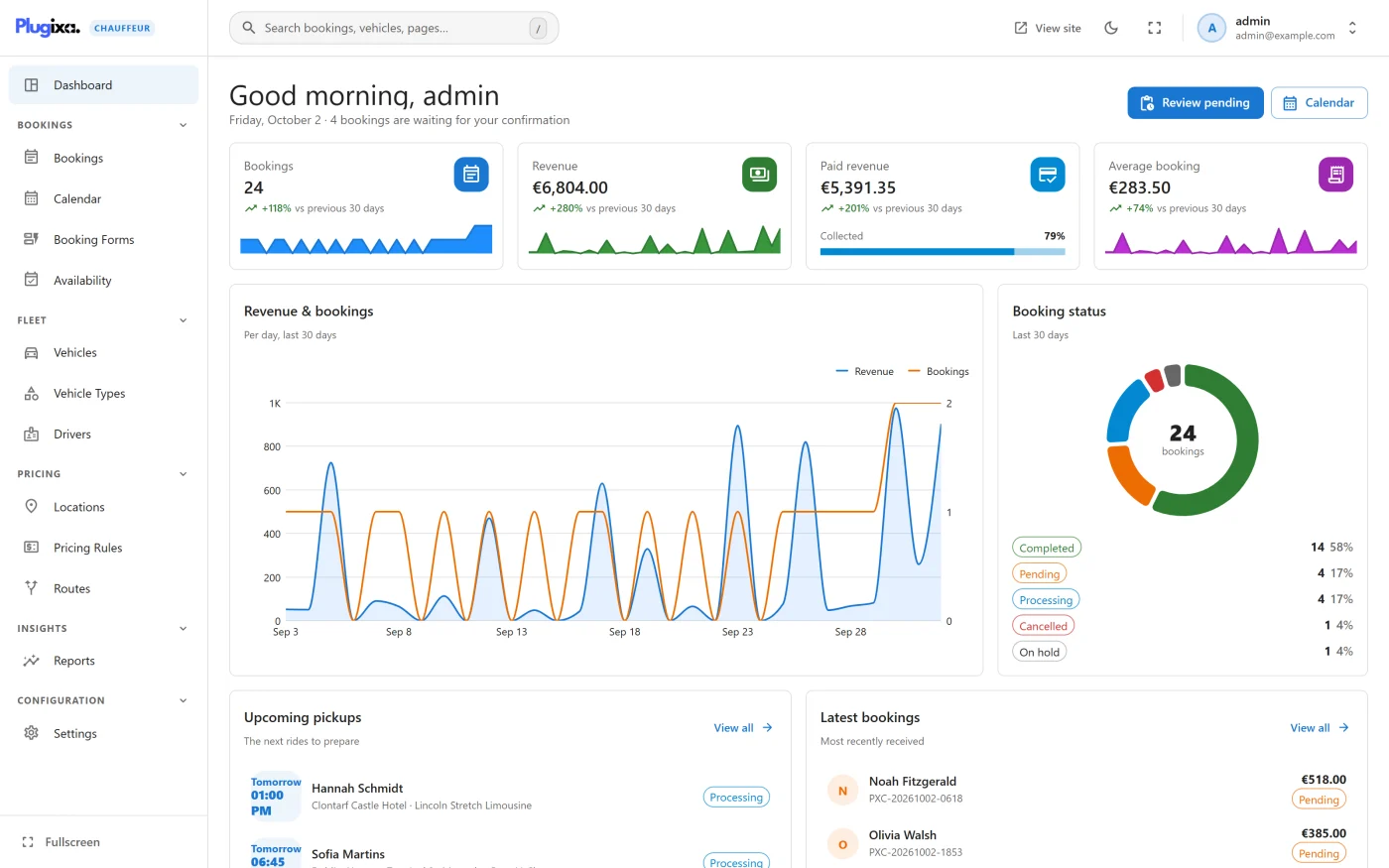
Open it from Plugixa Chauffeur -> Dashboard. It is part of the free edition and is the same in Pro.
The greeting and the two buttons
The title greets you by first name: “Good morning” before noon, “Good afternoon” until 18:00 and “Good evening” after that, by your browser’s clock. The line under it shows today’s date and how many bookings have the status Pending, for example “4 bookings are waiting for your confirmation”. When there are none it reads “no bookings are waiting for confirmation”.
| Button | What it does |
|---|---|
| Review pending | Opens the Bookings list filtered to Pending. Shown only when at least one booking is pending. |
| Calendar | Opens the Calendar. |
The pending count covers every pending booking, not only those of the last 30 days.
The four figures
Each card shows a total for the last 30 days and how it compares with the 30 days before.
| Card | What it counts |
|---|---|
| Bookings | Bookings received in the period. The card is a link to the Bookings list. |
| Revenue | The sum of the totals of those bookings. |
| Paid revenue | The part of that sum whose payment status is Paid. The Collected bar shows it as a share of Revenue. |
| Average booking | Revenue divided by the number of bookings. |
Under each figure is the change against the previous 30 days, for example “+12% vs previous 30 days”. When the previous period has nothing to compare with, the card reads “No data for the previous 30 days”. The small chart at the bottom of a card is the same figure day by day.
How the period is counted
Three rules explain every number on this screen:
- The period is today and the 29 days before it, in your site’s timezone. It cannot be changed here. Reports PRO lets you choose the dates.
- A booking is counted on the day it was received, not on the day of the pickup. A ride booked today for next month is in today’s figures.
- Every status is counted. Revenue includes bookings that are still Pending and bookings that were later Cancelled, Refunded or Failed. Only Paid revenue looks at the payment status.
Amounts are shown in the Currency from Settings. Totals are added up as plain numbers: bookings made by a form with a different currency are not converted.
Revenue & bookings
A chart with one point per day for the 30 days, with a line for revenue and a line for the number of bookings. Days without a booking are drawn at zero. With no booking at all it reads “No bookings in the last 30 days.”
Booking status
A ring showing how the bookings of the period are split by status, with the count and the percentage of each status listed under it and the total in the middle.
Upcoming pickups
“The next rides to prepare”: the five bookings with the nearest pickup time from now on. Bookings that are Cancelled, Refunded or Failed are left out.
Each row shows the day (Today, Tomorrow or a date) and the time, the customer’s name, the pickup address, the vehicle and the status. Click a row to open the booking. View all opens the Calendar.
Latest bookings
“Most recently received”: the five newest bookings, whatever their pickup date, with the customer’s name, the reference, the total and the status. Click a row to open the booking. View all opens the Bookings list.
Revenue by service
The revenue of the period for each service type, Distance and Hourly, and Flat rate PRO when routes are in use, with the number of bookings behind each bar.
Top vehicles
The five vehicles that brought in the most revenue in the period, with the number of bookings of each. Bookings whose vehicle has since been deleted are grouped in one row without a vehicle name.
Your setup
“Everything customers can book”: four tiles that count your records and open the matching screen.
| Tile | What it shows |
|---|---|
| Vehicles | Published vehicles out of all vehicles, for example 7/8. Only published vehicles are offered to customers. |
| Vehicle types | The number of categories. |
| Locations | The number of saved places. |
| Booking forms | The number of forms, drafts included. |
Who can see it
The Dashboard needs the plugin’s manage permission,
plugixa_chauffeur_manage, like every screen except Settings. Its figures come
from one REST route, GET /settings/dashboard, described in
REST API.
What the Dashboard does not do
- It has no date picker, no filter and no export. Those are in Reports PRO.
- It does not refresh by itself while it is open. Reload the page to see a booking that has just arrived.
- Nothing can be edited on it. Every row and tile is a link to the screen where the record is changed.
What to do next
- Work through pending rides in Bookings.
- See the week ahead in Calendar.
- Find any screen or record from the search box, described in Getting started.