

Contents
Reports - Plugixa Chauffeur
Reports PRO answers “how did we do between these two dates”. The free dashboard already shows the last 30 days; Reports lets you choose the period, adds the list of bookings behind the totals, and exports that list.
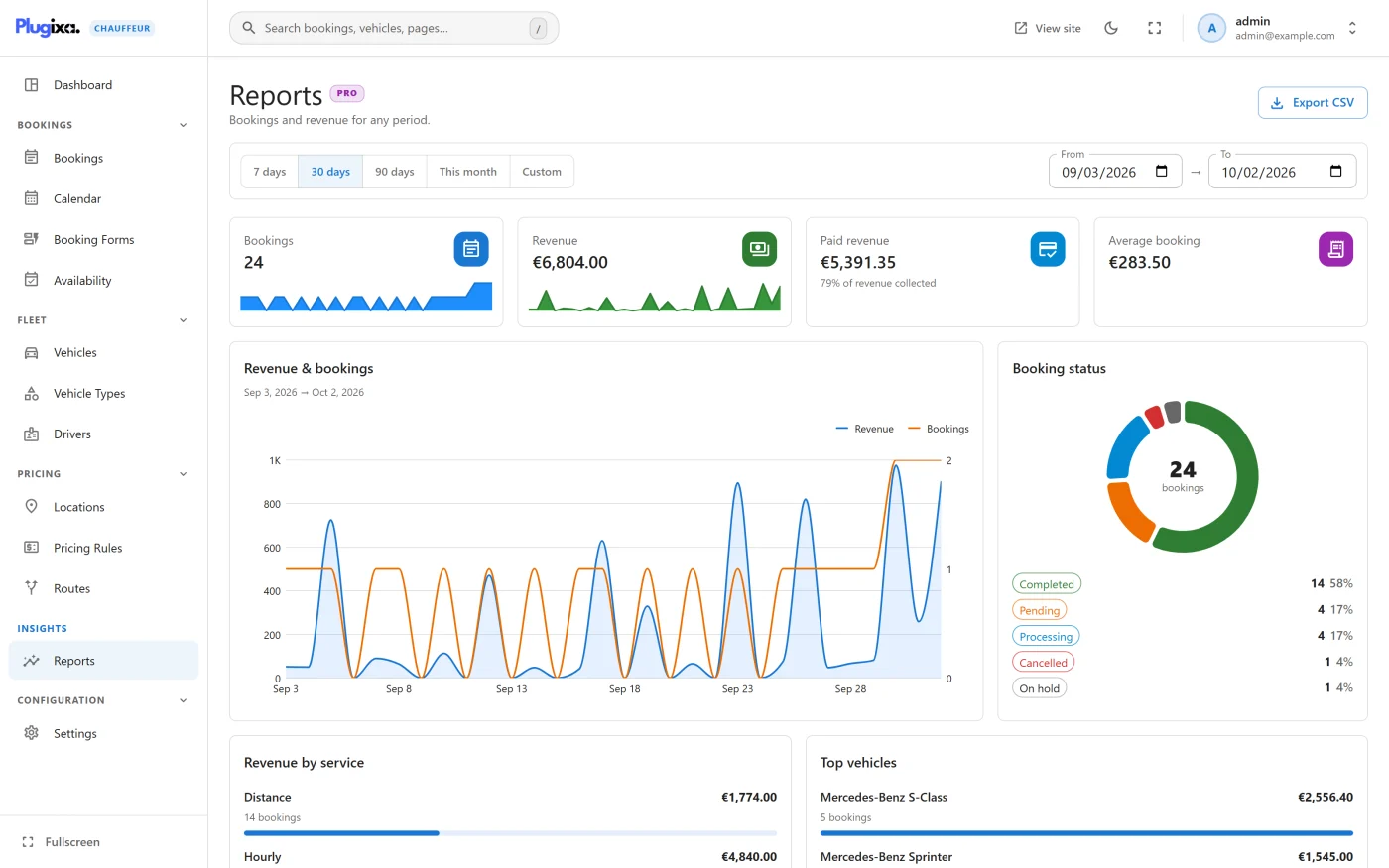
Open it from Plugixa Chauffeur -> Reports. In the fullscreen sidebar it is the Insights group.
Choosing the period
| Control | Period |
|---|---|
| 7 days | Today and the six days before |
| 30 days | Today and the 29 days before. This is the starting view. |
| 90 days | Today and the 89 days before |
| This month | The first of the current month up to today |
| Custom | Whatever you put in From and To |
Editing From or To switches to Custom. Both days are included.
The period is the date the booking was made, not the pickup date. A ride booked in September for a pickup in December counts in September.
The four totals
| Tile | What it is |
|---|---|
| Bookings | The number of bookings created in the period |
| Revenue | The sum of their totals |
| Paid revenue | The sum of the totals of bookings whose payment status is paid, with the share “of revenue collected” |
| Average booking | Revenue divided by the number of bookings |
Two points to read these correctly:
- Every booking counts, whatever its status. Cancelled, failed and refunded bookings are included in Bookings and Revenue. Use the status chart and the status filter on the table to see how many of them there are.
- Totals are added as plain numbers. If your booking forms use different currencies, their totals are summed without conversion and shown in the site currency. Keep one currency per site for the totals to mean anything.
Charts
| Card | What it shows |
|---|---|
| Revenue & bookings | Revenue and booking count per day across the period. Days without bookings are drawn as zero. |
| Booking status | How the period’s bookings split by status |
| Revenue by service | Revenue and booking count for each service type |
| Top vehicles | The ten vehicles with the most revenue, with their booking counts |
A card with nothing to draw says “No bookings in this period.”
Bookings in this period
Below the charts is the list of bookings the totals were built from.
| Column | What it shows |
|---|---|
| Booking | The booking number and when it was made |
| Customer | Name and email |
| Service | The service type |
| Payment | The payment status |
| Total | The booking total in its own currency |
| Status | The booking status |
The search box matches the number, customer name and email. The Status filter offers only the statuses that occur in the period.
The list holds the 1,000 most recent bookings of the period. The four totals and the charts are calculated from every booking, so on a very busy period the totals can cover more bookings than the list shows. Narrow the dates to see the rest.
Export CSV
Export CSV downloads the bookings of the current period as
bookings-<from>_<to>.csv, for example bookings-2026-09-01_2026-09-30.csv.
| Column | Content |
|---|---|
| Booking | Booking number |
| Date | When the booking was made |
| Customer | Customer name |
| Customer email | |
| Service | Service type |
| Status | Booking status |
| Payment | Payment status |
| Total | Booking total |
| Currency | The booking’s currency |
- The file contains the same rows as the list, so it is limited to the 1,000 most recent bookings of the period too.
- It ignores the search box and the status filter: you always get every row of the period.
- The button is disabled while the period has no bookings.
- The file is built in your browser from data already on the screen. Nothing is written to the server.
The export contains customer names and email addresses. Treat the file as personal data. See Privacy and uninstall.
Who can see reports
Anyone with the plugin’s manage permission, which is administrators unless you
have delegated it. See REST API
for the route behind this screen, GET /reports/summary.