

Contents
Settings - Plugixa Chauffeur
Plugixa Chauffeur -> Settings holds the options that apply across the whole plugin: “How the plugin behaves across every booking form.” The screen has a tab for each group of settings.
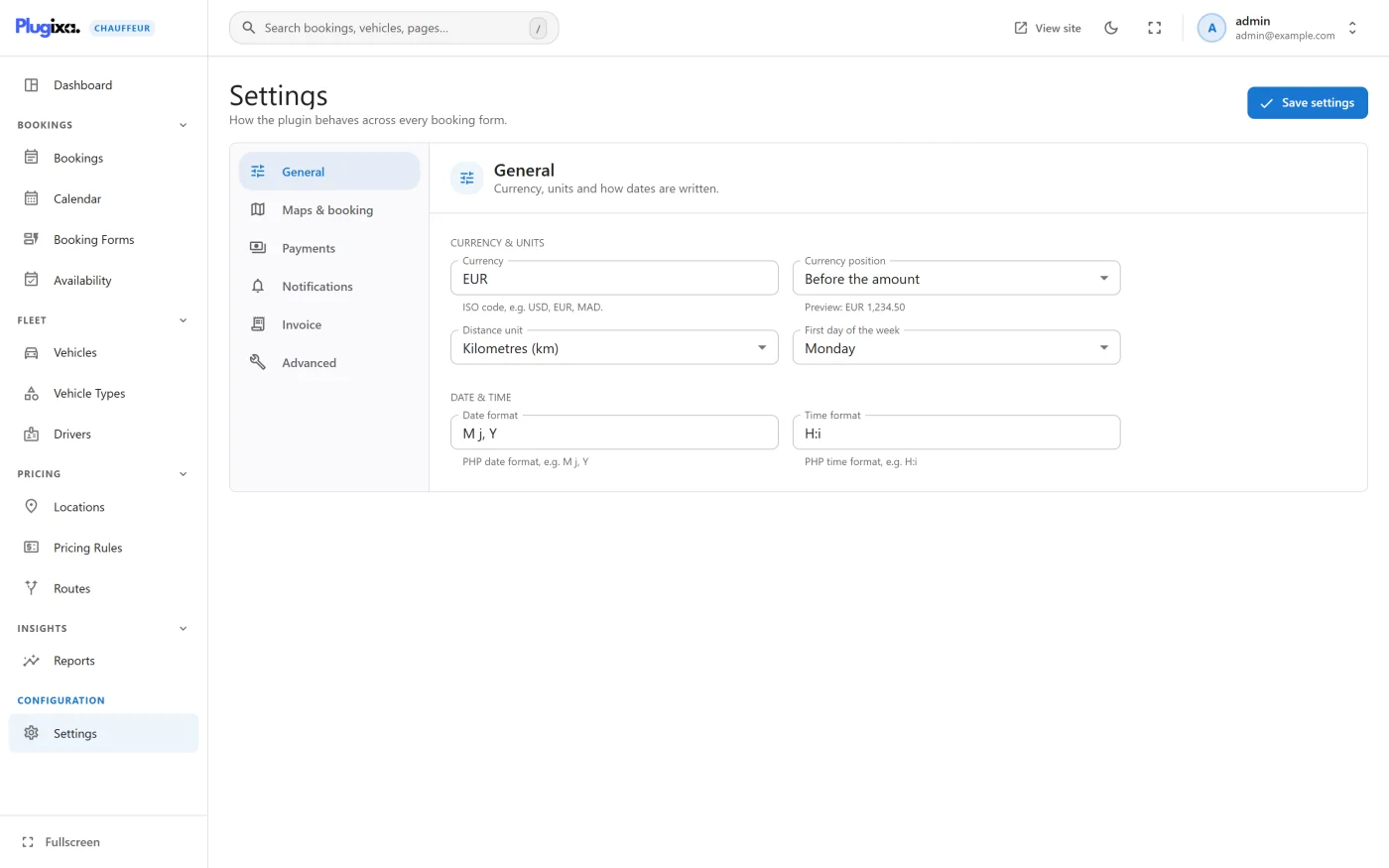
| Tab | What it covers |
|---|---|
| General | “Currency, units and how dates are written.” |
| Maps & booking | “Map access and what happens to a new booking.” |
| Payments | “The ways customers can pay for a ride.” |
| Notifications | “Emails sent when a booking is made or changes.” |
| Invoice PRO | “The letterhead printed on every booking invoice.” |
| Advanced | “Data handling and other rarely-changed options.” |
Settings that belong to one booking form (its service types, currency, lead time) are on the form itself. See Booking forms. The rules for when a ride can be booked are under Availability.
Saving
All tabs are saved together with Save settings at the top right. You can move between tabs without losing edits. While there are edits, a bar at the bottom of the screen reads “You have unsaved changes”, with Discard to put the stored values back. A successful save shows “Settings saved”.
The open tab is kept in the address, for example #/settings?tab=payments, so
a reload or a shared link lands on the same tab.
Settings need an administrator. The settings routes require the WordPress
manage_options capability, not the plugin’s own manage permission. A role you
have given booking access to can open every other screen but cannot load or
save this one. See REST API.
General
Currency & units
| Setting | Default | What it does |
|---|---|---|
| Currency | USD | “ISO code, e.g. USD, EUR, MAD.” The currency of every booking form that does not set its own, and the currency reports and admin totals are shown in. It is typed in capitals for you. |
| Currency position | Before the amount | Before the amount or After the amount. The field shows a preview. |
| Distance unit | Kilometres (km) | Kilometres (km) or Miles (mi). Sets the unit shown beside the distance field in the booking wizard. |
| First day of the week | Monday | Sunday or Monday. Sets the first column of the Calendar and the order of the days on the Availability screen. |
Date & time
| Setting | Default | What it does |
|---|---|---|
| Date format | M j, Y |
“PHP date format, e.g. M j, Y” |
| Time format | H:i |
“PHP time format, e.g. H:i” |
What these do in version 1.0.0
Three notes, so the settings do not surprise you:
- Distance unit is a label, not a conversion. The wizard sends the number the customer types as the distance, and each vehicle’s per-distance price is multiplied by that number. On a site set to miles, enter per-mile prices on your vehicles. See Pricing.
- Currency position, Date format and Time format are stored but not yet
applied. In this version the wizard and the admin app format amounts and
dates by locale (the wizard by the site’s language, the admin app by your
browser’s), and the emails and invoice use a fixed layout (the currency code
before the amount, dates like
Oct 10, 2026 20:00). The preview under Currency position is the only place the choice shows. - Changing Currency does not change existing bookings. Each booking keeps the currency it was made in.
Maps & booking
Google Maps
| Setting | Default | What it does |
|---|---|---|
| Google Maps API key | Empty | “Your Google Maps Platform key, used by the map features.” |
The key is stored, but version 1.0.0 contains no map feature that reads it: the plugin makes no request to Google, the wizard shows no map, and the distance is typed by the customer rather than calculated. Leaving the field empty changes nothing.
New bookings
| Setting | Default | What it does |
|---|---|---|
| Default booking status | Pending | Pending or Processing. “The status a booking starts with when a customer submits it.” |
In version 1.0.0 a booking made through the wizard always starts as Pending, whatever this is set to. A booking paid through Stripe moves to Processing when the payment is confirmed. See Bookings.
Payments
Each payment method is a switch. Turning one on reveals its fields. The methods that are on are offered to the customer on the last step of the wizard, with Stripe first.
| Method | Default | Description on screen | Fields |
|---|---|---|---|
| Cash to the driver | On | “The customer pays the chauffeur in cash at the end of the ride.” | Cash instructions |
| Bank transfer | Off | “The customer wires the fare before the ride.” | Bank transfer instructions |
| Pay on pickup | On | “The customer pays the driver by card at pickup.” | Pay-on-pickup instructions |
| Stripe | Off | “Online card payment during booking. The booking is marked paid when Stripe confirms it.” | Publishable key, Secret key, Webhook signing secret |
The instructions are shown to the customer under the method on the confirmation step, on the thank-you screen and in the booking email. The defaults are “Please pay the driver in cash at pickup.” and “You can pay by card to the driver at pickup.”; the bank transfer instructions start empty and are where your account details go.
The name a customer sees for each method (“Pay online (card)”, “Cash to the
driver”, “Bank transfer”, “Pay on pickup (card)”) has no field on this screen.
It can be changed by saving a payment_stripe_label, payment_cash_label,
payment_wire_label or payment_pickup_label key through the settings route.
Stripe
| Field | What it does |
|---|---|
| Publishable key | Stored. Checkout is a redirect to Stripe’s own page, so version 1.0.0 does not use this key. |
| Secret key | Used to create the Stripe Checkout session for a booking. Stripe is only offered to customers when the switch is on and this key is filled in. |
| Webhook signing secret | “Used to verify that webhook calls really come from Stripe.” Without it every webhook call is rejected and bookings are never marked paid automatically. |
The secret fields are masked, with a button to show them. Both keys and the signing secret are stored in the WordPress options table as entered.
The webhook endpoint to register with Stripe, the event it needs and the full payment flow are in Payments.
If every method is off, or Stripe is the only one on and has no secret key, the
wizard shows no payment choice and the booking is recorded with the method
cash.
Notifications
| Setting | Default | What it does |
|---|---|---|
| Booking emails | On | “Send a confirmation to the customer and a notification to you for every booking.” Off stops every email the plugin sends, including status-change emails. |
| From name | Empty | “Defaults to the site name.” |
| From email | Empty | “Defaults to the admin email.” |
| Admin notification recipients | Empty | “Comma-separated. Defaults to the site admin email.” Addresses that are not valid emails are skipped. |
The three fields appear when Booking emails is on. What each email contains and when it is sent is in Emails.
Invoice PRO
| Setting | Default | What it does |
|---|---|---|
| Company name | Empty | “Shown as the invoice letterhead. Defaults to the site title.” |
| Company address | Empty | “Printed under the company name. One line per address line.” |
| Tax / VAT number | Empty | “Left off the invoice when empty.” |
| Invoice number prefix | Empty | “Prepended to the booking number, e.g. INV-.” |
This tab exists only in Pro. See Invoices.
Advanced
| Setting | Default | What it does |
|---|---|---|
| Delete all data on uninstall | Off | “Bookings, vehicles, forms and settings are permanently removed when the plugin is deleted. Leave off to keep them.” |
Off, deleting the plugin keeps its database tables, so a reinstall finds your bookings, vehicles and forms again. On, the tables are dropped when the plugin is deleted. Exactly what is and is not removed in each case is in Privacy and uninstall.
Deactivating the plugin never deletes anything, whatever this is set to.
Where settings are stored
Everything on this screen is one row in the WordPress options table,
plugixa_chauffeur_settings. Developers can add defaults, sanitise their own
keys and refuse a save with three filters. See
Hooks reference.
Setting keys
Each field on this screen is saved under one key of that row. These are the names to use with the settings route of the REST API and in the settings filters.
| Key | Default | Field |
|---|---|---|
currency |
USD |
Currency |
currency_position |
left |
Currency position. left is before the amount, right is after it. |
distance_unit |
km |
Distance unit. km or mi. |
first_day_of_week |
1 |
First day of the week. 0 is Sunday, 1 is Monday. |
date_format |
M j, Y |
Date format |
time_format |
H:i |
Time format |
google_maps_api_key |
Empty | Google Maps API key |
default_booking_status |
pending |
Default booking status |
payment_cash_enabled |
true |
Cash to the driver |
payment_cash_instructions |
“Please pay the driver in cash at pickup.” | Cash instructions |
payment_wire_enabled |
false |
Bank transfer |
payment_wire_instructions |
Empty | Bank transfer instructions |
payment_pickup_enabled |
true |
Pay on pickup |
payment_pickup_instructions |
“You can pay by card to the driver at pickup.” | Pay-on-pickup instructions |
payment_stripe_enabled |
false |
Stripe |
stripe_publishable_key |
Empty | Publishable key |
stripe_secret_key |
Empty | Secret key |
stripe_webhook_secret |
Empty | Webhook signing secret |
email_enabled |
true |
Booking emails |
email_from_name |
Empty | From name |
email_from_address |
Empty | From email |
email_admin_recipients |
Empty | Admin notification recipients |
delete_data_on_uninstall |
false |
Delete all data on uninstall |
invoice_company_name PRO |
Empty | Company name |
invoice_company_address PRO |
Empty | Company address |
invoice_tax_number PRO |
Empty | Tax / VAT number |
invoice_prefix PRO |
Empty | Invoice number prefix |
Some keys have no field on the screen:
| Key | Default | Notes |
|---|---|---|
payment_cash_label, payment_wire_label, payment_pickup_label, payment_stripe_label |
Empty | The name a customer sees for a payment method, described under Payments above. Empty keeps the built-in name. payment_stripe_label is read like the others but is not among the stored defaults, so it is absent until you save it. |
items_per_page |
20 |
Stored as a whole number. Version 1.0.0 does not read it: the admin lists and the REST routes use their own page size. |
The four invoice keys exist only when Pro is installed. A save merges the keys it is given into the stored row and keeps the others, so a request can change one key without sending the rest.