

Contents
Availability - Plugixa Chauffeur
Plugixa Chauffeur -> Availability decides “When customers are allowed to book a pickup.” The rules are site-wide: they apply to every booking form.
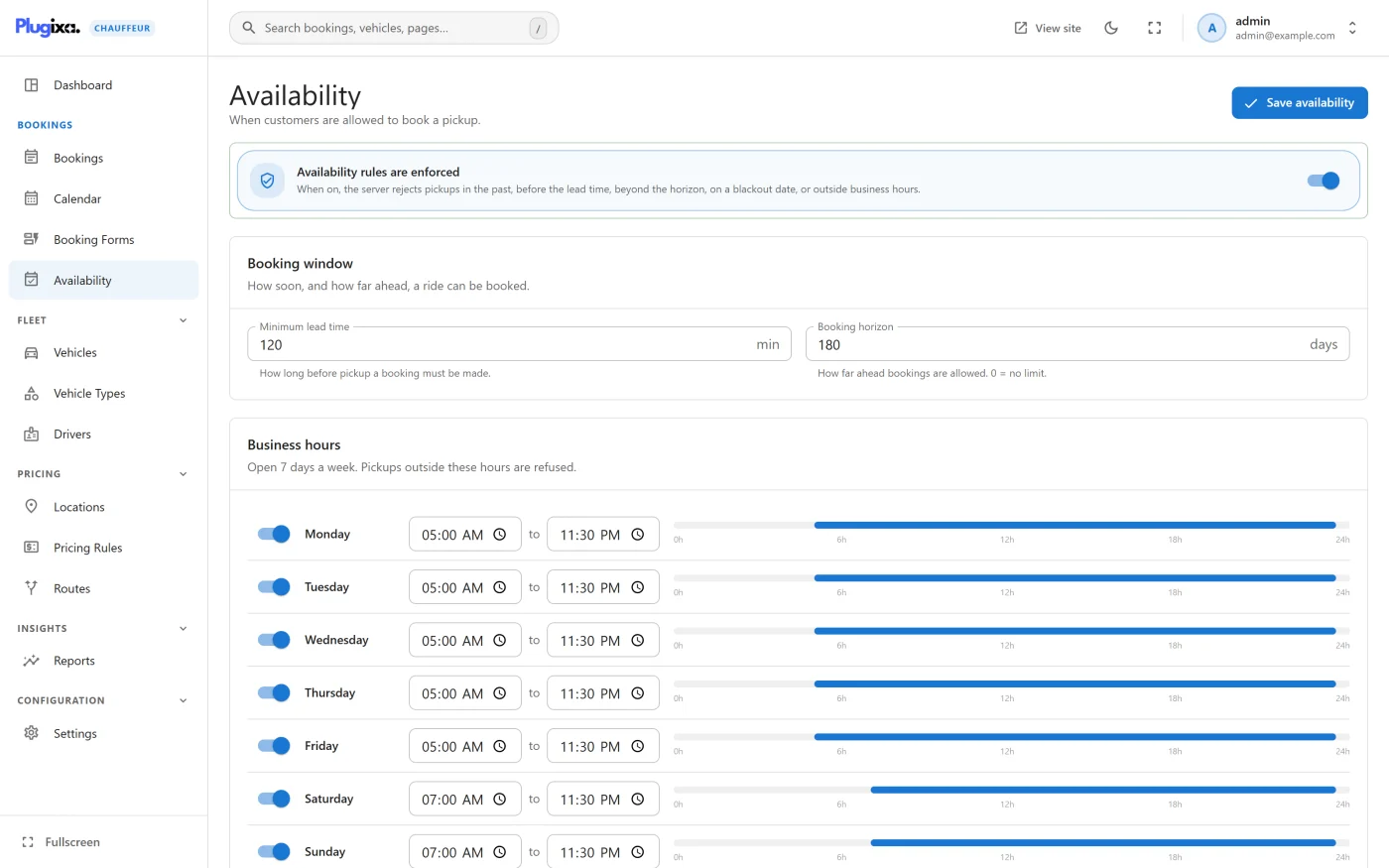
Switching the rules on
The card at the top is a single switch. It reads Availability rules are off until you turn it on, and then Availability rules are enforced.
When on, the server rejects pickups in the past, before the lead time, beyond the horizon, on a blackout date, or outside business hours.
The rules are off on a new site. While they are off, the rest of the screen is dimmed and none of it is applied. A booking form’s own minimum lead time still applies, see Booking forms.
Press Save availability after any change. Nothing is applied until you save.
Booking window
“How soon, and how far ahead, a ride can be booked.”
| Field | Default | What it does |
|---|---|---|
| Minimum lead time | 60 min | “How long before pickup a booking must be made.” In minutes. |
| Booking horizon | 0 days | “How far ahead bookings are allowed. 0 = no limit.” |
With a lead time of 0, the only requirement is that the pickup is in the future.
Business hours
Each weekday has a switch and, when it is on, an opening and a closing time. A day that is switched off reads Closed. The bar beside each day shows the open hours across 24 hours, and the section heading counts the open days.
By default Monday to Friday are open from 09:00 to 18:00, and Saturday and Sunday are closed. If you run seven days a week, switch the weekend on before you turn the rules on.
The days are listed from Monday, or from Sunday when Settings -> General -> First day of the week is Sunday.
How the hours are read:
- The opening time is included and the closing time is not. With 09:00 to 18:00, a 09:00 pickup is accepted and an 18:00 pickup is refused.
- The hours apply to the pickup time only, not to how long the trip lasts.
- Hours cannot cross midnight. A day set from 20:00 to 04:00 refuses every pickup. For a 24-hour service, set the day from 00:00 to 23:59, which accepts every pickup time except 23:59 itself.
Blackout dates
“Days when no pickup can be booked” such as holidays, private events or fleet maintenance. Press Add dates to add a row.
| Field | Notes |
|---|---|
| From | The first closed day. Required: a row without it is dropped when you save. |
| To | The last closed day, included. Left empty, or set earlier than From, it becomes the same day as From. |
| Reason (optional) | A note for yourself. |
Both days are included, and the whole day is closed whatever the business hours say.
The reason is not shown in the wizard, but it is part of the form configuration the wizard downloads, so it can be read by anyone who inspects the page. Do not put anything private in it.
How a pickup time is checked
When the rules are on, a pickup time has to pass four checks, in this order. The first one that fails is the message the customer sees.
| Check | Message |
|---|---|
| Lead time | “Bookings must be made at least 2 hours in advance.” The wording follows your lead time, in minutes, hours or days. With a lead time of 0 the message is “The pickup time must be in the future.” |
| Horizon | “Bookings can be made at most 30 days in advance.” |
| Blackout dates | “The selected date is not available for booking.” |
| Business hours | “We are closed on Sunday. Please choose another day.” or “Bookings on Monday are available between 09:00 and 18:00.” |
The checks run twice: when the customer presses Continue on the first step of the wizard, and again when the booking is saved. A request that skips the wizard is refused in the same way.
All times are read in your site’s timezone, set under WordPress Settings -> General. A customer in another timezone is choosing a time on your clock.
What availability does not cover
- Vehicles - the rules do not look at whether a vehicle is already booked. Two customers can book the same vehicle for the same time.
- Individual forms - the rules cannot be different from one booking form to another. Only the form’s own minimum lead time is per form.
- The date picker - closed days and hours are not greyed out in the customer’s date picker. The customer chooses a time and is told if it is not available.
What to do next
- Set a per-form lead time in Booking forms.
- See where the customer meets these messages in Booking wizard.
- Check for double bookings in Calendar.