

Contents
Drivers - Plugixa Chauffeur
Drivers PRO is a list of the chauffeurs who carry out your rides. A driver can be assigned to any booking, and the assigned driver’s name is printed on the booking’s invoice.
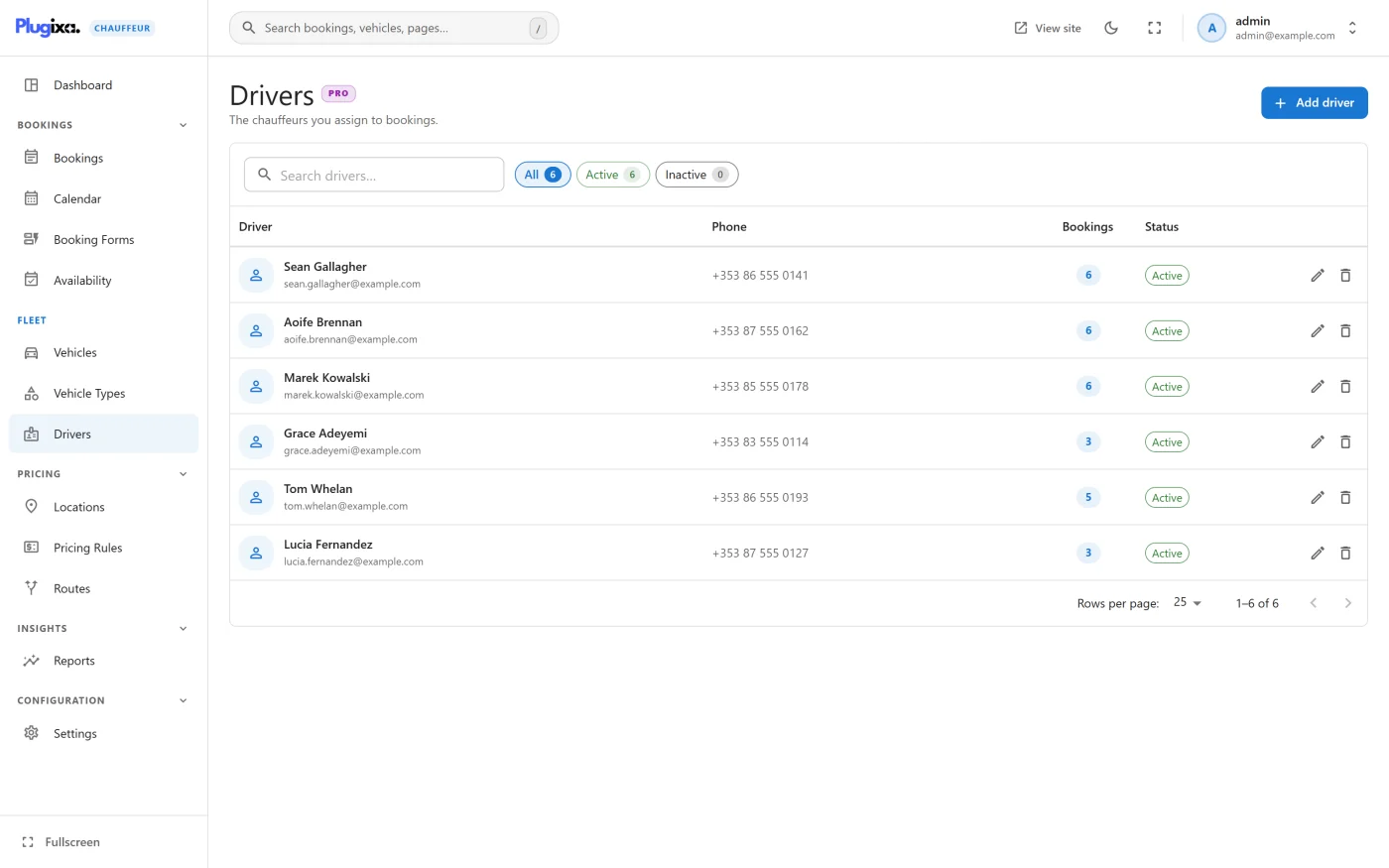
Open it from Plugixa Chauffeur -> Drivers. In the fullscreen sidebar it sits in the Fleet group, after Vehicle Types.
The list
The list shows every driver, ordered by display order.
| Column | What it shows |
|---|---|
| Driver | Photo, name and email |
| Phone | The driver’s phone number |
| Bookings | How many bookings the driver is assigned to |
| Status | Active or Inactive |
The search box matches the name, email and phone number. The status filter narrows the list to active or inactive drivers.
Adding a driver
Click Add driver. The form has three parts.
Profile
| Field | Notes |
|---|---|
| Name | Required. A save without a name is refused with “Name is required.” |
| Slug | “Generated from the name if left empty.” If the slug is already taken, a number is added to make it unique. |
| Bio | Free text, several lines. |
Contact
| Field | Notes |
|---|---|
| Optional. | |
| Phone | Optional. |
The form describes these as “Used to reach the driver about their assignments.” They are stored for your reference. The plugin does not send email or text messages to drivers: the booking emails go to the customer and to the admin recipients only. See Emails.
Side panel
| Field | Notes |
|---|---|
| Availability | Active or Inactive. New drivers start active. |
| Display order | “Lower numbers show first.” |
| Photo | Chosen from the WordPress media library. |
Click Create driver, or Save changes when editing.
Assigning a driver to a booking
- Open a booking from Plugixa Chauffeur -> Bookings.
- Pick a name in Assigned driver.
- Save the booking.
The driver is saved with the rest of the booking, not the moment you pick it. To remove the assignment, choose the unassigned option at the top of the list and save.
A booking has at most one driver. Customers do not choose a driver in the booking wizard; assignment is always done by you, after the booking exists.
What the status does
Inactive is a label. The Assigned driver list on a booking offers every driver, active or not, sorted by name, so marking a driver inactive does not remove them from that list or from bookings they already hold. Use the status filter on the list to keep track of who is currently working.
Deleting a driver
Deleting a driver asks for confirmation with “They will be unassigned from any bookings. This cannot be undone.” The bookings themselves are kept; only their driver is cleared.
Deleting needs the delete permission as well as the manage permission. See REST API.
What is stored
Drivers live in the {prefix}plugixa_chauffeur_drivers table. The table is
created by the free plugin too, so driver records and booking assignments
survive a switch from Pro to free and back. Without Pro the screen and its REST
routes are simply absent. See
Free vs Pro.