

Contents
Google Analytics and UTM - Plugixa Easy Social Share Buttons
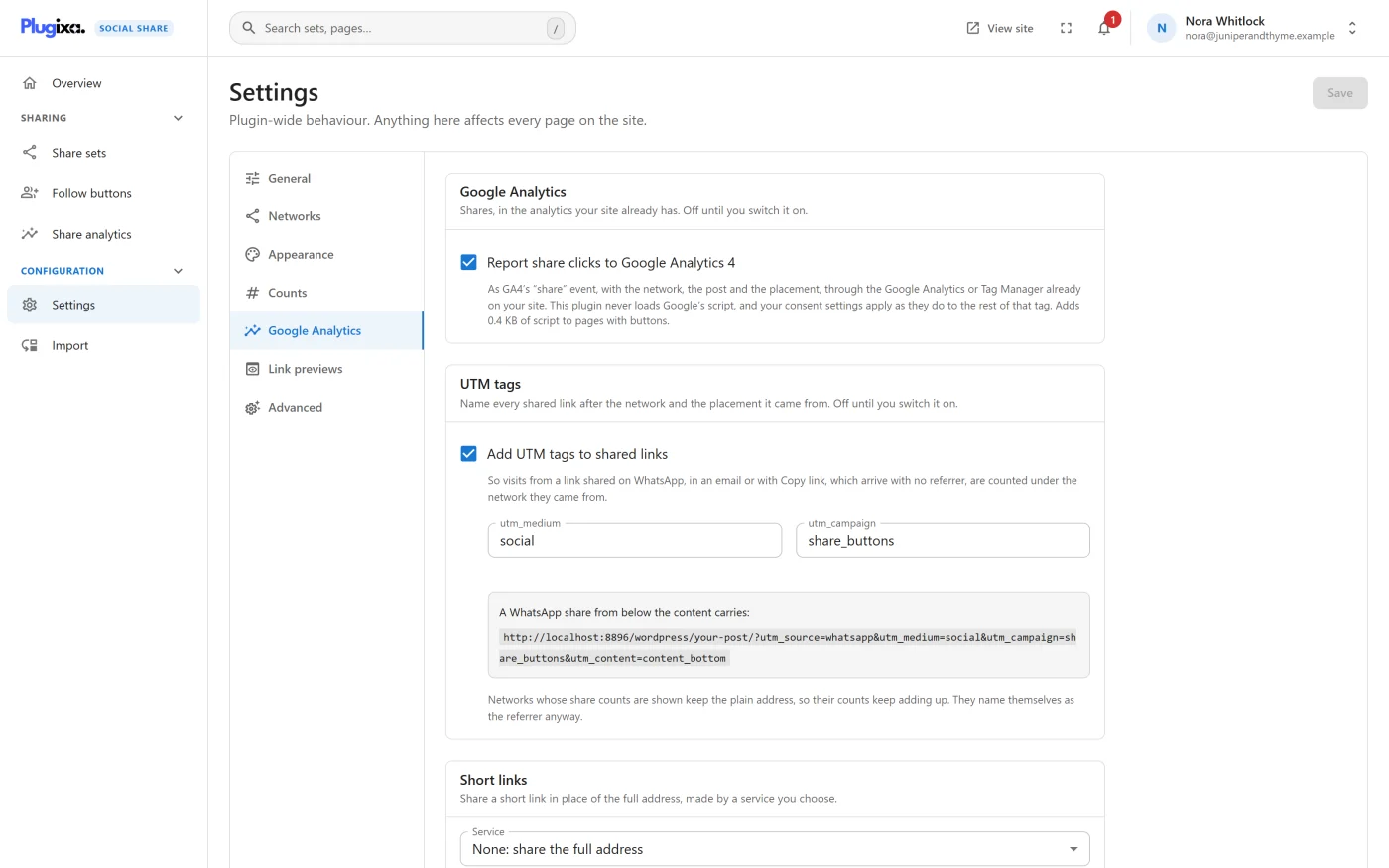
Two separate things live on the Google Analytics tab of the Settings screen:
- GA4 share events tell Google Analytics when a visitor clicks a share button. Free.
- UTM tags PRO mark the shared link itself, so the visits it brings back later are counted under the network they came from.
Both are off until you switch them on.
GA4 share events
Go to Settings -> Google Analytics and tick Report share clicks to Google Analytics 4, then Save.
From then on, every click on a share button is handed to the Google Analytics
tag or Google Tag Manager already on your site, as GA4’s recommended share
event.
| Parameter | Value |
|---|---|
method |
The network’s slug, such as facebook or whatsapp |
content_type |
post when the buttons belong to a post, otherwise page |
item_id |
The post’s ID, or the page’s path where there is no post |
placement |
Where the button was, such as content_bottom or float_left |
What it needs
The plugin never loads Google’s script. It uses what your site already has:
| Your site has | What happens |
|---|---|
The Google tag (gtag.js) |
The event is sent with gtag( 'event', 'share', ... ) |
| Google Tag Manager only | The event is pushed to the data layer with event: 'share'. Add a GA4 event tag in Tag Manager that fires on it |
| Neither | Nothing is sent anywhere |
Because the event goes through your own tag, your consent settings apply to it as they do to everything else that tag sends.
What it costs
Switching it on adds a 0.4 KB script to pages that show buttons, and nothing to the rest. The setting states the size beside the tick box. The script is separate from the plugin’s main script, so it also works on a page whose buttons are plain links.
What is not reported
- A click on a follow button. Following a profile is not a share.
- A click on the “+” that opens the menu. A share made from the menu is reported.
GA4 events and the built-in analytics
They are independent. The Share analytics screen records clicks on your own server whether GA4 events are on or off.
UTM tags PRO
A visit that comes from a link pasted into WhatsApp, an email, Telegram or a text message reaches your analytics with no referrer, as “direct”. UTM tags on the shared address put those visits back under the network they came from.
Pro adds a UTM tags panel to the same tab, below GA4 events.
| Setting | Default | What it does |
|---|---|---|
| Add UTM tags to shared links | Off | Adds the four tags below to the address each button shares |
utm_medium |
social |
The medium for every shared link |
utm_campaign |
share_buttons |
The campaign for every shared link |
The tags
| Tag | Value |
|---|---|
utm_source |
The network’s slug, such as whatsapp, email or copy |
utm_medium |
What you set, or social |
utm_campaign |
What you set, or share_buttons |
utm_content |
The placement, such as content_bottom. Left out when there is none |
The panel shows a worked example: “A WhatsApp share from below the content carries:” followed by the address with its tags, built as your site will build it.
A post at https://example.com/hello/ shared to WhatsApp from below the
content therefore carries:
https://example.com/hello/?utm_source=whatsapp&utm_medium=social&utm_campaign=share_buttons&utm_content=content_bottom
How values are cleaned
A tag value is kept to lower-case letters, digits, hyphens and underscores, at most 40 characters. Spaces become underscores. When what you typed will be stored differently, the field says “Saved as” with the cleaned value. An empty field falls back to the default.
This is deliberate: analytics tools split reports by the exact text, so
Social and social would be two rows.
Which links are not tagged
- Networks whose share counts are shown. While counts are on, a network whose count is asked for keeps the plain address, so its count keeps adding up. Those networks name themselves as the referrer anyway.
- Print. Printing is not a destination.
Good to know
- The page’s own query string is kept as written, and a
#fragmentstays at the end. - A tag already in the address is replaced, not repeated.
- With short links on as well, the tagged address is the one that gets shortened.
- The Pinterest Save button and quote boxes use the same rule, with their own
placement in
utm_content.
What to do next
- See every Settings tab: Settings.
- Read what is sent to whom: Privacy and uninstall.