

Contents
Link previews - Plugixa Easy Social Share Buttons
A share is only as good as the preview it produces. When a link to your site is shared, each network reads Open Graph and X card tags from the page to decide its title, text and picture. WordPress prints none itself. Without them each network guesses, and often picks your logo and your menu.
The plugin prints these tags, and prints none wherever an SEO plugin already does. The options are under Settings -> Link previews.
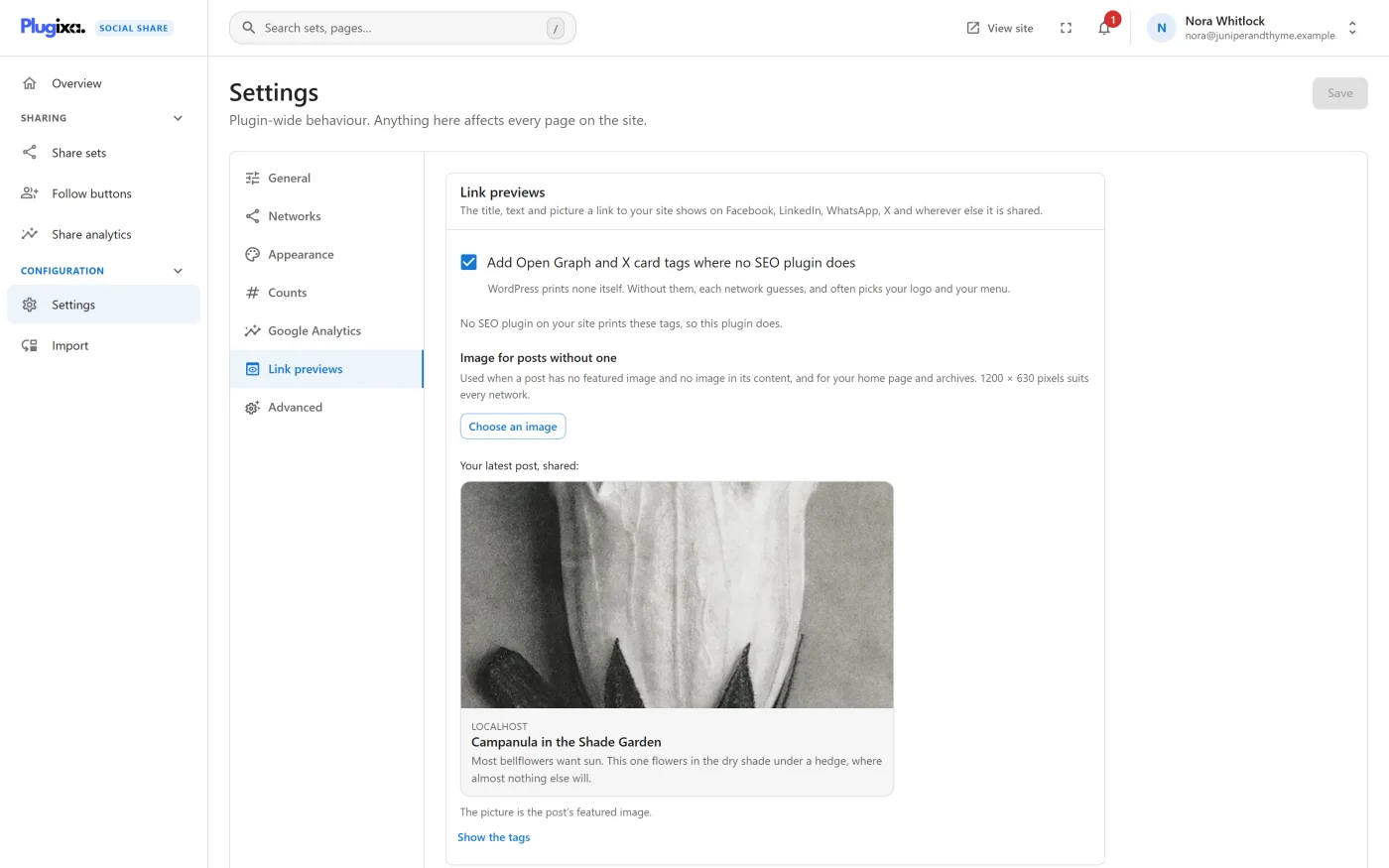
The settings
| Setting | Default | What it does |
|---|---|---|
| Add Open Graph and X card tags where no SEO plugin does | On | Prints the tags in the head of your pages |
| Image for posts without one | None | The picture used when a post has no featured image and no image in its content, and for your home page and archives |
For the image, 1200 by 630 pixels suits every network. After choosing one the panel shows its size, and warns when it is narrower than 600 pixels, because Facebook then draws it small.
Who prints the tags
The first thing the tab says is who prints the tags on your site.
| Message | Meaning |
|---|---|
| “No SEO plugin on your site prints these tags, so this plugin does.” | The plugin prints both groups |
| “… prints these tags on your site, so this plugin adds none. Edit your previews there.” | Another plugin prints both groups |
| “… prints the Open Graph tags, so this plugin adds only X’s card tag.” | The groups are split |
| “… prints X’s card tag, so this plugin adds only the Open Graph tags.” | The groups are split the other way |
| “Off: links to your site are previewed with whatever each network finds on the page.” | The switch is off |
The two groups, Open Graph tags and X’s card tags, are decided separately.
The plugins it steps aside for
The plugin reads each of these plugins’ own settings, not just whether it is installed. Switch off Yoast’s Open Graph, for example, and this plugin fills the gap.
| Plugin | How it is read |
|---|---|
| Yoast SEO | Its Open Graph and X card switches, each on by default |
| Rank Math | Always treated as printing both |
| SEOPress | Its Social feature must be on, then each group has its own switch |
| All in One SEO | Its Facebook and X switches, each on by default |
| The SEO Framework | Its Open Graph and X card switches, each on by default |
| Slim SEO | Its Open Graph and X Cards features |
| Easy Social Share Buttons | Its one Open Graph switch, which covers both groups |
| Hubbub | Prints on single posts and pages only, unless switched off there |
Jetpack is asked not to print a second set of Open Graph tags wherever this plugin prints its own.
A theme or plugin not on the list can declare that it prints its own tags with
the plugixa_social_share_link_previews_printed_by filter. See the
Hooks reference.
The sample
Under Your latest post, shared: the tab draws your newest published post as its link will look, with a line saying where the picture came from. Show the tags lists the exact tags as they appear in the page’s source.
The sample uses the image you have just chosen, before you save. With no published post yet it says “Publish a post to see how its link will look.”
When another plugin prints the Open Graph tags, the image choice and the sample are not shown, because they would change nothing a visitor sees.
What is printed
Open Graph
| Tag | Value |
|---|---|
og:locale |
The site’s language, such as en_GB. Left out for a language with no country |
og:type |
article for a blog post, website for everything else |
og:title |
The post’s title |
og:description |
The excerpt, or the start of the text, cut to at most 200 characters at a word boundary |
og:url |
The canonical address |
og:site_name |
The site’s name |
article:published_time, article:modified_time |
For blog posts |
og:image, with its width, height, type and alt text |
The picture, when there is one |
fb:app_id |
Your Facebook app ID, when one is set under Settings -> Networks |
X card
| Tag | Value |
|---|---|
twitter:card |
summary_large_image, or summary when the picture is the site icon or narrower than 300 pixels, or there is none |
twitter:site |
The account under X account to credit, when one is set |
X reads the Open Graph title, text and picture when a page has no twitter:
ones, so the plugin does not repeat them. A tag with no value is not printed.
Where the picture comes from
For a post, page or product, the first of these that exists:
- The featured image
- The first image in the content that was placed from the media library
- The Image for posts without one
- The site icon
The home page and archives use the default image, then the site icon.
Which pages get tags
| Page | Title | Text |
|---|---|---|
| A post, page or product | Its title | Its excerpt or the start of its text |
| The blog home | The site’s name, or the posts page’s title | The site’s tagline |
| A category, tag or other term archive | The term’s name | Its description, or the tagline |
| An author archive | The author’s name | Their biography, or the tagline |
| A post type archive | The archive’s title | The type’s description, or the tagline |
Search results, date archives, “not found” pages and feeds get no tags.
A password-protected post shows its title and nothing of its content: no text, and no picture taken from inside the post.
What to do next
- Set the Facebook app ID and X account: Settings.
- Change the tags in code with
plugixa_social_share_link_preview_tags: Hooks reference.