

Contents
Share counts - Plugixa Easy Social Share Buttons
A share count is the number beside a button. This page explains where that number comes from, why some networks never show one, and how to get counts back after your site’s addresses changed.
Two kinds of number
| Kind | What it is | Available for |
|---|---|---|
| Network count | What the network itself reports for the page’s address: shares from anywhere on the internet | Facebook, Reddit, Tumblr, VK, Odnoklassniki |
| Click count | How many times your own visitors clicked that button on that post, recorded on your server | Every network |
The two are shown separately and never added together. A button shows its network count where one exists, and your own click count where none does. A network with neither shows nothing, never a zero.
Where counts come from
The wizard’s Layout step lists, under the count options, which of your selected networks counts are available from.
| Service | Needs | What the number is |
|---|---|---|
| Nothing | The combined score of the Reddit posts that link to the address | |
| Tumblr | Nothing | The address’s note count |
| VK | Nothing | The share count VK reports |
| Odnoklassniki | Nothing | The share count Odnoklassniki reports |
| Your own Facebook app token | The share count from Facebook’s Graph API |
X, LinkedIn, Pinterest, Buffer and the other networks publish no count, so they are never asked. Their buttons show your own click count.
The Facebook app token
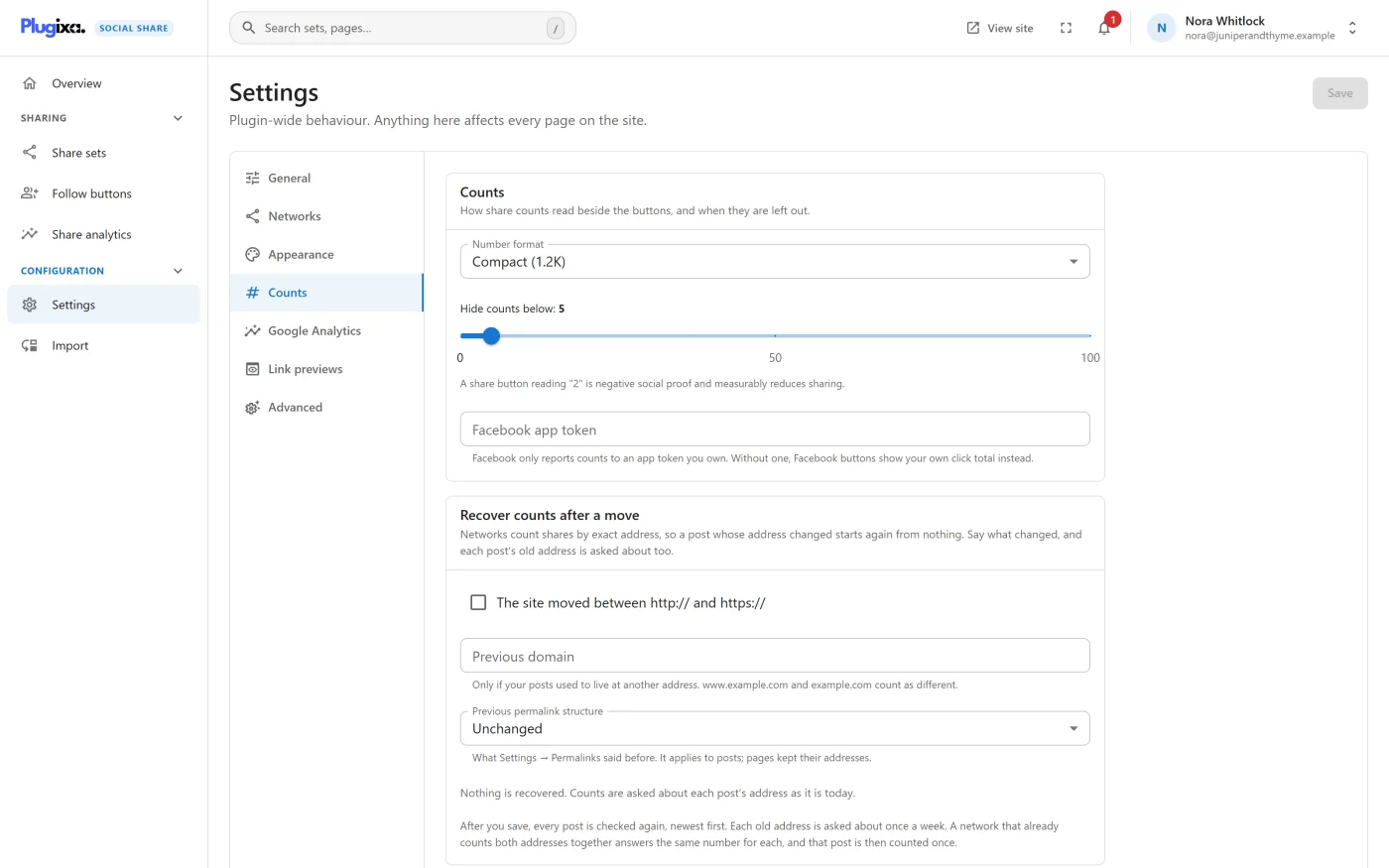
Facebook only reports counts to an app token you own. Enter it under Settings -> Counts -> Facebook app token. Without one, Facebook is never contacted and Facebook buttons show your own click total instead.
The token is write-only. Once saved it is never shown again: the field says “A token is saved. It is never shown again; type a new one to replace it.” Use Remove the saved token to delete it.
Switching counts on
Counts are a choice per share set, in the wizard’s Layout step:
| Option | What it shows |
|---|---|
| Show share counts | A number beside each button |
| Show the combined total | One total for the row, labelled “Shares” |
The combined total is the sum of the network counts. Click counts are not part of it.
Both are off in a new set. See Share sets for the seven number positions and the four total positions.
Switching either option on, in any saved share set, is what allows your server to contact the count services. With both off in every set, no service is contacted and the scheduled job is removed, including for posts that were counted before.
A shortcode’s counts="true" shows numbers already stored and your own click
counts, but it does not start requests on its own.
How counts are fetched
- By your server, in the background. A scheduled job runs hourly and refreshes up to 40 post and network pairs per run. A count is considered fresh for six hours, so each address is asked about at most once every six hours per network.
- Never while a visitor waits. The page is sent without numbers. The plugin’s script then asks your own site for them and fills the slots, which are already sized so nothing moves.
- Only the address is sent. Each request carries the public address being counted and a User-Agent naming the plugin and your site. The Facebook token goes only to Facebook.
- Failures back off. When a service does not answer, the last good number is kept and the next attempt waits twice as long, and longer again after each further failure. A request times out after five seconds.
- New posts first. A post that has never been counted is asked about on the next run.
A post is registered for counting when it is published, if a set that shows counts is placed on its post type, and also the first time a page showing its counts is viewed. A deleted post’s counts and clicks are removed with it.
Because counts arrive through the script, a set that shows counts loads the script on the pages where it appears.
Which address is counted
The address counted is the one the buttons share, set by Settings -> General -> URL to share. Networks count by exact address, so changing that setting splits your existing counts.
How counts are shown
These are under Settings -> Counts.
| Setting | Default | What it does |
|---|---|---|
| Number format | Compact (1.2K) | Compact (1.2K) or Full (1,234) |
| Hide counts below | 5 | A count under this number is not shown. The slider runs from 0 to 100 |
- A compact number never takes more than four characters and is rounded down, so 1,250 shows as 1.2K. A full number has no such limit and can widen its slot.
- A number below the threshold is not sent to the browser at all. The same threshold applies to click counts and to the total.
Lists of posts
On the blog home and archives, rows and sidebars show no counts. Each count belongs to one post and a list shows several.
Your own clicks
Every click on a share button is recorded for every network, including the ones that publish no count: which post, which network, which placement, which day. Nothing about the visitor is stored.
Clicks are recorded by the plugin’s script, on pages where it is loaded, and only for published posts. A set made entirely of plain links, such as Email and the AI assistants, loads no script and records no clicks.
The full record is on the Share analytics screen.
Recover counts after a move
Networks count shares by exact address. After a move to https, to a new domain or to new permalinks, every post starts again from nothing, while the shares it had are still counted against the old address.
Under Settings -> Counts -> Recover counts after a move, say what changed:
| Option | When to use it |
|---|---|
| The site moved between http:// and https:// | The protocol changed |
| Previous domain | Your posts used to live at another address. Type only the name, like old-blog.com. www.example.com and example.com count as different |
| Previous permalink structure | What Settings -> Permalinks said before. It applies to posts; pages kept their addresses |
The permalink choices are Unchanged, Plain (?p=123), Day and name,
Month and name, Numeric, Post name and Custom structure. A
custom structure must start with a slash, use only WordPress’s own tags, and
include %postname% or %post_id%.
Any of the three can be combined.
Check before you save
The panel shows your latest post’s address as it is today and as it was “before the move”, built from what you have typed, before anything is saved. Check that the old address is the one people actually shared. If the changes make no difference to that post’s address, the panel says there is nothing to recover for it.
What happens after you save
Every post is checked again, newest first. Each old address is asked about once a week, in the same pass as the current address, and what was shared there is added to the post’s count.
A network that already counts both addresses together, as Facebook does after a redirect, answers the same number for each. That post’s count is then shown once, never doubled.
Changing the recovery options discards the numbers recovered under the old ones. Switching recovery off takes the recovered numbers off the page at once.
Your own click counts never need recovering: they are stored by post, not by address.
What to do next
- See what your visitors click: Analytics.
- Read exactly what is sent and stored: Privacy and uninstall.