

Contents
Archive - Plugixa Activity Log
The live log is written on every request and read by every screen. It stays fast by staying small. The archive answers “how do I keep three years of history without carrying it around every day?”: events past a set age move to a table of their own and stay searchable.
Pro feature. The archive is part of Plugixa Activity Log Pro. See the Free vs Pro matrix.
The settings
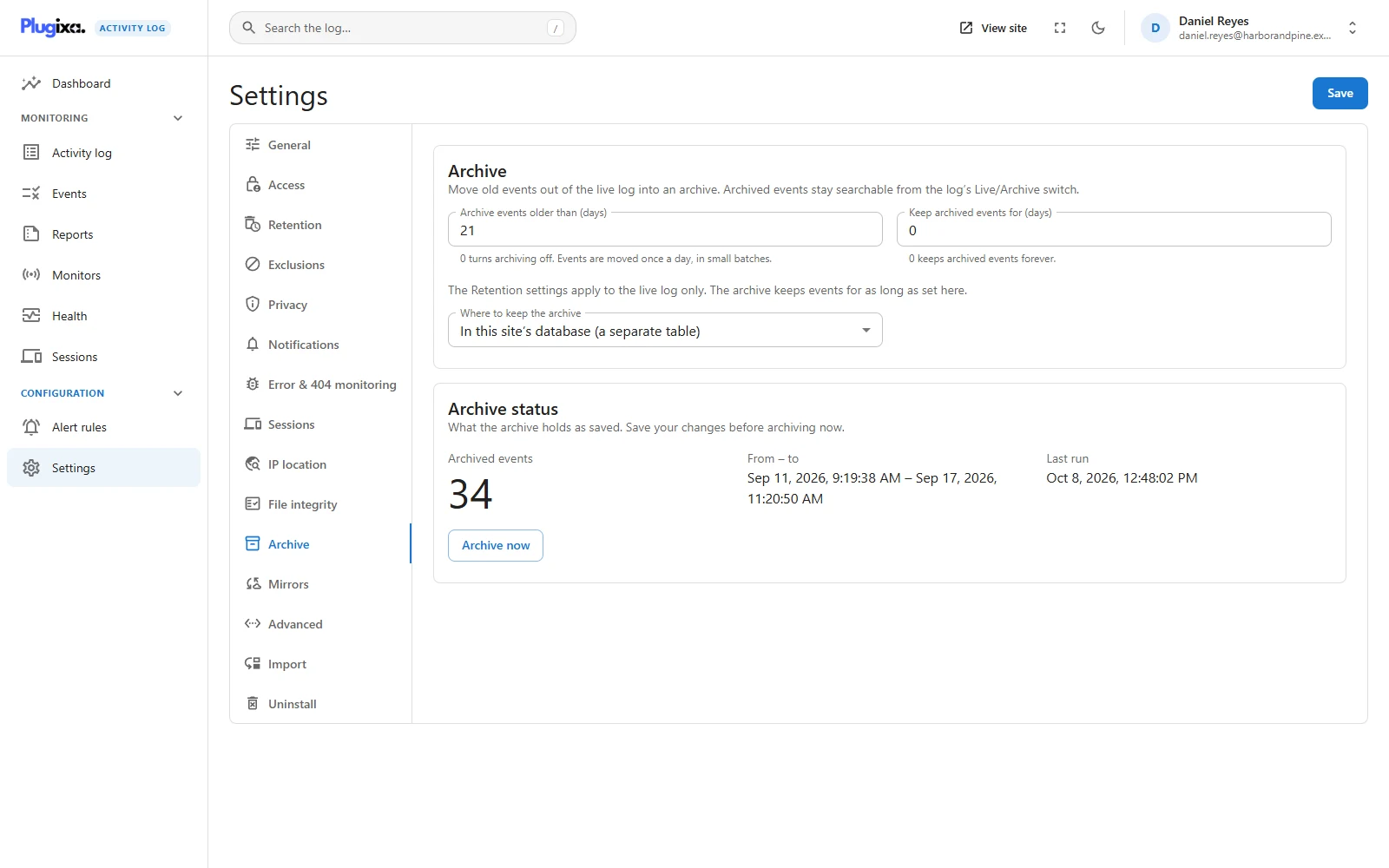
Settings -> Archive.
| Setting | What it does |
|---|---|
| Archive events older than (days) | Events past this age are moved. 0, the default, turns archiving off. |
| Keep archived events for (days) | The archive’s own retention. 0 keeps archived events forever. |
| Where to keep the archive | In this site’s database, or on another MySQL or MariaDB server. |
Where the archive lives
In this site’s database puts the archive in a separate table,
plugixaactivitylog_events_archive with your table prefix, beside the live one.
Nothing to configure, and it already takes the weight off the live log.
On another MySQL or MariaDB server moves the history off the site’s database entirely. It asks for:
| Field | Notes |
|---|---|
| Database host | Host name or address, optionally with :port |
| Database name | The database to use |
| Database user and Password | An account that may create and write a table there |
| Table prefix | The table is created as the prefix followed by plugixaactivitylog_events_archive |
| Connect over TLS | Encrypts the connection |
Test connection connects with the values on screen, saved or not, creates the archive table if it is missing and says what happened. Use it before saving.
The password is never sent back to the browser. The form shows •••• and its
last four characters; leave that untouched to keep the saved password. A change to
the connection is recorded in the log (event 9402).
Copy, confirm, then delete
An archiver that deletes first and copies second loses events the day the network drops. This one cannot, because of the order it works in. Once a day, and on Archive now, it takes the oldest live events past the age limit, 500 at a time, and:
- copies them into the archive, where they keep their original ids;
- asks the archive which of those ids it now holds;
- deletes exactly those from the live log.
An event is therefore never in neither place. A run interrupted between steps leaves some events in both, and the next run finishes the job without making duplicates.
A run stops after about 15 seconds and books a follow-up a minute later, so a large backlog drains in short steps without holding up the site.
When the archive cannot be reached, nothing is deleted. The log records Archiving failed with the server’s reason (event 9401), and the events wait in the live log for the next run. A successful run records how many events were moved (event 9400).
Reading the archive
The log has a Live / Archive toggle in its toolbar.
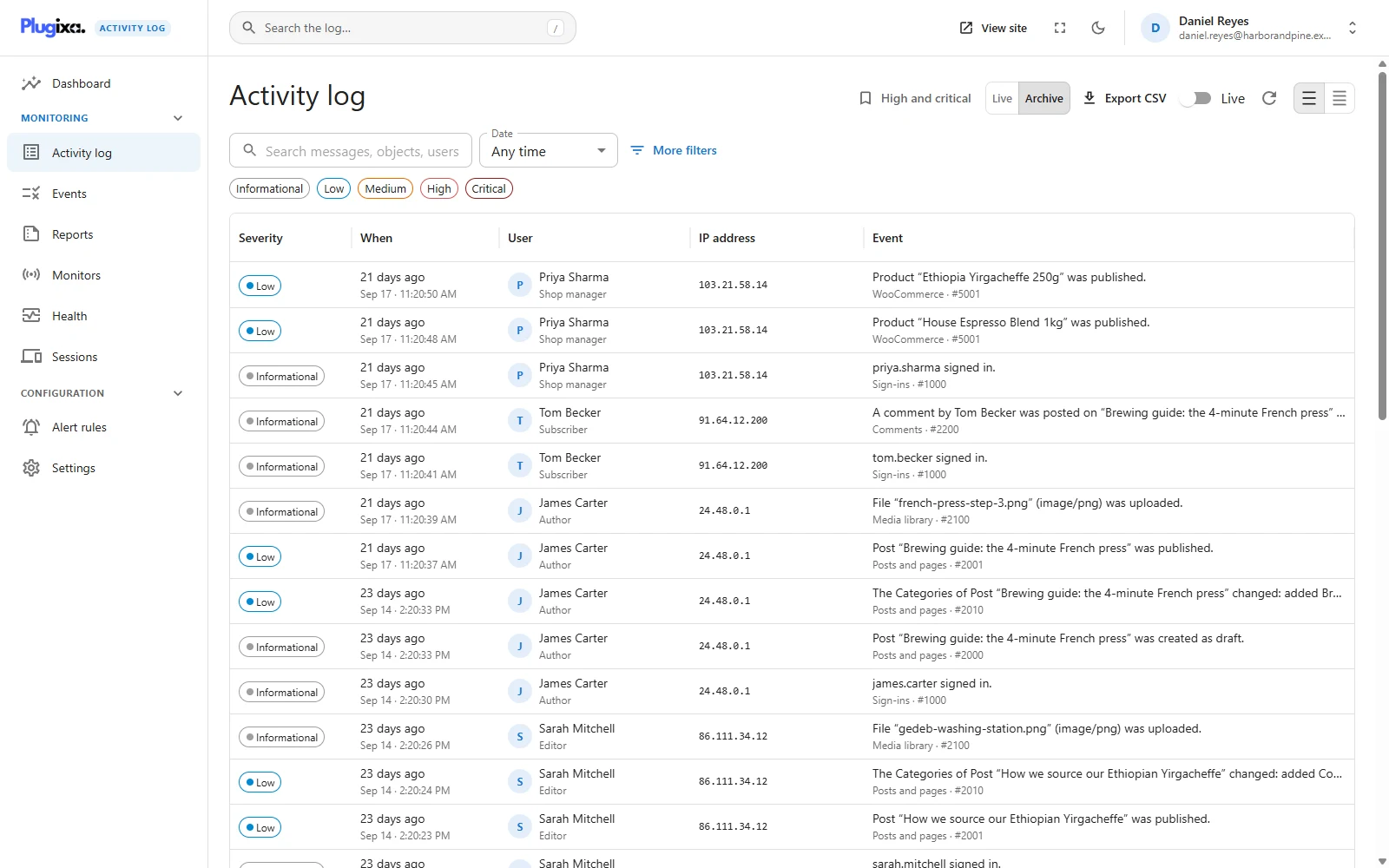
Filters, search, paging and the event inspector work the same on both sides. You are reading one or the other, not both at once: an investigation that spans the archive age means looking in both.
Exports and reports read the live log. To get archived events into a file, keep them live for longer.
Archive retention
Keep archived events for (days) is the only thing that ever removes an
archived event. Set it to the length of history you are obliged, or want, to keep.
At 0 the archive grows forever, which on an external server may be exactly the
intention.
How it interacts with Retention
This is the setting pair people get wrong.
Retention applies to the live log only. It deletes; the archive moves. If both are set, whichever age comes first wins.
So if Retention deletes events at 20 days and the archive takes events at 30 days, nothing is ever old enough to archive. Retention removed it ten days earlier. The Archive tab warns about exactly that combination.
The working arrangement:
| Setting | Value |
|---|---|
| Retention, Keep events for | 0, or longer than the archive age |
| Archive events older than | How long events stay live, for example 30 |
| Keep archived events for | How long history is kept in total, or 0 |
Let the archive move events out of the live log, and let the archive’s own retention bound the history.
The status card
Archive status shows how many events the archive holds, the span from the oldest to the newest, and when the last run was. It describes the archive as saved, so save your changes before pressing Archive now.
Troubleshooting
| Symptom | Usual cause |
|---|---|
| Nothing is ever archived | The age is 0, or Retention deletes events first. The tab shows a warning for the second. |
| Events are in both the live log and the archive | A run was interrupted. The next run finishes it. |
| Event 9401 | The archive could not be reached. Nothing was deleted. The message has the reason. |
| The test connection fails | Host, port, credentials or TLS. The message is the database server’s own. |
| The archive side of the log shows an error | The external server is unreachable. The live log is unaffected. |
| An export misses old events | Exports and reports read the live log. |
| A large backlog moves slowly | By design: short runs, a minute apart. It needs WP-Cron running. |
| The password field shows dots | It is masked. Leave it to keep the saved one. |
What to do next
- Set how long live events are kept: Retention.
- Search either side: Activity Log.
- Keep a copy somewhere the site cannot reach: Mirrors PRO.