

Contents
Saved views - Plugixa Activity Log
A saved view is a set of log filters with a name. It answers “show me that again” without rebuilding the filters each morning.
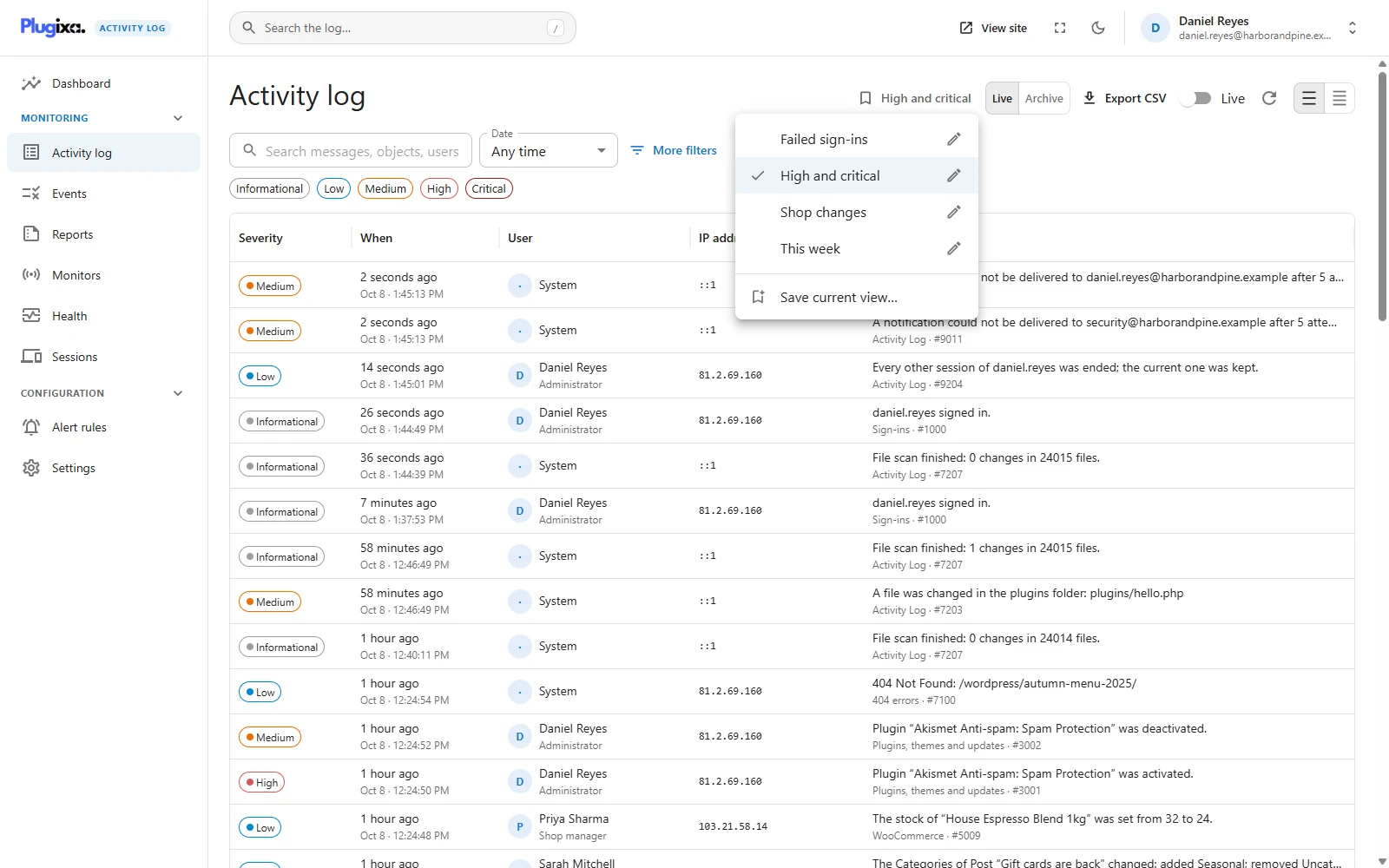
Saving one
Filter the activity log until it shows what you want, open Views in the header, and choose Save current view…
| Field | What it does |
|---|---|
| Name | What the view is called in the menu, up to 100 characters. You cannot have two with the same name |
| Open the log with this view | Makes it your default |
| Share with everyone who can see the log | Puts it in everybody’s menu. Shown only to people who may change settings |
To use a view, pick it from the menu. While the filters on screen match a view exactly, the Views button shows that view’s name and the menu ticks it.
What a view stores
Exactly the filters, and nothing else:
- the search text;
- the severity chips;
- the dates;
- everything under More filters: group, object type, action, role, user, username, IP address and event code.
It does not store how the screen is set up: row density, whether Live is on, the Live or Archive choice PRO, or which event is open.
A period is saved as a period. Save a view with the date set to Today, Yesterday, Last 7 days or Last 30 days and the view keeps that choice, not the dates it meant on the day you saved it. Open it a week later and it shows the seven days up to that day, with the date menu reading Last 7 days.
A Custom range is the opposite, on purpose: it is two dates, and a view saved with one always shows those two dates. Use it for “the week of the incident”, and a named period for anything you will open again and again.
A view is a link, not a permission
Applying a view only puts its filters in the address bar. The server checks them exactly as it would a link you typed by hand, so a shared view can never show somebody more than they could have filtered for themselves. On a network, a site administrator opening a super admin’s shared view still sees their own site only.
Views are a convenience, not part of the audit trail: creating, changing and deleting one is not recorded in the log.
Personal and shared
A view is personal unless it is shared.
| Personal | Shared | |
|---|---|---|
| Who sees it | Only you | Everybody who may see the log |
| Who may create it | Anybody who may see the log | People who may change settings |
| Who may rename, re-filter or delete it | You | Its owner, and anybody who may change settings |
Your own views are listed first, then everybody’s shared ones, each group in alphabetical order. A shared view carries a Shared label. Nobody can see another person’s personal views, not even to learn that they exist.
Sharing is restricted on purpose: a shared view lands in every reader’s menu, so it is treated as a change to how the log is set up for everyone.
The default view
Tick Open the log with this view and the log opens with those filters already applied. A star marks the default in the menu.
- One default each. Choosing a new one replaces the old one.
- It is personal. Your default is yours alone, and only a view you own can be your default. A view shared by Daniel Reyes cannot be made your default; save your own copy of its filters instead.
- A link wins. The default is applied only when the log is opened with nothing in the address bar. A link that carries filters, such as one a colleague sent or a dashboard tile, shows what it says.
- Clearing wins too. The default is applied once per visit. Press Clear filters and the log stays cleared.
Renaming, changing and deleting
Each view you may change has a pencil beside it. It opens the same dialog:
| To | Do this |
|---|---|
| Rename | Change the name and save |
| Change what it shows | Set the filters on screen first, then tick Replace its filters with the ones on screen |
| Make it the default, or stop | Tick or untick Open the log with this view |
| Share or unshare | Tick or untick the share box, if you may change settings |
| Delete | Press Delete view |
Without the Replace its filters tick, editing a view never touches what it filters, so renaming one while looking at something else is safe.
Deleting a shared view removes it from everybody’s menu. Nothing in the log is affected: a view holds filters, not events.
Limits
- Up to 50 views per person.
- When a user account is deleted, that person’s views are deleted with it, shared ones included.
Troubleshooting
| Symptom | Usual cause |
|---|---|
| There is no share box | Sharing needs permission to change settings. |
| There is no pencil on a view | It is somebody else’s shared view and you may not change settings. |
| There is no default box when editing a view | The view is not yours. Only your own view can be your default. |
| “You already have a view with that name” | Names are unique per person. Rename one of them. |
| A view shows old dates | It was saved with a Custom range, which is two fixed dates. Open it, choose a named period such as Last 7 days, and save the filters into it. |
| A view shows nothing | Its filters match nothing now, often because of a Custom range older than the retention period. |
| The log opens filtered and I did not ask | You have a default view. Untick it in the view’s dialog. |
| The log did not open with my default | The link you followed carried filters of its own. |
| A shared view vanished | Its owner’s account was deleted, or somebody with settings access deleted it. |
What to do next
- Learn every filter a view can hold: The Activity Log.
- Decide who may see the log and share views: Access.
- Send the same filter out as a file: Export PRO.