

Contents
Privacy and personal data - Plugixa Activity Log
An activity log records people: who signed in, from where, with which browser. That makes it personal data, and this page is about the three things privacy law expects of whoever holds it: store no more than you need, hand a person their entries when they ask, and remove them when they ask.
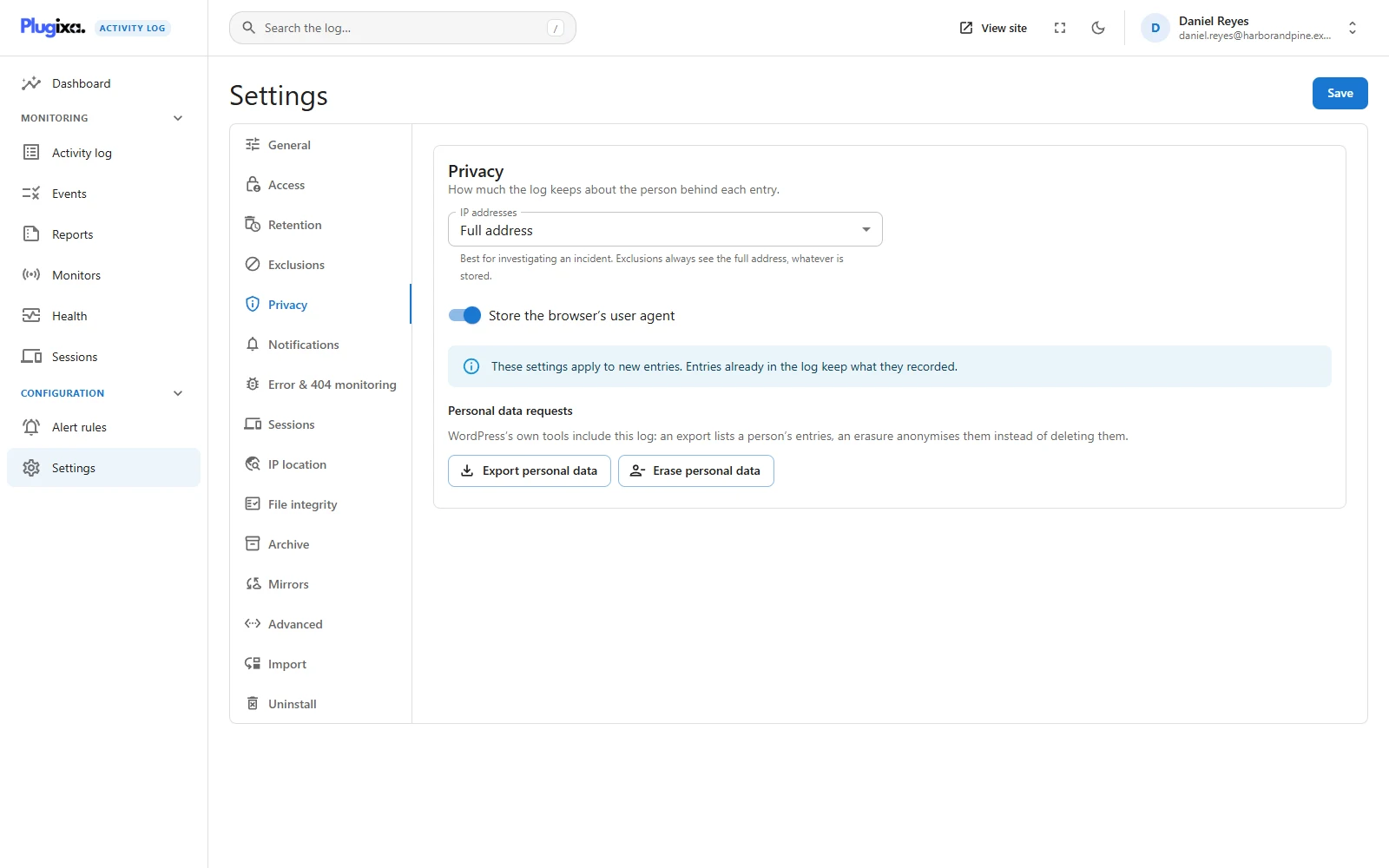
All of it is in the free plugin, under Settings -> Privacy.
How much is stored
| Option | Setting | Default | Values |
|---|---|---|---|
| IP addresses | privacy_ip_mode |
full |
full, truncate or none |
| Store the browser’s user agent | privacy_store_user_agent |
On | On or off |
The default keeps everything, deliberately. A log that quietly kept less than its owner expected would fail on the one day it was needed. Storing less is a choice you make, knowing what it costs an investigation.
IP addresses
| Mode | What is stored | What you can still tell |
|---|---|---|
| Full address | 192.0.2.57 |
Exactly where a sign-in came from |
| Shortened | 192.0.2.0 |
The network: the same provider, the same area, not one device |
| Not stored | Nothing | Nothing about where it came from |
Shortening keeps the network and drops the host. For IPv4 the last number is zeroed, leaving a /24. For IPv6 the first 48 bits are kept, which is a typical customer allocation.
The sentence is shortened too. A few events put the address in their message, the failed sign-in flood warning for one. The stored sentence carries the shortened address, or a dash when none is stored, so the message never keeps what the column no longer holds.
Exclusions always see the real address. An excluded address or range keeps working even with Not stored, because the address is reduced only after every other decision has been made. See Exclusions.
With IP location PRO in use, remember that a location is looked up from the address: store less of one and you learn less of the other. See IP location.
The user agent
The browser’s user agent string is kept in each event’s details. Switch Store the browser’s user agent off and new events are stored without it.
Both apply to new entries only
Entries already in the log keep what they recorded. Changing a mode today does not rewrite last month. To remove what is already stored about one person, use the erasure tool below. To bound how long anything is kept at all, use Retention.
Exporting a person’s entries
The log plugs into WordPress’s own Tools -> Export Personal Data. There is nothing separate to learn: a request for an email address includes the activity log automatically, in a group called Activity log.
A person is found in three ways:
| How | What it finds |
|---|---|
| Their account | Every entry they made while signed in |
| The name typed at a failed sign-in | Attempts made with their user name or their email address, which have no account attached |
| Entries about their account | What somebody else did to it, such as an administrator changing their role |
Each exported entry lists its time in the site’s time zone, the event, the event code, the IP address and the user agent. A long history is exported 500 entries at a time, so a busy account does not time out.
Erasing a person’s entries
Tools -> Erase Personal Data includes the log in the same way.
Erasure anonymises. It does not delete. Deleting the entries would leave gaps that look exactly like somebody covering their tracks, and it would also remove what other people did to that account. Instead the shape of the trail survives (an account signed in at 09:14 and changed a setting) and everything that identifies the person goes:
- Where the person acted: the account id becomes 0, the user name becomes
[erased], and the role, the IP address and the session are cleared. - In every matching entry: their user name, email address and display name
are replaced by
[erased]in the message and the item name, and the personal details (user agent, roles, typed names, email addresses) are removed. - Where the person is only the subject, such as an administrator changing their account: the administrator stays visible. Only the person is anonymised.
Names shorter than three characters are not searched for in the text, because replacing every “Al” would scramble unrelated words.
This is the one change the log allows
Everywhere else the log is append-only. No screen, no API route and no command edits or deletes an event. The eraser is the single sanctioned update to stored entries, and it exists because the right to erasure (GDPR Article 17) outranks the design.
And it is itself on the record. Each erasure writes one entry:
Personal data of a person was erased from the activity log (42 events).
That is event 9030, severity medium. It gives the count and never the person, because naming them would undo the erasure. Like every event numbered 9000 and above, it cannot be excluded.
Suggested privacy policy text
WordPress’s Settings -> Privacy -> Policy Guide shows a suggested paragraph from Plugixa Activity Log, ready to copy into your policy.
It follows your settings as they are now, so it does not claim more or less than the site does:
| The text says | When |
|---|---|
| Which account acted, or the name typed at a failed sign-in | Always |
| What was done, to which item, and when | Always |
| The IP address it came from | IP addresses are stored in full |
| A shortened IP address, the network only | IP addresses are shortened |
| Nothing about an address | IP addresses are not stored |
| The browser’s user agent | The user agent is stored |
| Entries are deleted automatically after N days | A retention period in days is set |
| Entries are kept until an administrator removes them | Retention days is 0 |
It ends by telling readers they can ask for a copy of the entries about them, or for them to be anonymised, which is exactly what the two tools above do. Read the guide again after changing a privacy or retention setting: the suggestion changes with it.
What else leaves the site
Privacy settings govern what this site’s log stores. Three Pro features can send events elsewhere, and each is off until you configure it:
- Mirrors PRO copy every new event to a syslog server, an HTTPS endpoint or a file. An erasure on this site does not reach those copies.
- Alert rules PRO send matching events to email, chat or a webhook.
- An Archive PRO can be kept on another database server.
The free plugin’s own email notifications carry the user name and IP address of the events they report.
For developers
The reduction runs on the plugixa_activity_log_event_row filter, after
exclusions and after the message is written. See
Hooks.
Troubleshooting
| Symptom | Usual cause |
|---|---|
| Old entries still show full addresses | The setting applies to new entries. Old ones leave through retention, or through erasure for one person. |
| An erased person’s rows are still listed | By design. They are anonymised, not removed. |
| The erasure tool found nothing | The email address matches no account, and nobody typed it at a failed sign-in. |
| A short first name survived in a message | Names under three characters are not replaced in text. |
| Event 9030 gives a count and no name | By design. It never names the person who was erased. |
| The policy text does not mention IP addresses | They are set to Not stored. |
| An excluded address still matches with addresses off | Correct. Exclusions see the real address. |
What to do next
- Decide how long entries are kept: Retention.
- Decide who may read them: Access.
- Leave some people out altogether: Exclusions.