

Contents
Monitors - Plugixa Activity Log
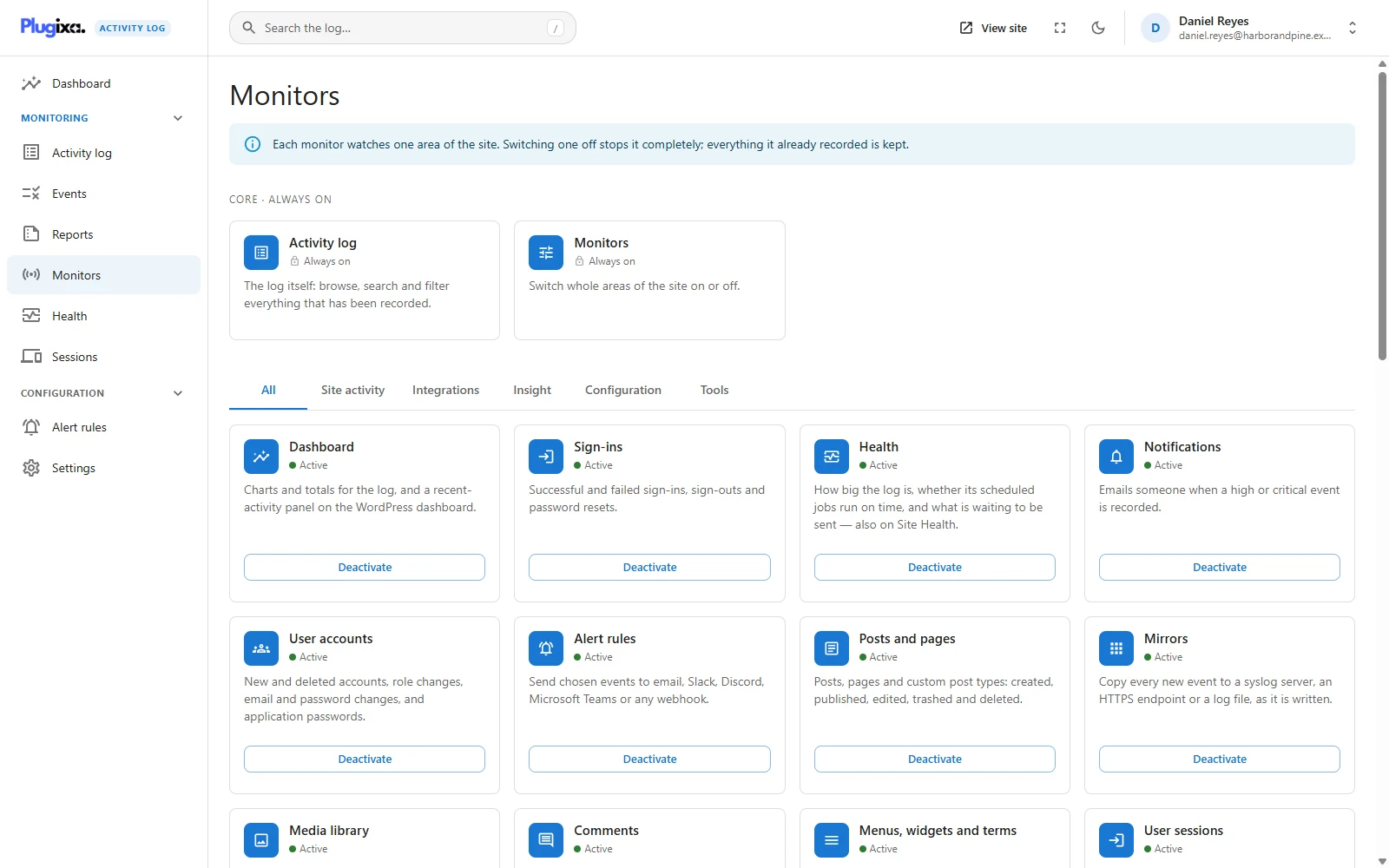
Plugixa Activity Log is built as a set of monitors, and this is where you turn them on and off. Each monitor watches one area of the site.
What switching one off actually does
Switching a monitor off stops it completely - and keeps everything it already recorded. Switch it back on and it starts again.
Both halves matter:
- Stopped completely. A monitor that is off attaches no WordPress hooks at all. It is not listening and discarding; it is not there, so it costs nothing on any request. Its scheduled jobs are cancelled and its part of the API stops answering.
- Nothing is deleted. Every event it recorded stays in the log, searchable as before. The time it was off is simply a gap.
This is the bigger of the two levers. To silence one sentence in an area you still want, switch off the single event on the Events screen instead.
The page reloads after each change, because what a monitor adds to the application is decided when the page loads.
Core is always on
Two cards sit under Core - always on, with a lock instead of a button:
- Activity log - the log itself. Without it there is nothing to switch anything else on for.
- Monitors - this screen. Switching it off would leave no way to switch anything back on.
Site activity
The monitors for WordPress itself. All are free.
| Monitor | Watches | Starts |
|---|---|---|
| Sign-ins | Successful and failed sign-ins, sign-outs and password resets | On |
| User accounts | New and deleted accounts, role changes, email and password changes, application passwords | On |
| Posts and pages | Posts, pages and custom post types: created, published, edited, trashed, deleted | On |
| Media library | Files uploaded to, edited in and deleted from the media library | On |
| Comments | New comments and every moderation action taken on them | On |
| Menus, widgets and terms | Navigation menus, widgets, categories, tags and Customizer changes | On |
| Plugins, themes and updates | Installing, activating, updating, editing and deleting plugins and themes, and core updates | On |
| Site settings | Core WordPress settings and, on a network, its sites and their members | On |
| PHP errors | Fatal errors, warnings, notices and deprecations | Off |
| 404 errors | Pages that do not exist, and addresses that look like a scan | Off |
PHP errors and 404 errors are the only two that start off. Both can record a great deal on the wrong site. See PHP Errors and 404s.
Integrations PRO
The Pro build adds a monitor for each of these plugins, under an Integrations tab:
WooCommerce, Yoast SEO, Rank Math SEO, Redirection, Gravity Forms, WPForms, Advanced Custom Fields, bbPress, LearnDash, MemberPress, Paid Memberships Pro, TablePress and WP 2FA.
A card that says “Plugin not active” is not broken. The monitor found that the plugin it watches is not active on this site, so it registers nothing, contributes no events to the catalogue, and offers no button, because a button would do nothing. Activate the plugin and the card comes alive on the next page load.
What each one records is in Integrations.
The other tabs
The screen also holds the features that are not sensors, so that everything optional is switched in one place.
| Tab | Holds |
|---|---|
| Insight | Dashboard, Health, Notifications, and with Pro: Alert rules PRO, IP location PRO, Mirrors PRO, File integrity PRO |
| Configuration | Retention, Exclusions, Privacy, Archive PRO |
| Tools | History import, CSV export PRO, Reports PRO, User sessions PRO |
The same rule applies: off stops it, and keeps its data and its settings.
Think before switching off Retention. With it off, nothing is ever removed and the log grows without limit. The Health screen flags this.
The list depends on the build. A free site sees its own cards and no empty slots where the Pro ones would be: a feature that is not installed is absent, not disabled.
Reading a card
| It shows | Meaning |
|---|---|
| A lock and Always on | Core. No switch. |
| A green dot and Active | Running. The button says Deactivate. |
| A grey dot and Inactive | Not running. The button says Activate. |
| Waiting for another monitor | It is switched on, but something it needs is off. |
| Plugin not active | An integration whose plugin is not active here. |
Two Pro features depend on another: Alert rules needs Notifications, and Reports needs CSV export. Switch the one they need back on and they resume by themselves. Nobody switched them off, and the card does not claim anybody did.
Every switch is logged
Switching a monitor on or off records event 9002, The monitor “Sign-ins” was switched off, with who did it, when and from where. Like the rest of the plugin’s own trail, that event cannot be hidden by an exclusion, so excluding yourself from the log does not hide what you switched off.
Switching monitors needs permission to change settings: administrators, and on a network, network administrators. The screen is not shown to anybody else.
Troubleshooting
| Symptom | Usual cause |
|---|---|
| A card has no button | It is core, or its plugin is not active. |
| The buttons are greyed out | A change is being saved. |
| An integration is not listed at all | The Pro build is not installed. |
| An integration says “Plugin not active” but the plugin is installed | Installed is not active. Activate it. |
| A card says “Waiting for another monitor” | Switch on the feature it depends on. |
| A settings section vanished | It belongs to a feature that was switched off. |
| Events for an area stopped arriving | Its monitor is off. Look for event 9002 in the log to see who switched it and when. |
| Switching a monitor off did not remove its events | Correct, and deliberate. |
| The Health screen says health checks are switched off | Health was deactivated here. |
What to do next
- Switch off single events instead: Events.
- Configure what is left on: Settings.
- See what each edition has: Free vs Pro.