

Contents
Mirrors - Plugixa Activity Log
A log kept only on the site it describes has one weakness: whoever takes over the site can reach it. A mirror answers “where is the copy they cannot take back?”. It sends events off the site as they are written - to a SIEM, a log collector, or a file a log shipper reads.
Pro feature. Mirrors are part of Plugixa Activity Log Pro. See the Free vs Pro matrix.
Three kinds of mirror
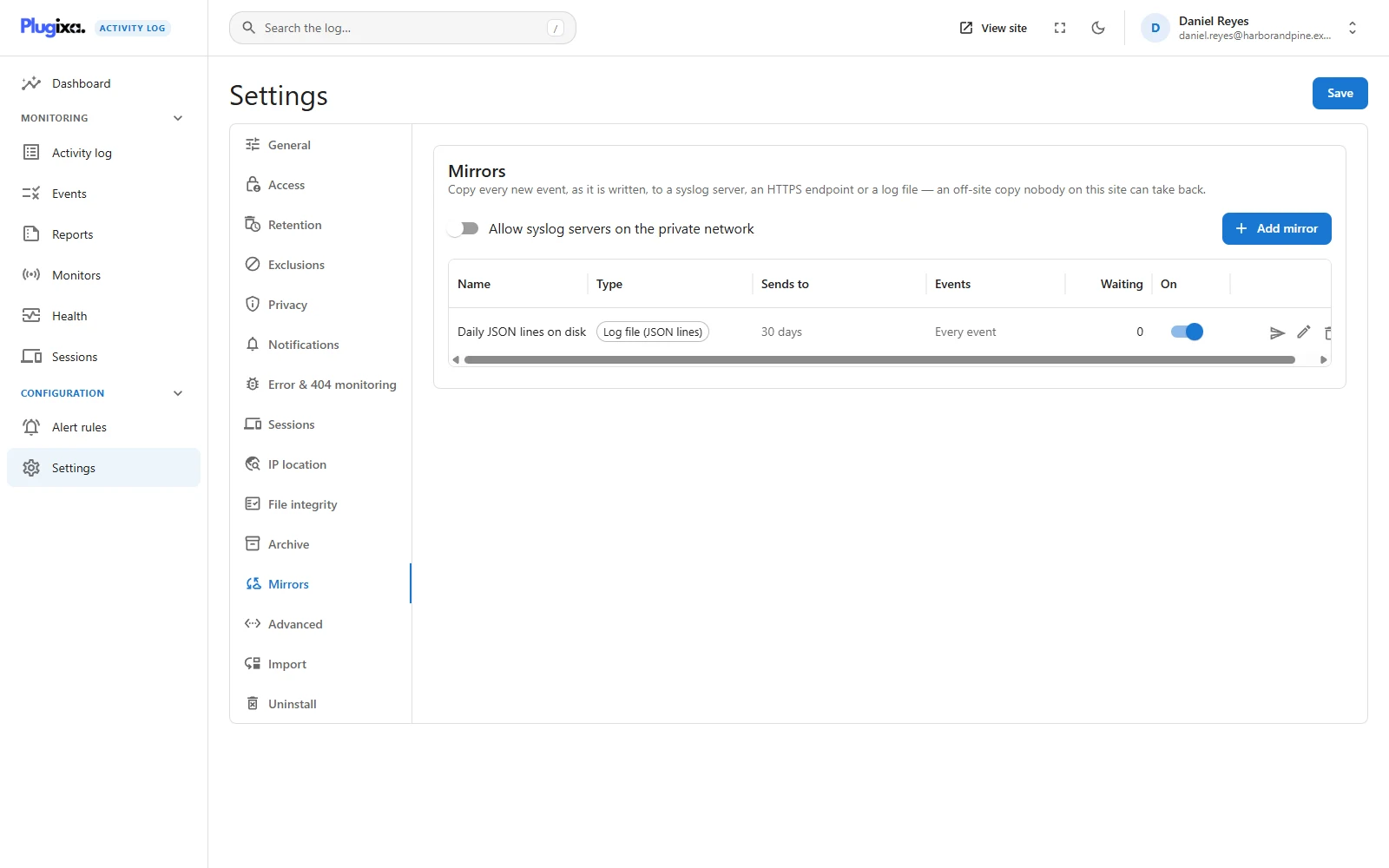
Settings -> Mirrors -> Add mirror. A site can have up to 20.
| Type | You give it | What is sent |
|---|---|---|
| Syslog server | Host, port (514 by default) and transport: UDP, TCP or TLS | One RFC 5424 message per event, from plugixa-activity-log, with the event code, user and IP address as structured data |
| HTTPS endpoint (JSON) | An https:// URL and an optional bearer token |
A POST with source, site and an events list, one request per batch |
| Log file (JSON lines) | How many days to keep files (14 by default) | One JSON object per line, one file per day |
A mirrored event is the whole event: time, code, severity, area, user, role, IP address, the object and the details. That is more than an alert carries, because a mirror is a copy and an alert is a message.
Per-mirror filters
Each mirror has its own filter, so one site can send everything to a file and only the serious events to a SIEM that bills by volume.
| Filter | Effect |
|---|---|
| At least this severe | Only events of this severity or higher. Any sends all. |
| Only these areas | Only events in these areas. Empty means every area. |
Mirror is on pauses a mirror without deleting it.
The queue, and what happens when a receiver is down
Nothing is sent on the request that recorded the events. At the end of that request, the events each mirror accepts are put in a queue, one batch per mirror. WP-Cron delivers them within moments.
When delivery fails:
- The batch is retried after 1, 2, 4 and 8 minutes.
- That mirror’s later batches are held back meanwhile, so events arrive in the order they happened.
- After 5 attempts the batch is dropped and the log records Mirror “…” could not deliver events after 5 attempts (event 9500), at most once an hour per mirror.
The Waiting column shows how many batches a mirror has queued. A number that keeps growing is a receiver that is not answering.
That failure event is the one event never mirrored: a dead receiver would otherwise queue its own failure to itself for ever. Everything else in the plugin’s own trail - settings changes, exports, archiving - is mirrored, because that is exactly what an off-site copy is for.
The test button
Send a test event delivers one event to that mirror straight away, outside the queue, and reports the result: delivered, or the reason it was not. Test before relying on a mirror; a firewall rule is easier to find now than after an incident.
The private-network rule
A mirror is a connection your server opens to an address somebody typed. Left unguarded, that is a way to reach machines behind the site that the internet cannot.
So a destination is refused when it is this machine, a local name (localhost, or
a name ending in .localhost, .local or .internal), or a private, loopback,
link-local or reserved address. It is checked when you save and again when
sending, against what the host name resolves to at that moment.
HTTPS mirrors must use https://, and redirects are not followed. Any 2xx
answer counts as success.
The override, for syslog only
Log collectors very often sit on the local network, which the rule above forbids. Allow syslog servers on the private network, on the Mirrors tab, lifts the rule for syslog mirrors.
- It is off by default. Switch it on only when your collector really is on the LAN.
- It never applies to HTTPS mirrors. Those stay public-only whatever the setting says.
Where the file mirror writes
wp-content/uploads/plugixa-activity-log/mirror/, in files named after the mirror,
a random key and the date, ending in .jsonl. Files older than the mirror’s keep
period are deleted.
The folder sits under uploads because that is the one place WordPress guarantees is writable. That also makes it a place a browser could ask for, so it is protected twice:
- A deny-all
.htaccessand an emptyindex.phpblock requests and listings. - Every file name carries a random key that is fixed per mirror, so a file cannot be guessed.
On Apache the folder is not web-accessible. nginx ignores .htaccess, so
there the random file names are the only protection until you do one of two
things.
The Health screen tells you which case you are in. Once a file mirror exists, Health shows a File mirror folder check. The site asks its own web server for a harmless test file in the folder and reports what came back:
| The check says | What it means |
|---|---|
| Not reachable from the web | The web server refused the request. Nothing to do |
| Reachable from the web | The web server served the file, so it would serve the log too. Fix it now |
| Outside the web root | The folder is not under WordPress at all, so no address leads to it |
| Could not be checked | The site could not make a request to itself. Try a file from the folder in a browser |
To fix Reachable from the web, either add a rule to the server that denies
/wp-content/uploads/plugixa-activity-log/, or move the folder out of reach
altogether with one line in wp-config.php:
define( 'PLUGIXA_ACTIVITY_LOG_MIRROR_DIR', '/var/log/my-site/activity' );
The folder must exist or be creatable, and writable by PHP. A folder outside the
web root is the only protection that does not depend on how the web server is
configured, and it is also where a log shipper usually wants to read from.
Developers can set the same thing with the plugixa_activity_log_mirror_directory
filter.
Secrets
A bearer token is sent as Authorization: Bearer .... After saving it is shown
only as •••• plus its last four characters; leave it as it is to keep the saved
token.
Creating, changing or deleting a mirror is recorded in the log (event 9501). Deleting a mirror also drops whatever it still had waiting.
Troubleshooting
| Symptom | Usual cause |
|---|---|
| “Addresses on this machine or the private network are refused” | The private-network rule. For syslog on a LAN, use the override. |
| The override is on and an HTTPS mirror is still refused | It applies to syslog only, by design. |
| Waiting keeps growing | The receiver is not answering. Use Send a test event for the reason. |
| Event 9500 | A batch failed five times and was dropped. Those events are still in the log. |
| Nothing arrives on a quiet site | Delivery runs through WP-Cron, which needs traffic or a real cron job. |
| Some events are missing at the receiver | The mirror’s severity or area filter excluded them. |
| The file mirror reports an error | The uploads folder is not writable. |
| A file can be opened in a browser | nginx, or any server that ignores .htaccess. Health shows Reachable from the web. Add a deny rule for the folder, or move it with PLUGIXA_ACTIVITY_LOG_MIRROR_DIR. |
What to do next
- Send chosen events to people instead of everything to a machine: Alert Rules PRO.
- Keep old events searchable on the site: Archive PRO.
- Check the scheduled jobs: Health.