

Contents
Sessions - Plugixa Activity Log
The log tells you who signed in. Sessions tells you who is still signed in, right now, from where and on what - and lets you end it.
Pro feature. Sessions are part of Plugixa Activity Log Pro. See the Free vs Pro matrix.
Who is signed in
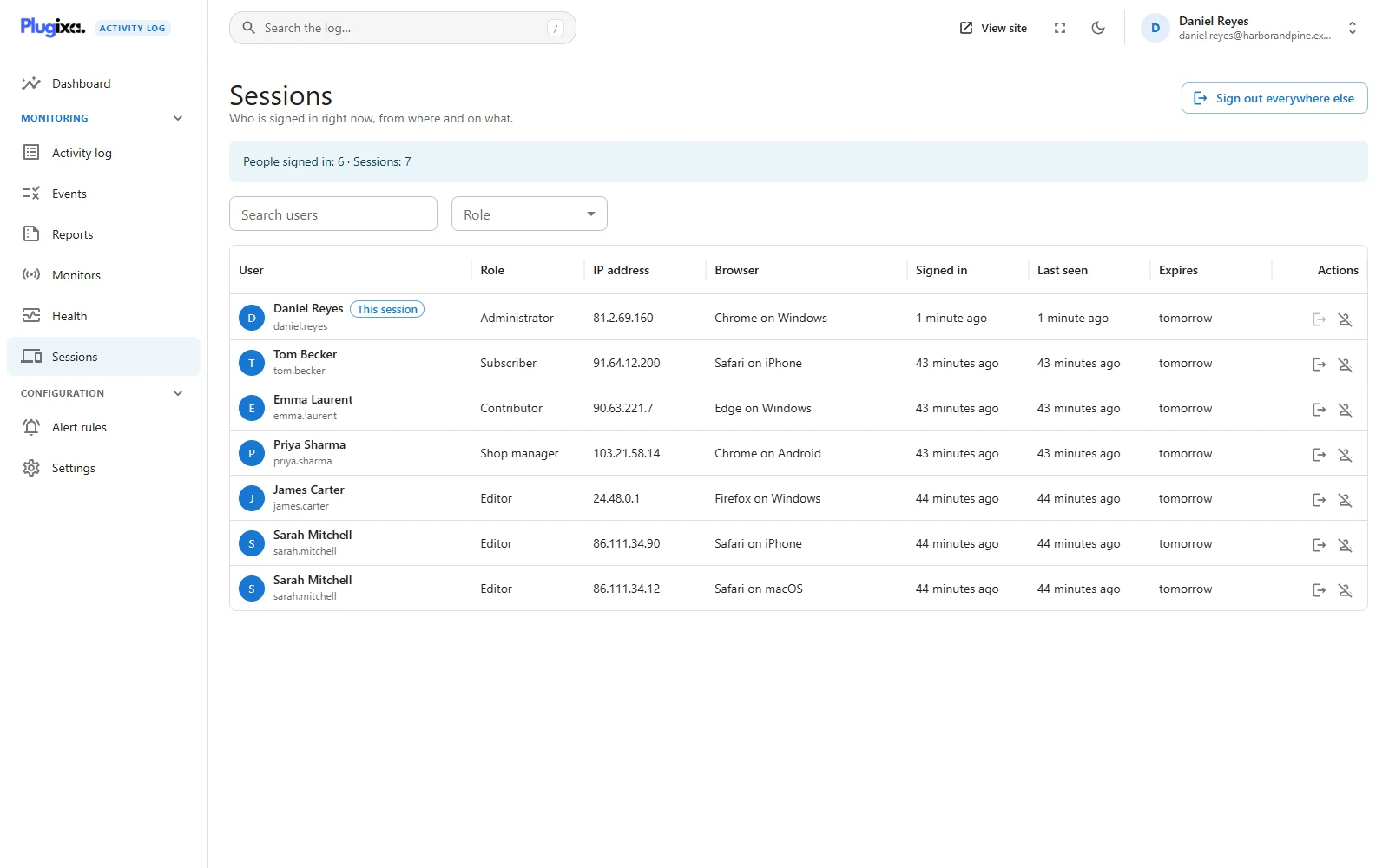
Open Sessions. There is one row per sign-in session, not per person: Sarah Mitchell signed in on her laptop and her phone is two rows.
| Column | Shows |
|---|---|
| User | Name and username |
| Role | Their role |
| IP address | Where the session was started from. Behind a proxy or CDN this is the visitor’s own address once the proxy’s header is named in Settings, Advanced; sessions started before that keep the address WordPress recorded |
| Browser | For example Chrome on Windows. Hover for the full browser string |
| Signed in | When the session began |
| Last seen | The last ordinary page load |
| Expires | When WordPress will end it anyway |
The banner above the list counts people and sessions. The session your own browser is using is marked This session. Search by username, name or email, or narrow to one role.
Last seen is deliberately coarse. It is written at most once every five minutes per session, because writing it on every page view would turn every request of every signed-in person into a database update. Background calls - the editor’s autosave, the dashboard heartbeat, REST requests - do not count, so a forgotten tab does not look active. A session that began before the module was switched on shows Not yet until its next page load.
Ending sessions
| Action | What it does |
|---|---|
| End session | Signs that one device out. You cannot end the session you are using from here. |
| End all sessions of this user | Signs the person out everywhere. Used on yourself, it keeps the session you are in. |
| Sign out everywhere else | Ends every session of yours except this one. |
The person is signed out on their next request. Each action is recorded in the log (events 9200, 9201 and 9204). Ending one of your own sessions on another device is not recorded as an administrator doing it.
Who sees what
People who may change the plugin’s settings see and end everybody’s sessions. Anybody else sees only their own. So an author like James Carter can open the screen, see his own devices and use Sign out everywhere else after leaving a shared computer, and never see anybody else’s row.
The session policy
Settings -> Sessions holds the rules. Out of the box there are none: no limit, no idle sign-out.
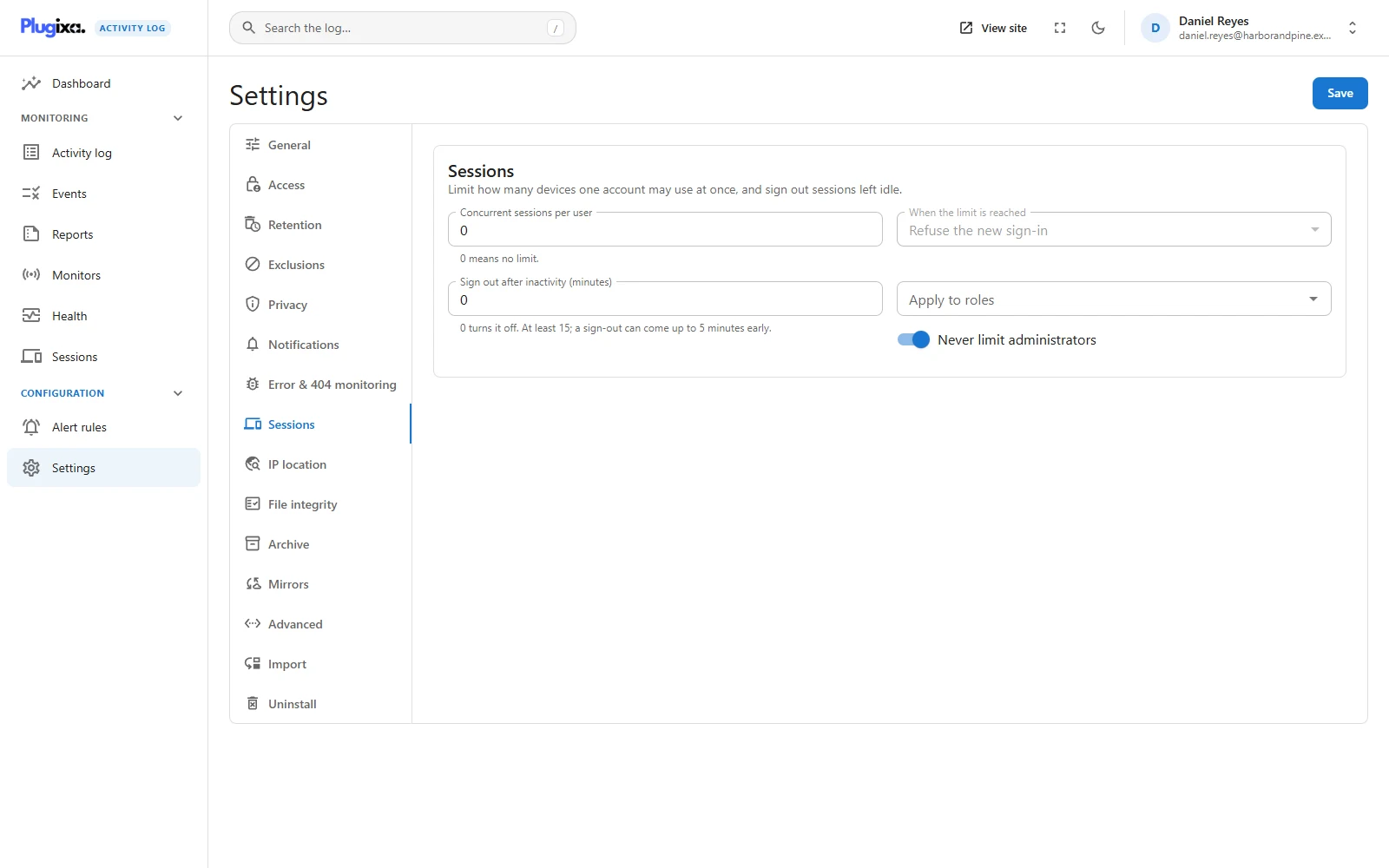
| Setting | Default | What it does |
|---|---|---|
| Concurrent sessions per user | 0, no limit | How many devices one account may be signed in on at once, up to 100. |
| When the limit is reached | Refuse the new sign-in | See below. |
| Sign out after inactivity (minutes) | 0, off | A session not seen for this long is ended. At least 15. |
| Apply to roles | Empty, every role | The rules apply only to these roles. |
| Never limit administrators | On | Administrators and super admins are exempt from both rules. |
What happens at the limit
You choose one of two behaviours, and they suit different problems.
- Refuse the new sign-in. The sign-in form shows an error saying the account is already signed in on that many devices, and the attempt is recorded (event 9202). The password is checked first, so a wrong password still fails as a wrong password and reveals nothing about other sessions. Use this to stop shared accounts.
- End the oldest session. The new sign-in succeeds and the oldest other sessions are ended until the account is back at the limit. Use this when people move between devices and forget to sign out.
Idle sign-out
A session that has not been seen for the set time is ended on its next page load: the person is sent to the sign-in form with a notice explaining that they were signed out for inactivity. It is recorded as event 9203.
Because last seen is written every five minutes, a sign-out can come up to five minutes early. That is why the smallest value is 15 minutes. A session that has no last seen yet is never judged on a guess.
Which roles, and the administrator exemption
Leave Apply to roles empty and the rules cover every role. Choose roles and only those are covered: limit Shop manager to two devices and Priya Sharma is affected while Sarah, an editor, is not.
Never limit administrators is on by default, and it wins over the role list. A session rule that locks the only administrator out of the site is worse than no rule. Turn it off only when you are sure another way in exists.
Limits
The screen reads WordPress’s own session store. A plugin that moves sessions somewhere else makes the list empty and the rules inactive. At most 2,000 signed-in accounts are listed.
Troubleshooting
| Symptom | Usual cause |
|---|---|
| I only see my own sessions | Seeing everybody’s needs the settings permission. |
| Last seen says Not yet | The session began before the module was on. It fills in on the next page load. |
| Last seen is a few minutes old for an active person | It is written every five minutes, not every click. |
| An open tab is not counted as active | Autosave and heartbeat calls are not activity, by design. |
| The limit does not apply to an administrator | Never limit administrators is on. |
| The limit does not apply to somebody else | Their role is not in Apply to roles. |
| Somebody was signed out a little early | Idle sign-out can come up to five minutes early. |
| An idle value below 15 was changed to 15 | The minimum, for the reason above. |
| The list is empty | Another plugin stores sessions elsewhere. |
What to do next
- See the sign-ins themselves: Activity Log.
- See where an address is: IP location PRO.
- Be told about refused sign-ins: Alert Rules PRO.