

Contents
Exclusions - Plugixa Activity Log
Not everything that happens on a site is worth a row. A monitoring service that signs in every minute, a build robot, a post type a plugin uses as a private scratch pad: exclusions keep them out.
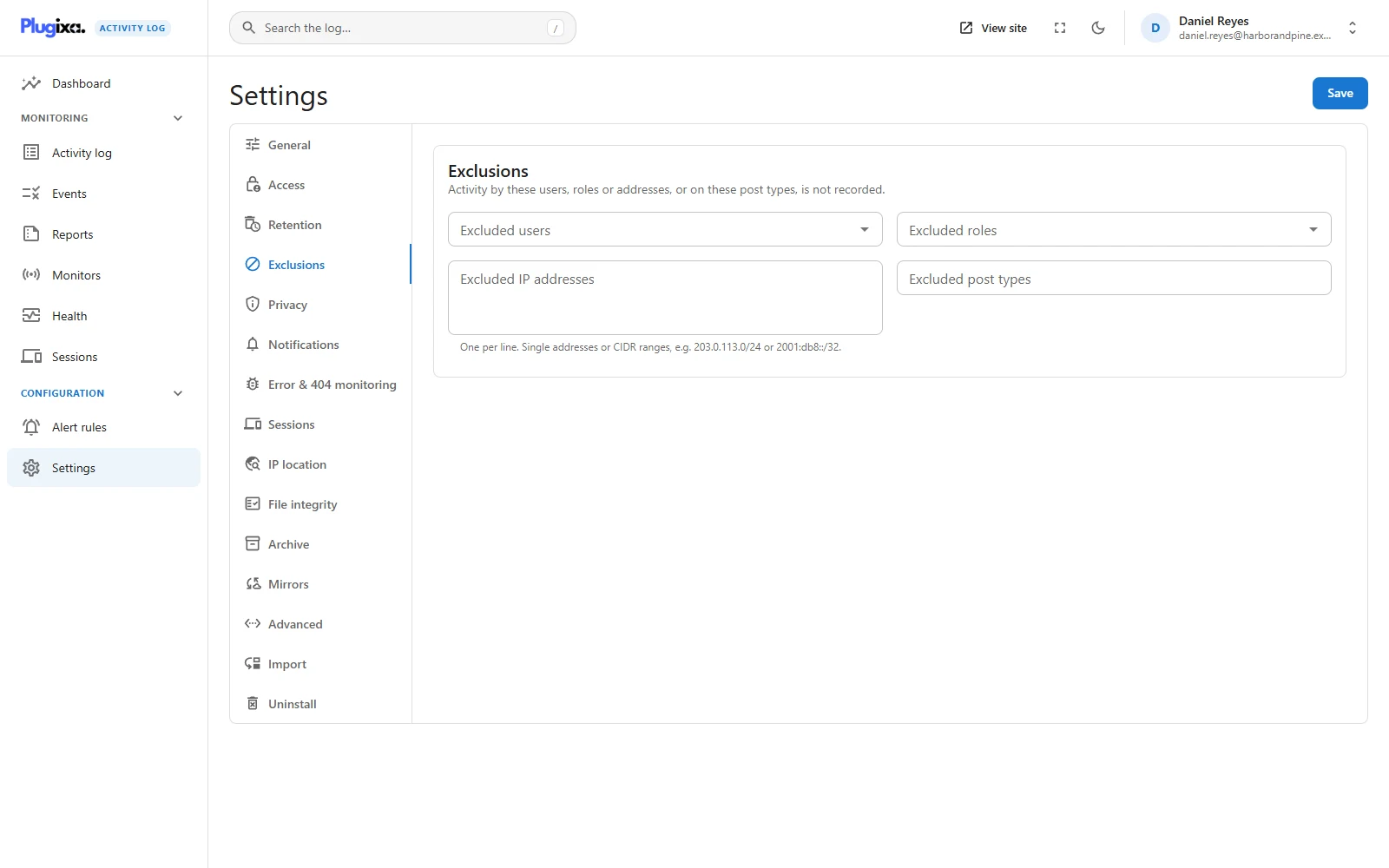
The four lists
Settings -> Exclusions. All four are empty by default, so nothing is excluded until you say so.
| Option | Setting | Accepts |
|---|---|---|
| Excluded users | excluded_user_ids |
Accounts. Start typing a name to find one |
| Excluded roles | excluded_roles |
Any role that exists on the site |
| Excluded IP addresses | excluded_ips |
One per line: a single address, or a CIDR range |
| Excluded post types | excluded_post_types |
Post type slugs. The picker offers the ones with an admin screen, and you can type another |
An event is dropped as soon as it matches any one list. The lists are not
combined: excluding the role Editor and the address 203.0.113.9 leaves out
all editors, and everything from that address, not only editors at that address.
An excluded event is never stored. It is not hidden, and it cannot be brought back by clearing the list later. Exclusions apply from the moment you save, to new activity only. What is already in the log stays.
How each one matches
Users matches the account that acted. It is an exact match on the account, so renaming the user changes nothing.
Roles matches any role the person holds at that moment. Somebody who is both an Author and a Shop manager is left out if either is on the list.
IP addresses accepts IPv4 and IPv6, single addresses and ranges:
203.0.113.9
203.0.113.0/24
2001:db8::/32
Addresses are compared as numbers, not as text, so ::1 and
0:0:0:0:0:0:0:1 are the same address, and an IPv4 rule never matches an IPv6
visitor by accident.
A line that is not an address or a range is refused, not stored. The field names the bad line and Save stays disabled until it is fixed. A rule that silently matched nothing would be worse than no rule.
Post types leaves out events about content of that type: the posts
themselves and their custom fields, and comments on them. Media is the post type
attachment.
What an exclusion does not cover
The plugin’s own trail is always recorded. Events numbered 9000 and above describe changes to the log itself:
| Event | Says |
|---|---|
| 9000 | Activity Log settings were changed, exclusions included |
| 9001 | Old events were removed by retention |
| 9002 | A monitor was switched on or off |
| 9030 | A person’s data was erased from the log |
| 9040 | History was imported |
Excluding yourself is a reasonable thing for an administrator to want. It must not also hide who changed the exclusions, shortened the retention period or switched a monitor off. An audit trail that can be told to stop auditing itself is not one, so no list on this tab reaches these events, whoever caused them and from wherever.
A failed sign-in for a name that does not exist is not covered by a user or role exclusion. There is no account behind it, so there is nothing for those two lists to match. It is recorded, unless it came from an excluded address.
The other cases follow from the same rule, that the lists match who acted and from where:
| Activity | Excluded user | Excluded role | Excluded address |
|---|---|---|---|
| A failed sign-in for an unknown name | Recorded | Recorded | Left out |
| A failed sign-in for a real account (wrong password) | Left out, if it is that account | Left out, if the account has that role | Left out |
| An administrator edits an excluded user’s profile | Recorded | Recorded | Left out, if the administrator is at that address |
| A scheduled task or WP-CLI, with nobody signed in | Recorded | Recorded | Recorded: there is no address |
The third row is worth reading twice. Excluding a user leaves out what that person does. It does not leave out what is done to them. If somebody changes an excluded account’s role or password, that is still in the log, under the person who did it.
Think before excluding an address you do not control. An IP exclusion also leaves out failed sign-ins from that address, and the flood warning that follows thirty of them. That is the right outcome for your own monitoring server and the wrong one for a whole office network.
Exclusions see the real address
If Privacy is set to shorten or
not store IP addresses, exclusions still work exactly as written. The address is
shortened only after every other decision has been made, so a rule for
203.0.113.9 keeps matching on a site that stores no addresses at all.
What an exclusion sees is the address the plugin resolved for the visitor. On a site behind a proxy or a CDN, set the trusted header first, or every visitor has the proxy’s address and an exclusion of it would silence the whole site. See the Advanced section of Settings.
Exclusion, or something else
| You want | Use |
|---|---|
| No events about one kind of thing, from anybody | Switch the event off on the Events screen |
| A whole area of the site left alone | Switch its monitor off |
| One person, role, address or post type left out | An exclusion |
| The events recorded, but not shown to some people | Access |
| The events recorded, but no email about them | The severity threshold under Notifications |
Developers can veto an event in code with the same filter this tab uses,
plugixa_activity_log_should_record. See
Hooks.
From the terminal
wp activity-log settings get excluded_ips
wp activity-log settings set excluded_ips '["203.0.113.0/24"]'
wp activity-log settings set excluded_roles '["subscriber"]'
The value replaces the whole list, and goes through the same checks as the screen: an invalid address or an unknown role is dropped. See WP-CLI.
Troubleshooting
| Symptom | Usual cause |
|---|---|
| Save is greyed out | A line in the IP box is not an address or a range. |
| An excluded person still appears | They appear as the subject of somebody else’s action, or the event is one of the plugin’s own (9000 and above). |
| An excluded address still appears | The site is behind a proxy and the log resolves a different address from the one you listed. Check the address shown on a recent event. |
| Nothing at all is recorded any more | An excluded range covers the proxy’s address, or a role held by everybody is on the list. |
| Old events of an excluded user are still there | Exclusions apply to new activity. Existing events leave through retention. |
| Settings changes by an excluded administrator are logged | By design. The plugin’s own trail cannot be excluded. |