

Contents
Notifications - Plugixa Activity Log
A log nobody is reading cannot warn anybody. Notifications answer one question: did something serious just happen on this site? When it did, the plugin emails the people you chose.
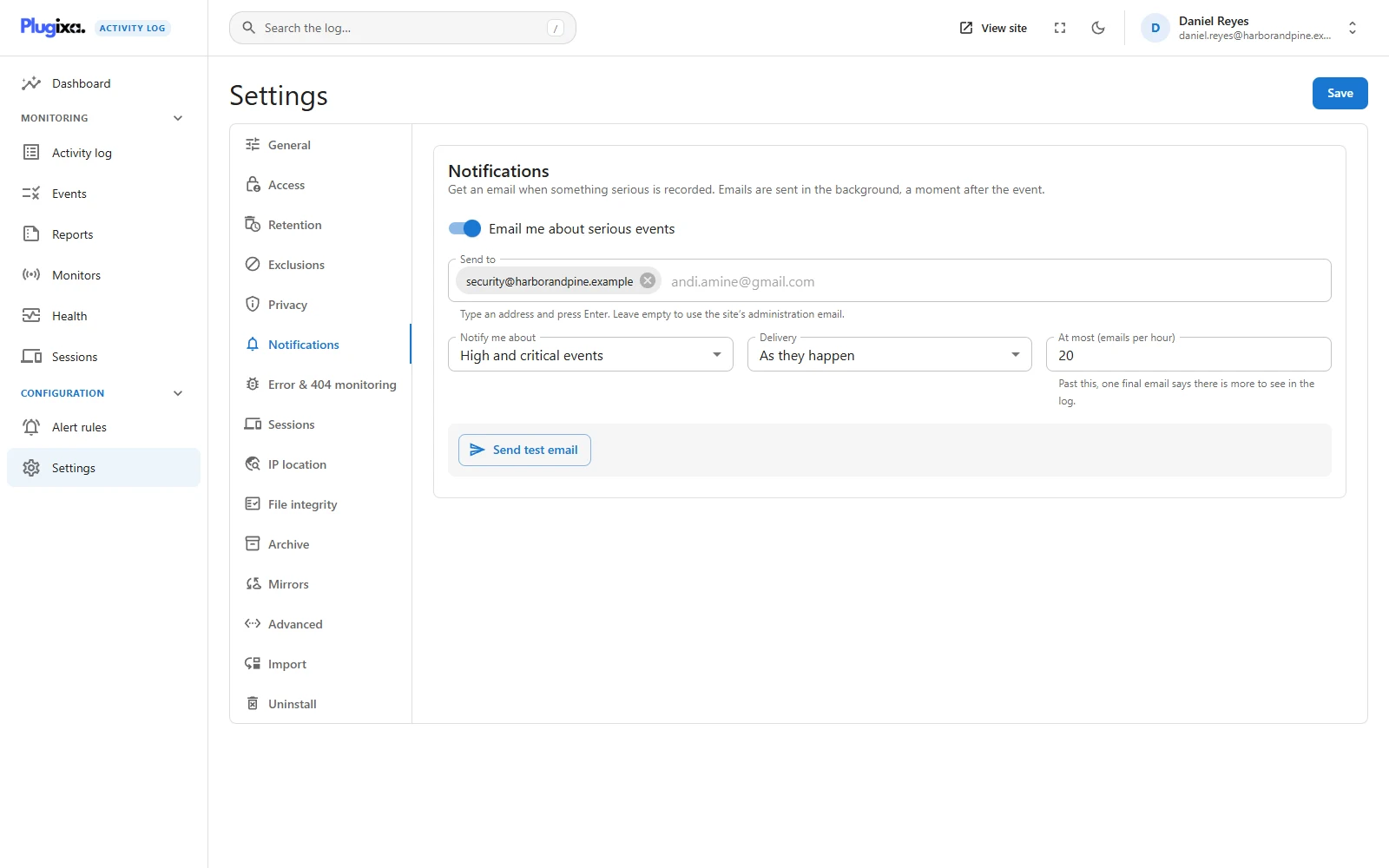
Off until you switch it on
Settings -> Notifications. Nothing is sent after installing the plugin. An activity log that starts emailing the site owner on day one gets its mail marked as spam in the first week, and then the one message that mattered is missed too.
The settings
| Setting | What it does |
|---|---|
| Email me about serious events | The on/off switch. Off by default. |
| Send to | Type an address and press Enter. Up to 20 addresses. Left empty, mail goes to the site’s administration email. |
| Notify me about | Medium, high and critical events, High and critical events (the default) or Critical events only. |
| Delivery | As they happen, or Bundled every 5 minutes, every 15 minutes or every hour. |
| At most (emails per hour) | 20 by default, from 1 to 500. |
There is no setting below medium. Low and informational events are most of the log: every sign-in, every saved post. Emailing those is a firehose, and a firehose is not read.
Nothing is sent on the request that recorded the event
This is the part people assume wrongly, so it is worth stating plainly: the page load that recorded an event never sends mail.
Events are often recorded on a visitor’s page view or on the sign-in form. A slow
mail server there would cost somebody a page load. So the recording request only
compares a few numbers and writes the matching events to a queue. A background job
run by WP-Cron (plugixa_activity_log_send_notifications) delivers them a moment
later.
Two things follow from that:
- An email arrives a little after the event, not during it.
- On a site with almost no traffic, WP-Cron only runs when somebody visits. If mail is late on a quiet site, give WordPress a real cron job.
Bundling
With Delivery set to a bundle, events that are due together go out as one email instead of one each. Windows are aligned to the clock, so with 15 minutes everything recorded in the same quarter of an hour lands in the same message.
The subject tells you which kind it is:
- One event:
[Site name] High: Plugin "Akismet" was activated. - Several:
[Site name] 4 new events (highest: Critical)
Each event in the email has a View in the log link. It opens the activity log filtered to that kind of event on that day, not the single event.
The hourly cap
An attack that trips a hundred alerts must not also turn your site into a source of spam. Once the cap is reached within an hour:
- One final email says that more were due and that the rest is in the log.
- Everything further in that hour is dropped, not delayed.
Nothing is lost from the log itself. The cap limits mail, never recording.
When an email cannot be sent
A failed delivery is retried after 1, 2, 4 and 8 minutes. After the fifth failure it is dropped and the log records A notification could not be delivered to … after 5 attempts (event 9011), so a broken mail setup shows up in the one place you are already looking.
The test button
Send test email sends a sample to the recipients as saved, straight away, and tells you whether WordPress accepted it. If you have just changed the addresses, save first: the screen reminds you that the test uses the saved list.
A test that reports success but never arrives is a mail delivery problem on the site, not a notification setting.
The plugin’s own events never notify
Event codes 9000 and above are the plugin’s own trail: settings changed, the log pruned, an export downloaded. They are recorded like everything else and they never trigger a notification. One of them is “a notification could not be delivered”, and emailing about that would loop.
More than email, and more than severity
The free edition decides by severity and sends email. To choose events by area, user, role, IP address or text, and to send them to Slack, Discord, Microsoft Teams or a webhook, see Alert Rules PRO.
Troubleshooting
| Symptom | Usual cause |
|---|---|
| No email at all | Notifications are off by default. Check the switch, then press Send test email. |
| The test fails | WordPress cannot send mail on this site. Fix that with a mail plugin; it is not a log problem. |
| The test tested the old addresses | The test uses the saved recipients. Save first. |
| Emails arrive late | WP-Cron needs traffic, or a real cron job. Bundling also waits for the end of its window. |
| A medium event did not email | The default threshold is high and critical. |
| Emails stopped during an incident | The hourly cap was reached. One final email said so; the events are in the log. |
| A settings change did not email | Codes 9000 and above never notify, by design. |
| Event 9011 in the log | Delivery failed five times. The message names the recipient. |
What to do next
- Target specific events and other channels: Alert Rules PRO.
- See which events are high or critical: Events.
- Check the queue and the scheduled jobs: Health.