

Contents
Retention - Plugixa Activity Log
An activity log that is never trimmed grows until it is the largest table on the site. Retention bounds it: once a day, the oldest events are removed.
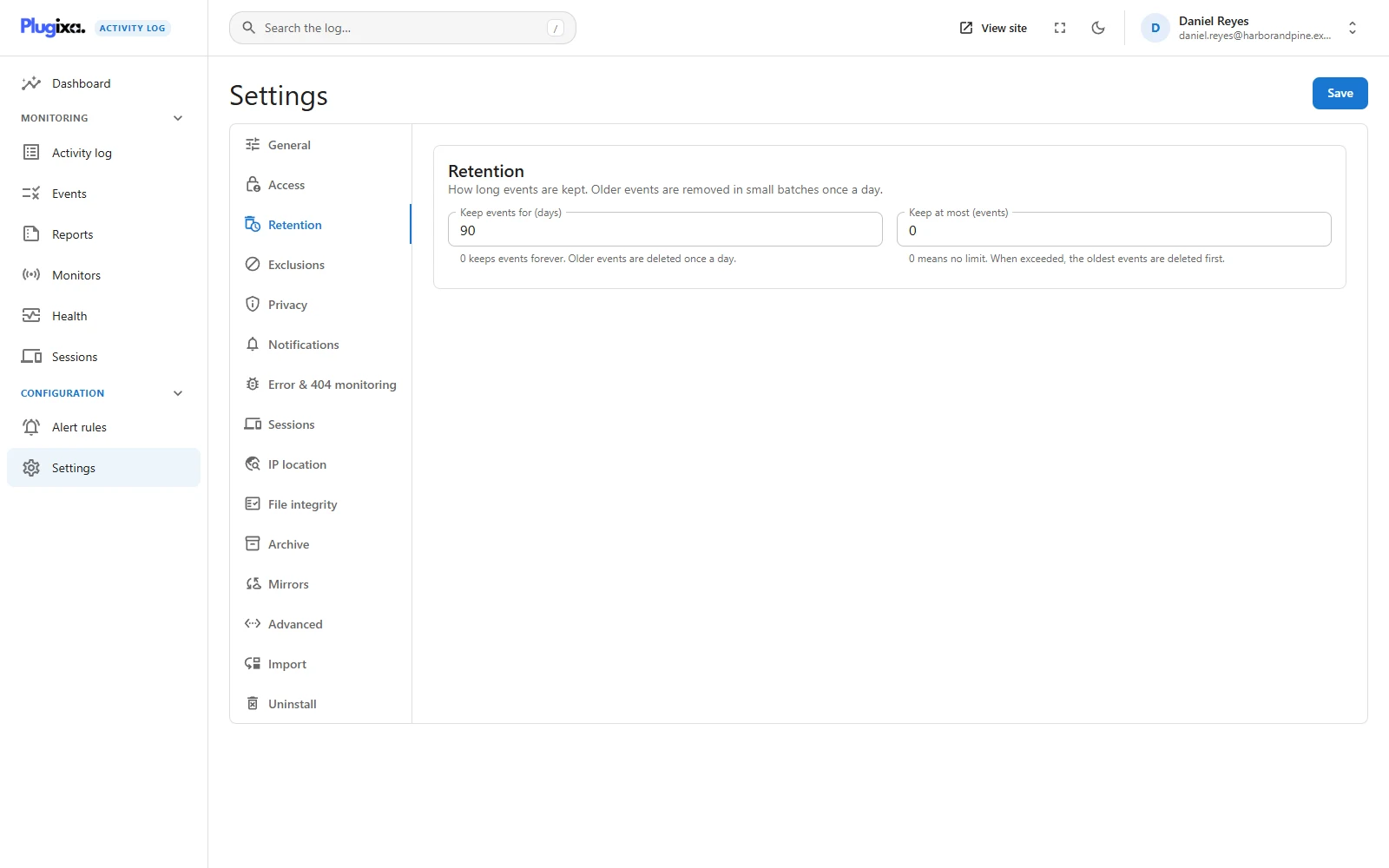
The two limits
Settings -> Retention has two fields. Use either, or both.
| Option | Setting | Default | Range |
|---|---|---|---|
| Keep events for (days) | retention_days |
90 | 0 to 3650. 0 keeps events forever |
| Keep at most (events) | retention_max_rows |
0 | 0 to 100,000,000. 0 means no limit |
Ninety days is the default because it suits a security log: long enough to investigate something you noticed late, short enough that the table stays small.
The two limits are independent, and whichever bites first wins. They answer different worries:
- Days is the limit a quiet site cares about. It is also the one a privacy policy can quote. See Privacy.
- Events is the limit a busy site, or a site under attack, cares about. A burst of a million events in one afternoon is all younger than ninety days; only a count stops it.
Set both to 0 and nothing is ever deleted. That is allowed, and the
Health screen flags it as a
warning, because a log with no bound grows without one.
What the daily clean-up does
A scheduled job, plugixa_activity_log_prune, runs once a day through WP-Cron.
- It deletes every event older than the days limit.
- If a count limit is set, it then deletes everything older than the newest N events.
The oldest always go first. Events are removed in id order, which is time order, so the log is trimmed from its far end and never has a hole in the middle.
It works in small batches. One huge delete would hold locks on the table for as long as it ran, and every event being recorded meanwhile would wait behind it: retention would stall the very site it is tidying. So it removes 1,000 rows at a time and stops after about 15 seconds. If there is more to do, it books itself to run again a minute later and carries on. A large backlog, such as the first run after you shorten the period, drains across several short runs.
The job is booked whenever the plugin loads and finds it missing, not only on activation, so an update by file copy cannot leave the log growing unnoticed. Deactivating the plugin cancels it.
A prune is itself logged
Whenever a run removes anything, the log records it:
1,240 old events were removed by the retention policy.
That is event 9001, informational, with the count and the two limits that were in force. An audit log that silently forgot things would be hard to trust, so the forgetting is on the record too. A run that removes nothing records nothing.
Changing the retention settings is recorded as well, as event 9000 (Activity Log settings were changed), with the names of the settings that changed. Neither event can be excluded. See Exclusions.
Preview and run it from the terminal
wp activity-log prune --dry-run
Success: 3812 events would be removed.
--dry-run only counts. It tells you what the current settings would remove
right now, which is worth knowing before you shorten the period on a log you
care about. Change the setting, run the dry run, and read the number.
Without the flag, the same command applies retention immediately instead of waiting for the daily job:
wp activity-log prune
Like the daily job, one run works within its time budget and books a follow-up if there is more to remove, so on a very large backlog the number it prints is what that run removed, not necessarily everything that is due.
The settings can be read and changed from the terminal too:
wp activity-log settings get retention_days
wp activity-log settings set retention_days 30
wp activity-log settings set retention_max_rows 500000
See WP-CLI.
Retention and the Archive PRO
Retention deletes. The Archive moves old events into a table of their own instead, where they stay searchable.
Retention applies to the live log only. The archive has its own period, Keep archived events for (days), on the Archive tab.
The order of the two ages matters. If Retention deletes events at 20 days and the archive takes events at 30 days, nothing ever lives long enough to be archived. The Archive tab warns when the retention days are not greater than the archive age. To keep a long history cheaply:
| Goal | Retention days | Archive after | Keep archived for |
|---|---|---|---|
| 90 days, then gone | 90 | 0 (off) | n/a |
| 30 days live, a year in the archive | 0 | 30 | 365 |
| 30 days live, archived forever | 0 | 30 | 0 |
What retention does not do
- It does not remove one person’s entries. For that, use WordPress’s Erase Personal Data tool, which anonymises them. See Privacy.
- It does not reach copies that already left the site. Whatever a mirror PRO sent to a syslog server or a file stays there.
- It cannot be asked to delete a chosen event. There is no such button anywhere in the plugin. The oldest go, and only the oldest.
The importer respects retention as well: events older than the retention period are not imported from WP Activity Log, because the next clean-up would only remove them again.
Troubleshooting
| Symptom | Usual cause |
|---|---|
| The log holds events older than the period | The daily job has not been running. Open Health and look at the scheduled jobs. WP-Cron needs visits to the site, or a real server cron. |
| Nothing was removed after shortening the period | The job runs once a day. Run wp activity-log prune to apply it now. |
| Only part of a large backlog went | One run stops after its time budget and continues a minute later. |
| The log never shrinks | Both limits are 0, or the Retention module is switched off on the Monitors screen. |
| Nothing is ever archived PRO | Retention deletes events before they reach the archive age. |
| An old import brought in nothing | Those events are older than the retention period. Raise it first, then import. |
What to do next
- Keep old events instead of deleting them: Archive PRO.
- Check that the clean-up is on time: Health.
- Leave noise out before it is stored: Exclusions.