

Contents
Webhooks - Plugixa Chat
PRO Plugixa Chat -> Configuration -> Webhooks sends every lead to another system. “Each lead is posted as JSON to the addresses below. Anything that accepts an incoming webhook works: Zapier, Make, n8n, or your own code.”
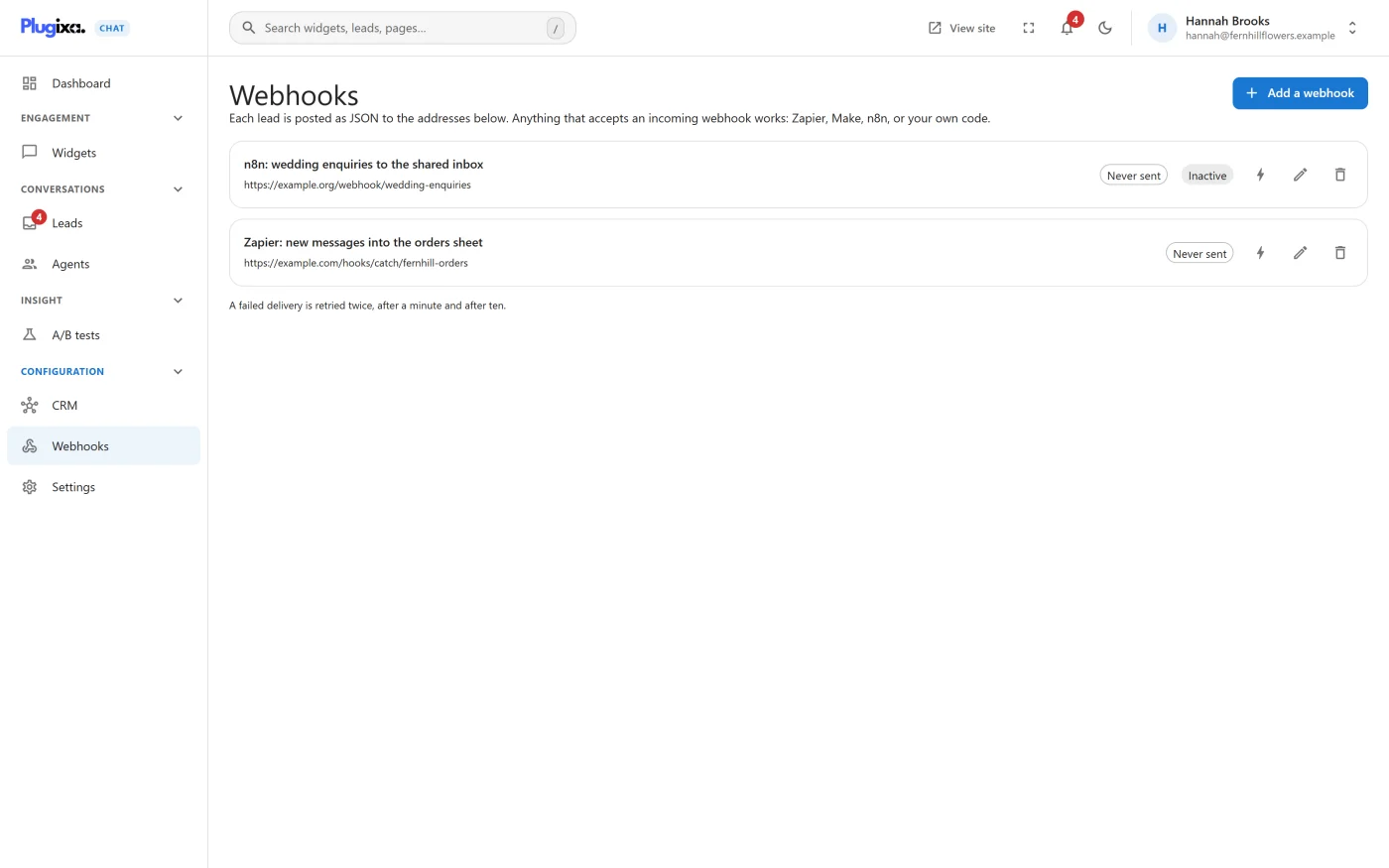
Adding a webhook
Press Add a webhook. A panel opens on the right.
| Field | What it is |
|---|---|
| Name | “Only you see this, such as “Zapier” or “Our CRM”.” |
| Address | “The https address that receives the JSON. Local and private addresses are refused, because this site makes the request itself.” |
| Send when | The events to send. Version 1.0.0 has one: A lead is received |
| Active | Switch a webhook off without deleting it |
| Signing secret | Created for you when the webhook is first saved. “The secret appears once the webhook is saved.” |
Save needs an address and at least one event. An address the site may not call is refused with “Enter a public https address this site can reach. Local and private addresses are refused.”
The signing secret is generated once and does not change when you edit the webhook. To get a new one, delete the webhook and add it again.
The list
Each webhook shows its name, its address and the state of its last delivery.
| Label | Meaning |
|---|---|
| Never sent | Nothing has been delivered yet |
| Last delivered … | The last delivery was accepted |
| One failed attempt - … or N failed attempts - … | The last deliveries were refused, with the reason or the HTTP status |
| Inactive | The webhook is switched off |
Each row has Send a test, Edit and Delete.
Send a test
Send a test posts a sample lead to the address straight away and shows
the result: “Delivered - the endpoint answered 200.” or “Not delivered:”
with the reason. The sample is marked with "test": true so the receiving
end can tell it apart.
Delivery
- A lead is queued for delivery as soon as it is stored. The request is made in the background by WordPress’s scheduler, not while the visitor waits.
- A delivery counts as accepted when the endpoint answers with a status from 200 to 299.
- The request waits up to 10 seconds for an answer and does not follow redirects.
- “A failed delivery is retried twice, after a minute and after ten.” After the third failure the lead is not sent to that webhook again. It is still on the Leads screen.
- A webhook that is switched off, or deleted, is skipped.
Deliveries depend on WordPress’s scheduler running. On a site with very little traffic and no real cron job, they can be delayed until the next visit.
The request
A POST with a JSON body.
| Header | Value |
|---|---|
Content-Type |
application/json; charset=utf-8 |
X-Plugixa-Event |
The event, lead.created |
X-Plugixa-Signature |
sha256= followed by the HMAC-SHA256 of the raw body, keyed with the signing secret |
User-Agent |
PlugixaChat/ and the plugin version, followed by the site’s address |
The body
{
  "event": "lead.created",
  "sent_at": "2026-10-05T09:30:00+00:00",
  "site": "https://example.com/",
  "data": {
    "id": 128,
    "widget": { "id": 2, "name": "Main widget" },
    "channel": "contact_form",
    "name": "Jane Doe",
    "email": "jane@example.com",
    "phone": "",
    "message": "Do you ship to Canada?",
    "consent": true,
    "subscribed": false,
    "page_url": "https://example.com/shop/",
    "created_at": "2026-10-05 09:30:00"
  }
}
| Field | Meaning |
|---|---|
event |
Always lead.created in 1.0.0 |
sent_at |
When the payload was built, in UTC |
site |
The site’s home address |
data.id |
The lead’s ID |
data.widget |
The widget the form belongs to |
data.channel |
Always contact_form |
data.name, data.email, data.phone, data.message |
What the visitor typed |
data.consent |
Whether the consent box was ticked |
data.subscribed |
Whether the newsletter box was ticked |
data.page_url |
The page the form was sent from |
data.created_at |
When the lead was stored, in UTC |
The visitor’s IP address is never included. Answers to custom form fields are not part of the payload in 1.0.0.
Checking the signature
Check the signature at the receiving end to be sure a request came from your site and was not altered. Compute the HMAC-SHA256 of the raw request body with your signing secret and compare it with the header.
<?php
$secret    = 'your-signing-secret';
$body      = file_get_contents( 'php://input' );
$expected  = 'sha256=' . hash_hmac( 'sha256', $body, $secret );
$signature = $_SERVER['HTTP_X_PLUGIXA_SIGNATURE'] ?? '';

if ( ! hash_equals( $expected, $signature ) ) {
	http_response_code( 401 );
	exit;
}

$payload = json_decode( $body, true );
Use the body exactly as received. Decoding and re-encoding the JSON changes it and the signature no longer matches.
Services such as Zapier and Make do not need the signature to work. It is there for when you write the receiver yourself.
Privacy
A webhook sends a visitor’s contact details to a service you chose. Mention that service in your privacy policy.
If Pro is removed
Webhooks stay stored. On the free edition nothing is sent and the screen is gone. See Free vs Pro.
What to do next
- Add contacts to a mailing list without code in CRM connectors.
- React to a lead from PHP instead, with the
plugixa_chat_lead_createdaction in the Hooks reference.