

Contents
Builder: When and where - Plugixa Chat
The third step of the builder asks “When and where should it appear?”. It has two parts: When it appears, the display triggers, and Where it appears, the targeting rules.
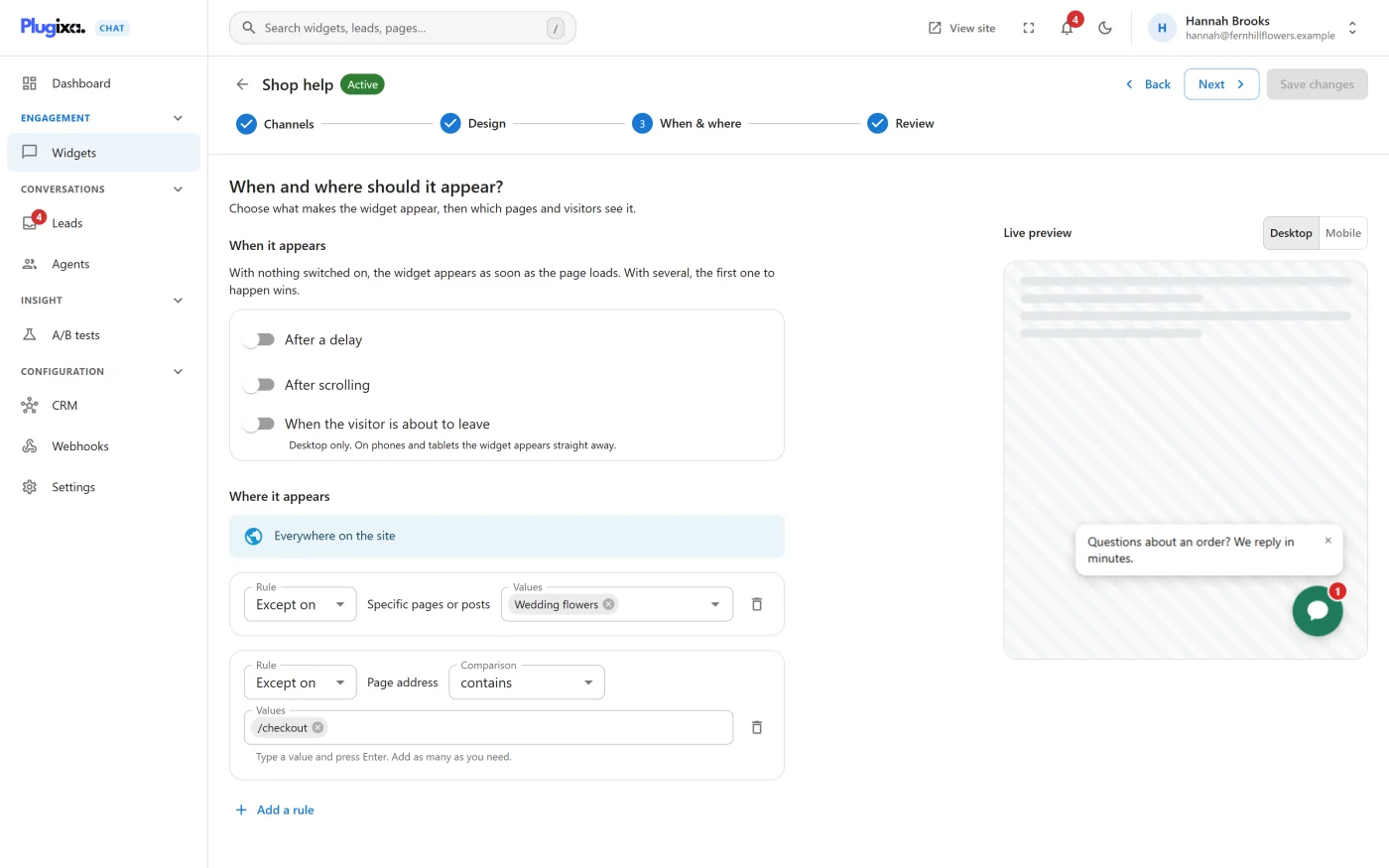
With nothing changed on this step, the widget appears as soon as a page loads, on every page of the site.
When it appears
“With nothing switched on, the widget appears as soon as the page loads. With several, the first one to happen wins.”
| Trigger | Setting | Behaviour |
|---|---|---|
| After a delay | Seconds, 1 to 600. Starts at 5 | The launcher appears that many seconds after the page loads |
| After scrolling | Percent of the page, 1 to 100. Starts at 30 | The launcher appears once the visitor has scrolled that far. On a page too short to scroll it appears straight away |
| When the visitor is about to leave | None | The launcher appears when the pointer leaves through the top of the window. “Desktop only. On phones and tablets the widget appears straight away.” |
Things to know:
- Until a trigger fires, the launcher’s place is kept but nothing is drawn, so the page does not move when it appears.
- Once a trigger has fired for a visitor, the widget appears straight away on the next pages they open in the same browser tab. They are not made to wait again on every page.
- On a device with no pointer to hover with, the leave trigger is ignored. If a delay or scroll trigger is also on, that one still applies there.
Where it appears
Rules decide which pages and which visitors get the widget. With no rules the screen shows Everywhere on the site.
Adding a rule
On an empty list, the line “Or limit it to:” is followed by a chip for each kind of rule. Click one to add a rule of that kind. After that, use Add a rule and choose from What should decide?.
Each rule has:
| Part | Choices |
|---|---|
| Rule | Show on or Except on |
| The kind | What the rule looks at, for example Page address |
| Comparison | Offered for Page address only |
| Values | One or more values. A rule matches when any one of its values matches |
A rule with no values is flagged “Add at least one value, or this rule will be discarded when you save.”
Kinds of rule
| Kind | Values | Matches |
|---|---|---|
| Kind of page | Front page, Blog page, Any single post or page, Any archive, Search results, Not found (404) | The type of screen being viewed |
| Page address | Text you type. Press Enter after each value | The address of the page. See Page address |
| Specific pages or posts | Pages and posts you find by typing their name | Those exact pages and posts |
| Category or tag | Categories, tags and other public terms you find by typing | Any single post or page that carries one of those terms |
| Content type | The site’s public content types, such as Posts, Pages or Products | Any single item of that type |
| Device | Desktop only, Mobile only | The width of the browser window. Mobile is narrower than 768 pixels |
| Signed in | Signed-in visitors, Signed-out visitors | Whether the visitor is logged in to the site |
| Came from | Text you type | Where the visitor arrived from. See Came from |
| Business hours PRO | A weekly timetable | See Business hours |
| Country PRO | Countries | See Country and language rules |
| Language PRO | Languages | See Country and language rules |
Pages, posts and terms are stored by their ID, not by their name or address. A rule keeps working when a page is renamed or its address changes. The search finds up to 20 matches at a time, and includes drafts and scheduled content so you can target a page before it is published.
Page address
The address is the path of the page as requested, including any query
string, for example /shop/shoes/?colour=red. It does not include the
domain.
| Comparison | Matches when the address |
|---|---|
| contains | Has the value anywhere in it |
| starts with | Begins with the value |
| ends with | Ends with the value |
| is exactly | Equals the value |
| matches the pattern | Matches the value as a regular expression |
- contains, starts with, ends with and is exactly are case sensitive.
- For matches the pattern, type the expression without delimiters, for
example
^/(shop|cart)/. It is matched without regard to case. A pattern that is not valid matches nothing.
Came from
The rule looks at the address the visitor arrived from, as the browser reports it.
| Value | Matches |
|---|---|
direct |
Visitors who arrived with no referring page, for example by typing the address |
A domain, such as google.com |
Visitors arriving from that domain or any of its subdomains |
Text containing / or =, such as utm_source=newsletter |
Visitors whose referring address contains that text |
UTM parameters
There is no separate UTM rule. A UTM parameter is part of an address, and two kinds of rule can read it. They look at different addresses.
| Rule | Looks at | Matches |
|---|---|---|
Page address contains utm_source=newsletter |
The address of the page being viewed, query string included | The page whose own address carries the parameter, which is the page the visitor lands on |
Came from utm_source=newsletter |
The address of the page the visitor was on before | A page opened from a page whose address carried the parameter |
Things to know:
- In a Came from rule, a value that contains
/or=is looked for anywhere in the referring address, without regard to case. A value with neither is read as a domain, so typeutm_source=newsletterand notnewsletteralone. - Came from reads the referring address and never the address of the
page itself. A visitor who arrives from another site on
/offer/?utm_source=newsletterhas that other site as the referring address, so the rule does not match on the landing page. It matches on the next page they open from it, because the referring address is then your landing page with its parameters. - Nothing is remembered. One page further on, the referring address no longer carries the parameter and the Came from rule stops matching.
- Page address is decided on the server when the page is built. A page cache that serves one stored copy whatever the UTM parameters are never shows the server the parameter, and the rule then does not apply. Came from is decided in the visitor’s browser and is not affected by a page cache.
- Page address with contains is case sensitive. Use matches the
pattern for several campaigns in one value, for example
utm_(source|medium)=newsletter. - Each value of a rule is an alternative. To ask for two parameters
together, type them as they appear in the address, for example
utm_source=newsletter&utm_medium=email. - The two rules cannot be put on one widget to cover both pages. They belong to different groups, and a widget must pass each group, so a widget with both as Show on rules shows only where both match. See How rules combine. To cover the landing page and the page after it, duplicate the widget and give each copy one rule.
How rules combine
- With no Show on rule, the widget shows everywhere.
- With one or more Show on rules, it shows only where they match.
- An Except on rule that matches hides the widget, whatever the Show on rules say.
“Everywhere except the checkout” is therefore one rule: Except on - Page
address contains /checkout.
Rules fall into three groups, and the widget must pass each group that has rules in it:
| Group | Kinds | Within the group |
|---|---|---|
| The page | Kind of page, Page address, Specific pages or posts, Category or tag, Content type | Show on rules are alternatives: one match is enough |
| The visitor | Signed in, Came from, and the Pro rules Business hours, Country and Language | Show on rules are alternatives: one match is enough |
| The device | Device | The devices you name are the ones that get the widget |
Examples:
| Rules | Result |
|---|---|
Show on: Kind of page is Front page. Show on: Page address starts with /shop |
The front page, and everything under /shop |
| Show on: Kind of page is Front page. Show on: Signed in is Signed-out visitors | The front page, and only for visitors who are not logged in |
| Show on: Content type is Products. Except on: Category or tag is Clearance | Every product that is not in Clearance |
| Show on: Device is Mobile only | Narrow windows only, on every page |
Rules and page caches
Rules about the page are decided on the server when the page is built. A page cache stores the result per address, so it stays right.
Rules about the visitor are decided in the visitor’s browser. The widget asks your site one short question, and the same cached page gives a signed-in and a signed-out visitor different answers. While that answer is on its way the launcher’s place is kept but nothing is drawn.
Device rules are a plain CSS rule on the window’s width. They need no request at all.
If the browser cannot get its answer, for example because an extension blocked the request, the If a visitor check fails setting decides what happens. See Settings.
Per-channel devices and hours
To show or hide a single channel rather than the whole widget, use the device buttons on the channel’s card in Builder: Channels, and in Pro the channel’s own business hours.
What to do next
- Check the summary and go live in Builder: Review.
- Add opening hours with Business hours PRO.
- Target by place or language with Country and language rules PRO.