

Contents
Leads - Plugixa Chat
Plugixa Chat -> Conversations -> Leads lists every message sent through the Contact form channel. The line under the title reads “Messages sent through the contact form in your widgets. They are stored in your own database.”
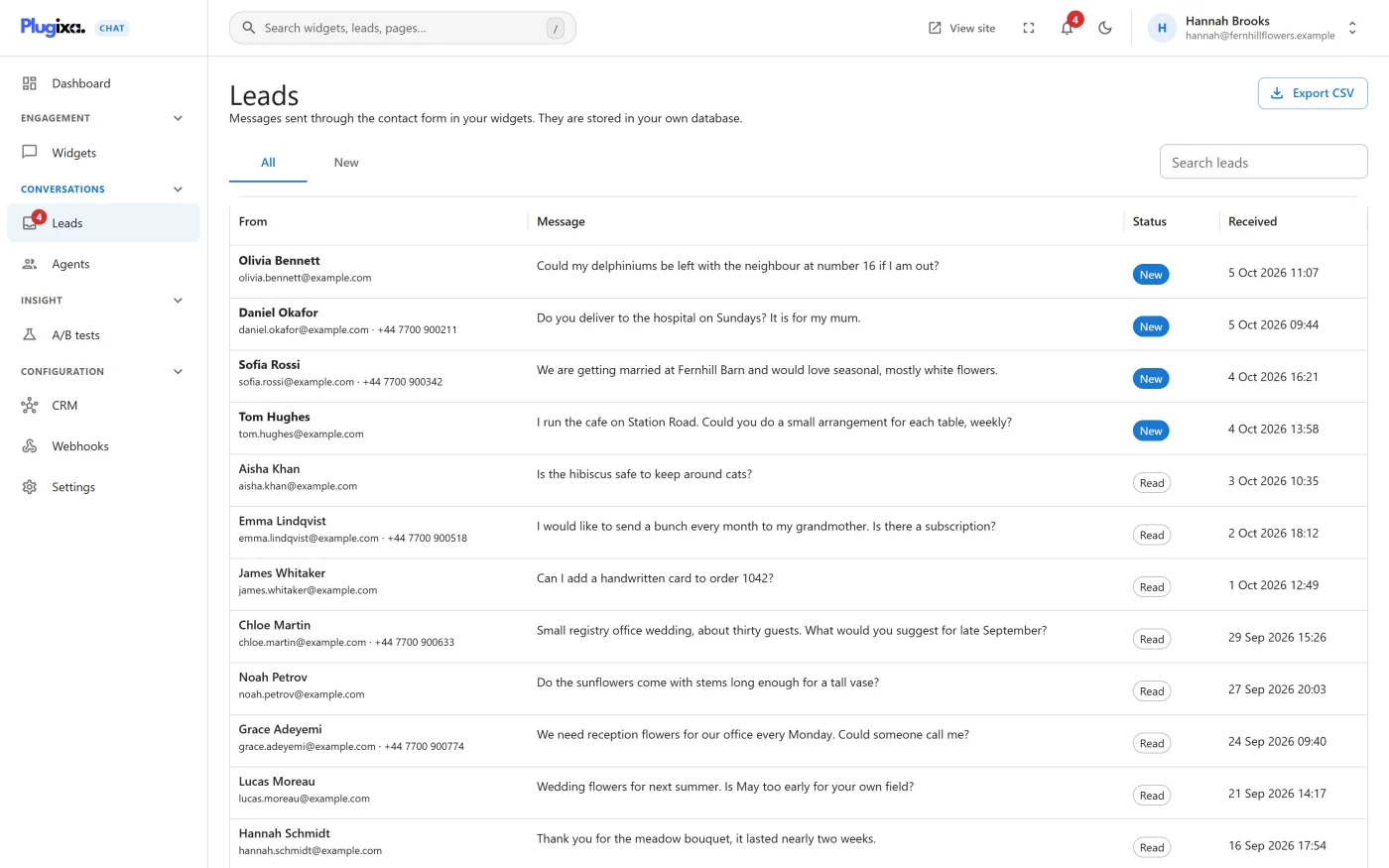
The list
| Column | What it shows |
|---|---|
| From | The sender’s name, or their email or phone when no name was given, with the contact details underneath |
| Message | The start of the message |
| Status | New or Read |
| Received | When it arrived, in the date and time format chosen in Settings |
Above the table:
| Control | What it does |
|---|---|
| All and New | Show every lead, or only the ones nobody has opened |
| Search leads | Searches names, email addresses, phone numbers and messages |
| Export CSV | Downloads the leads as a file. See Exporting |
The table shows 25, 50 or 100 rows a page. It starts with the number set under Settings -> Formatting -> Rows per page, up to 100.
With no leads at all the screen reads “No leads yet” and “Add the Contact form channel to a widget. Every message a visitor sends appears here, and a copy is emailed to you.”, with a Go to widgets button.
Opening a lead
Click a row. The lead opens in a panel on the right.
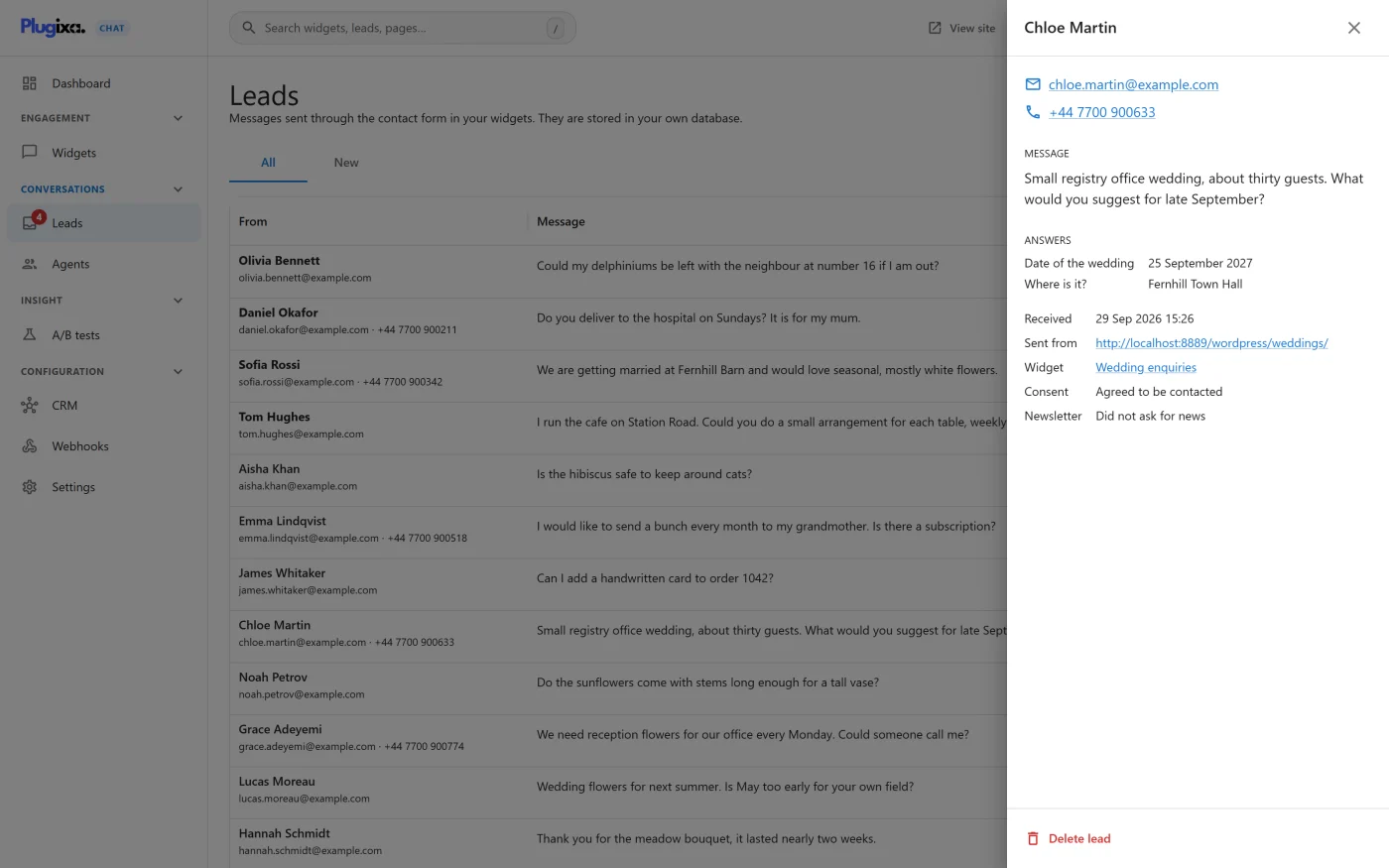
| Part | What it shows |
|---|---|
| Heading | The sender’s name, or “No name given” |
| A link that starts an email to the sender | |
| Phone | A link that starts a call |
| Message | The full message |
| Answers PRO | The answers to your own questions. See Custom form fields |
| Received | Date and time |
| Sent from | The page the visitor was on, as a link |
| Widget | The widget the form belongs to |
| Consent | Agreed to be contacted, or Not asked |
| Newsletter | Wants news and offers, or Did not ask for news |
Opening a lead marks it Read, when your account is allowed to edit. A lead cannot be marked New again from this screen.
Deleting a lead
Delete lead at the bottom of the panel asks “Delete this lead?” and explains “The message and the contact details will be removed from the list.” Confirm with Delete.
A deleted lead leaves the list at once. To remove messages automatically after a number of days, use the retention setting under Settings -> Privacy. See Settings.
Exporting
Export CSV downloads a file named leads- followed by today’s date.
When the New tab is selected, only new leads are exported; otherwise all
of them are. The search box does not narrow the export.
| Column | Content |
|---|---|
| Date | When the message arrived |
| Name | |
| Phone | |
| Message | |
| Consent | “Yes” when the consent box was ticked |
| Newsletter | “Yes” when the newsletter box was ticked |
| Sent from | The page address |
| Widget | The widget’s name |
| Status | New or Read |
The file is UTF-8 and opens in spreadsheet programs with accented and
non-Latin characters intact. A cell that begins with =, +, - or @
is prefixed with an apostrophe, so a spreadsheet does not run it as a
formula.
Exporting needs its own permission. Administrators have it.
Where new leads are flagged
| Place | What you see |
|---|---|
| The sidebar | A count beside Leads |
| The bell in the top bar | A count of new leads. Opening it lists the five latest under New leads, with View all. When there are none it reads “You are all caught up.” The count is refreshed every minute |
| The Dashboard | The Leads waiting tile and the Recent leads card |
| Your inbox | The notification email. See Contact form |
The search in the top bar finds leads by name, email, phone or message, and opens the one you choose.
What is stored with a lead
| Stored | Notes |
|---|---|
| Name, email, phone, message | As the visitor typed them |
| Consent and newsletter | Whether each box was ticked |
| The page address | Only when it is an address on your own site |
| The widget | Which widget’s form was used |
| The visitor’s IP address | In the form chosen under Settings -> Privacy. By default a one-way hash. It is never shown on any screen and is not part of the export |
| Status and date | New or Read, and when it arrived |
Leads are covered by WordPress’s own Export Personal Data and Erase Personal Data tools, under the name “Plugixa Chat leads”. See Privacy and uninstall.
What to do next
- Set who is emailed in Settings.
- Send leads to a mailing list with CRM connectors PRO.
- Post leads to another system with Webhooks PRO.