

Contents
Dashboard - Plugixa Chat
Plugixa Chat -> Dashboard is the first screen you see. It answers one question: are your widgets being seen and used.
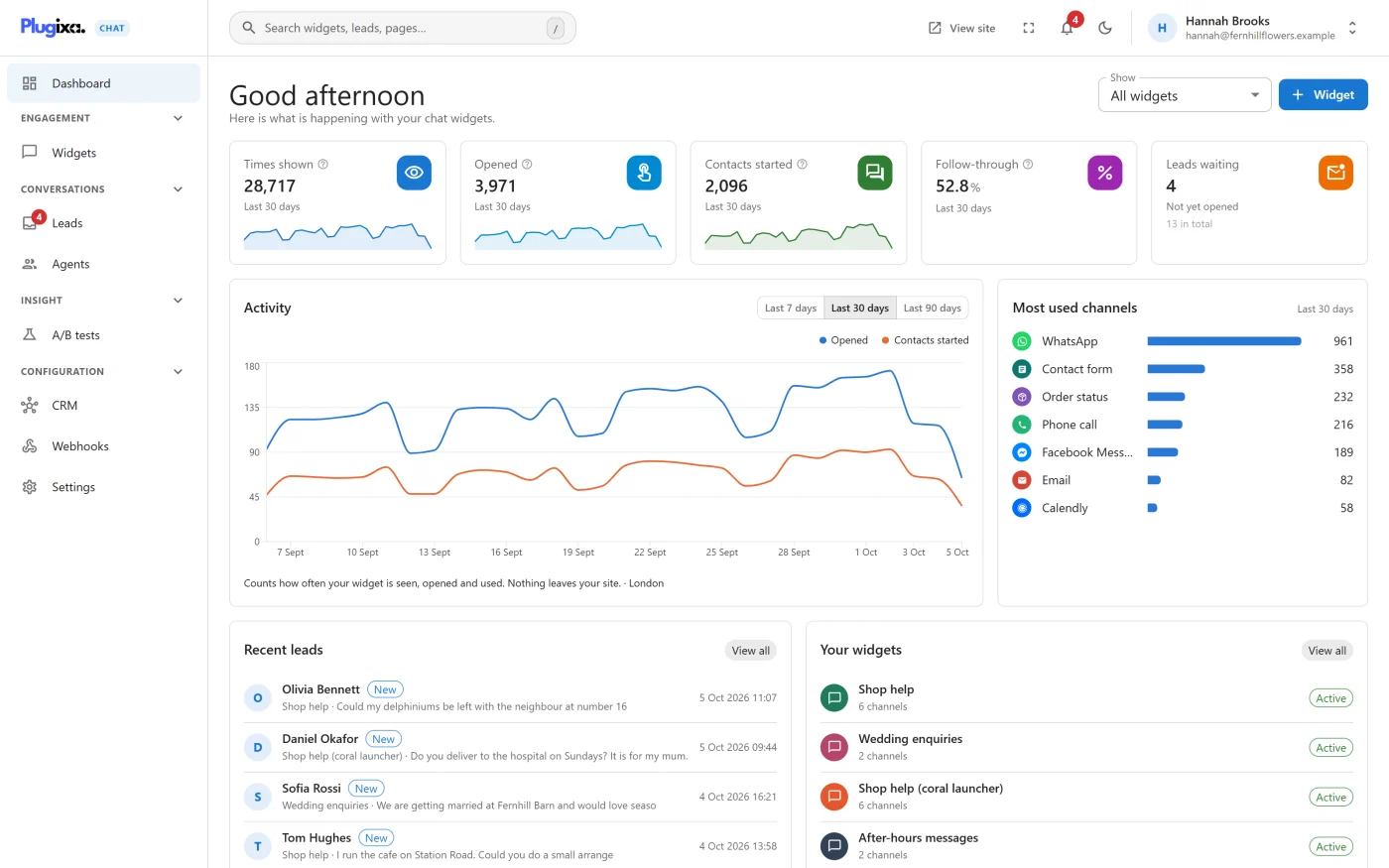
The page opens with a greeting that follows the time of day, the line “Here is what is happening with your chat widgets.” and, on the right, the Widget button with a plus sign, which starts a new widget. The button is shown to people who are allowed to create widgets.
In Pro, a Show picker appears beside that button once the site has two or more active widgets. See Dashboard filter and dark mode PRO.
The tiles
Five tiles sit across the top. The first four cover the period chosen on the Activity card, and each shows that period under its number. The three counting tiles also draw a small line of the daily values.
| Tile | What it shows |
|---|---|
| Times shown | How often the button appeared on a page someone loaded |
| Opened | How often someone pressed the button to see your channels |
| Contacts started | How often someone chose a channel and went through to it |
| Follow-through | Of the times the button was opened, the share that led to a channel being picked, as a percentage |
| Leads waiting | Contact form messages nobody has opened yet, with the total number of leads underneath. The tile links to the Leads screen |
Follow-through is contacts started divided by opens, to one decimal place. It is 0 while nothing has been opened.
Clicks on chat buttons placed in your content, and on the WooCommerce product button, count towards Contacts started for the widget and channel they borrow.
Activity
A chart of times shown, opened and contacts started for each day. The switch in the card’s corner sets the period for the whole dashboard:
| Period | Covers |
|---|---|
| Last 7 days | Seven days |
| Last 30 days | Thirty days. This is the default |
| Last 90 days | Ninety days |
Before any visitor has seen a widget the card reads “No activity recorded yet. Figures appear once visitors start seeing your widget.”
Most used channels
The channels visitors chose most in the period, by number of contacts started. Up to ten are listed. With nothing chosen yet it reads “No channel has been chosen in this period yet.”
Recent leads
The five most recent contact form messages, with the sender, the widget, the start of the message and when it arrived. A message nobody has opened is marked New. Clicking a row opens that lead on the Leads screen. View all opens the full list.
With no messages yet the card reads “No messages yet. Add the Contact form channel to a widget to start collecting them.”
Your widgets
A short list of your widgets with their status and number of channels. When there are more than the card shows, a line points to the Widgets screen. With no widget yet it reads “No widget yet. Create one, pick your channels, and switch it on.”
Where the figures come from
The numbers are counted on your own site and stored in your own database. See Analytics for what counts as a view, an open and a contact, and how long the figures are kept.