

Contents
Find and Replace - Plugixa Permalink Manager
PRO Find and replace edits the addresses themselves. Use it when a
section is renamed and the pattern is not what changed: the blog becomes the
journal, guides becomes how-to, a brand is rebranded.
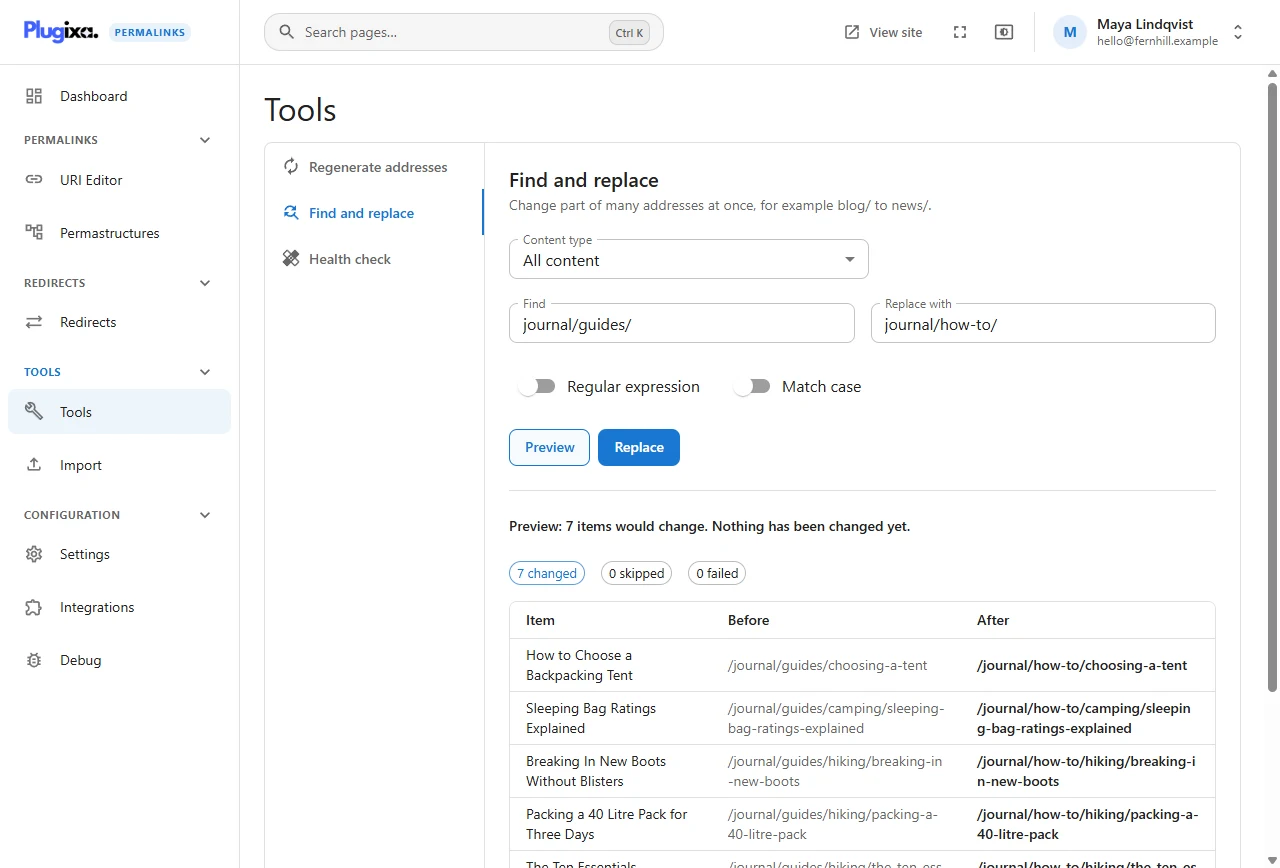
The fields
| Field | Meaning |
|---|---|
| Content type | All content (every post type), All taxonomies, or one post type or taxonomy. Content and taxonomies are searched in separate runs |
| Find | The text to look for in each address, up to 200 characters |
| Replace with | What to put in its place. Leave empty to remove the text |
| Regular expression | Treat Find as a pattern rather than literal text |
| Match case | Off by default: Blog/ and blog/ are the same |
An example
The demonstration shop wants its guides under how-to:
- Find:
journal/guides/ - Replace with:
journal/how-to/
Preview lists the seven posts affected, for example
/journal/guides/hiking/breaking-in-new-boots becoming
/journal/how-to/hiking/breaking-in-new-boots. Posts in News and Trip Reports
do not contain the text and are not listed.
Including the slashes in the search matters. Searching for guides alone would
also match a product called “Mountain Guides Jacket”.
Regular expressions
Tick Regular expression to use a pattern, with $1, $2 in the
replacement for captured groups.
| Find | Replace with | Effect |
|---|---|---|
^blog/(\d{4})/ |
journal/$1/ |
Renames the first part, keeps the year |
-\d+$ |
(empty) | Removes a trailing number from every address |
^shop/(tents|packs)/ |
gear/$1/ |
Moves two sections only |
A pattern that does not compile is refused before anything runs.
What it will not do
- Touch items set to Keep my URI and skip bulk tools.
- Create a duplicate. If a replacement would give two items the same address, the second one fails and is reported.
- Change the WordPress slug, the title or the content. Only the stored custom address is edited.
Hand-typed addresses are included: the tool edits addresses as they are, whoever wrote them. And every address it changes counts as hand-typed afterwards, so Regenerate and the site-wide setting leave it alone from then on.
The preview does not predict collisions. An item whose new address turns out to be taken is reported as failed by the real run.
After the run
Every replaced address redirects to its new one. The run can be undone from its result; see Tools.
If the change should also apply to future content, update the pattern too. Find and replace fixes what exists; the pattern decides what comes next.
From the command line
wp plugixa-permalinks find-replace "journal/guides/" "journal/how-to/" --type=post --dry-run
See WP-CLI.