

Contents
Content Settings - Plugixa Permalink Manager
The Content tab decides what the plugin manages.
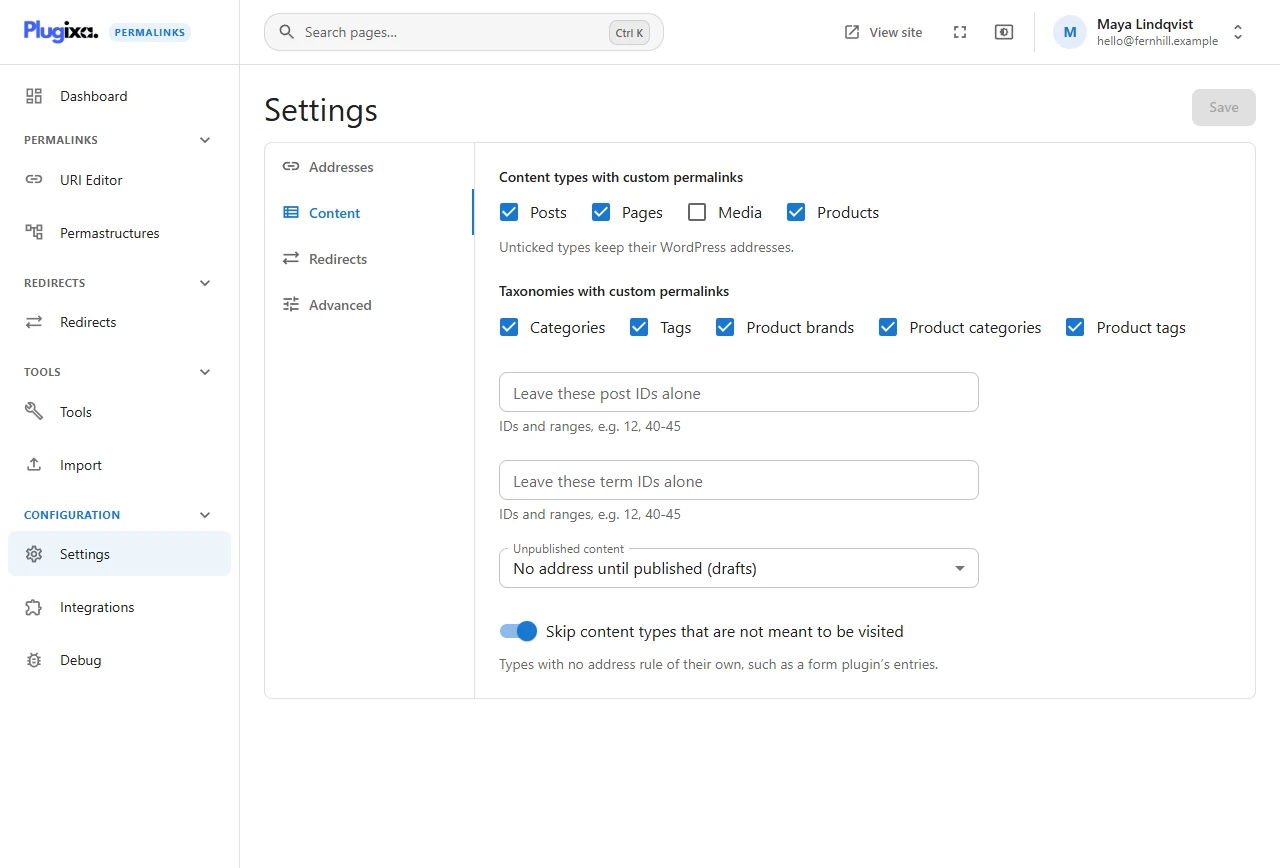
Content types with custom permalinks
A tick box for each public post type: Posts, Pages, Media and any that plugins add, such as Products. An unticked type keeps its WordPress addresses: it has no tab on Permastructures, no Permalink box, and does not appear in the URI Editor.
Four types are unticked by default, because they are rarely pages a visitor is meant to reach:
| Type | What it is |
|---|---|
Media (attachment) |
Attachment pages |
tribe_events |
An events plugin’s events |
e-landing-page |
A page builder’s landing pages |
elementor_library |
A page builder’s saved templates |
Tick any of them to give it custom addresses.
Taxonomies with custom permalinks
The same for taxonomies: Categories, Tags, and custom ones such as Product categories, Product tags and Product brands.
Leave these post IDs alone / Leave these term IDs alone
To exclude single items rather than a whole type, list their IDs. Ranges are allowed:
12, 40-45, 318
An excluded item is left to WordPress, and it is locked in the URI Editor so nobody gives it an address by accident.
Exclude an item before it has a custom address. If it already has one, that address simply stops working, with no redirect. To retire an existing custom address cleanly, set the item to Disable the custom permalink instead, which leaves a redirect.
Unpublished content
| Choice | Effect |
|---|---|
| Give drafts an address too | An address is stored as soon as the item is first saved |
| No address until published (drafts) | The default. Drafts have none; pending items do |
| No address until published (drafts and pending) | Neither has one until it is published |
Waiting until publication avoids filling the list with addresses for titles that change three times before they go live. It is why a draft shows a dash in the Permalink column.
Skip content types that are not meant to be visited
On by default. Some plugins register post types that have no address rule of their own, such as a form plugin’s entries or a page builder’s templates. With this on, they are left out even if they are technically public.
Turn it off only if a content type you ticked above is missing from Permastructures and the URI Editor.