

Contents
Addresses Settings - Plugixa Permalink Manager
The Addresses tab decides how addresses are built.
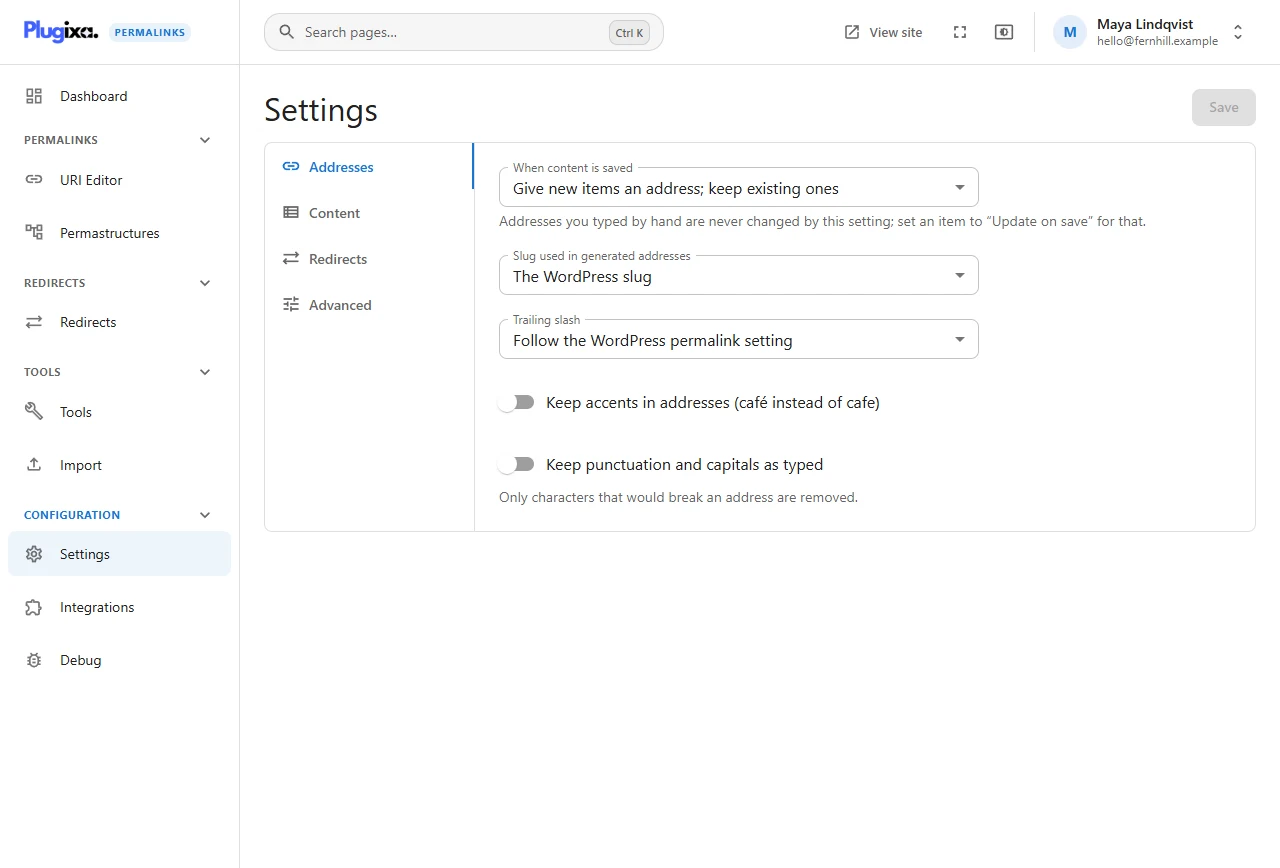
When content is saved
What the plugin does each time an item is created or updated.
| Choice | Effect |
|---|---|
| Give new items an address; keep existing ones | The default. A new item gets an address from its pattern. Editing it later does not move it |
| Also update generated addresses when the slug or category changes | A generated address is rebuilt from the pattern when the item is saved, so it follows a changed slug or category. The old address redirects |
| Do not create addresses for new items | New items stay on their WordPress address until you give them one |
Addresses you typed by hand are never changed by this setting; set an item to “Update on save” for that.
This is the “global setting” that the update mode Follow the global setting refers to. Any single item can opt out of it.
Slug used in generated addresses
Which word %postname% puts into a generated address.
| Choice | Effect |
|---|---|
| The WordPress slug | The default. Whatever is in WordPress’s own slug field |
| A slug made from the title | Built from the current title, ignoring an edited slug |
| The parent’s custom address plus the slug | A child item is placed under its parent’s custom address rather than its parent’s slug |
The third choice matters for hierarchical content. On the demonstration site
Our Story is a child of About Fernhill. If About had the custom address
company, this choice would put the child at company/our-story instead of
about/our-story.
Trailing slash
| Choice | Example |
|---|---|
| Follow the WordPress permalink setting | The default. Whatever your structure under Settings, Permalinks ends with |
| Always add one | /about/. Never added to an address ending in a file extension, such as /feed.xml |
| Never add one | /about |
The other form redirects to the chosen one; see Redirects settings.
Keep accents in addresses
Off by default: Crème brûlée becomes creme-brulee. Tick it to keep
crème-brûlée. Accented addresses work in every modern browser, but some
people prefer plain letters for sharing and typing.
Keep punctuation and capitals as typed
Off by default: addresses are lower-cased and punctuation is removed. Tick it to keep what you type; only characters that would break an address are removed.
Leave this off unless you are matching addresses from an older system exactly. Visitors arrive at the right page whatever case they type either way.