

Contents
Regenerate Addresses - Plugixa Permalink Manager
Saving a pattern only affects new items. Regenerate addresses is how you apply it to everything you already have.
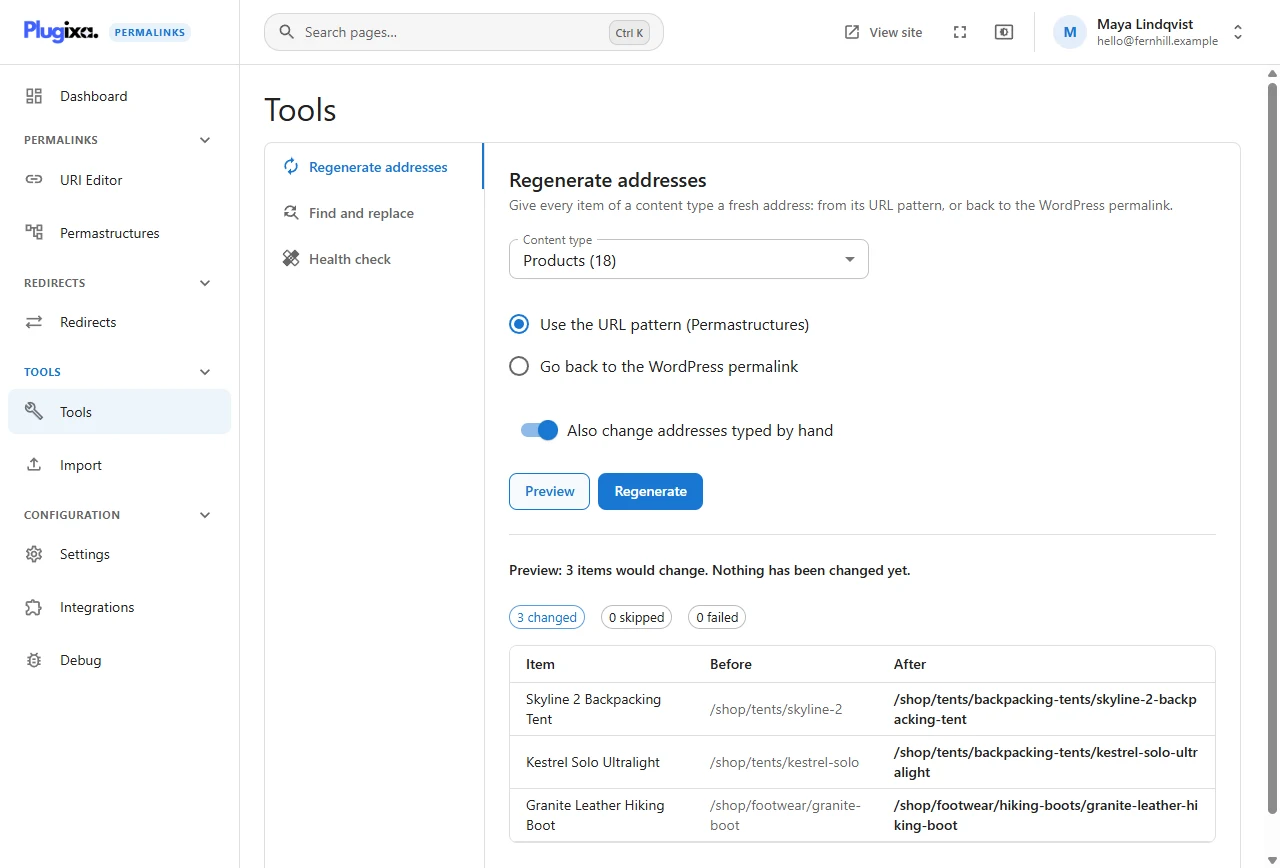
The choices
| Choice | Meaning |
|---|---|
| Content type | Which post type or taxonomy to work through. One at a time |
| Use the URL pattern (Permastructures) | Give each item the address its pattern produces |
| Go back to the WordPress permalink | Remove the custom addresses of this content type |
| Also change addresses typed by hand | Off by default. Tick it to overwrite hand-typed addresses too |
A normal run
- Save the pattern on the Permastructures screen.
- Open Tools, Regenerate addresses and choose the content type.
- Click Preview. Read the counts and the table.
- Click Regenerate.
When the demonstration shop was set up, its 18 products all moved from
/product/... to /shop/<category>/... in one run, and each /product/...
address became a redirect.
Why items are skipped
The preview’s skipped count is items the run deliberately leaves alone:
- Their address was typed by hand and Also change addresses typed by hand is not ticked.
- They are set to Keep my URI and skip bulk tools or to Disable the custom permalink.
- They are excluded in Content settings.
Items whose address is already what the pattern produces are not counted at all: they are neither changed nor skipped. Drafts, pending and scheduled items are not part of a run; only published and private content is.
In the screenshot above the tick box is on, so the three products with hand-typed short addresses would be moved back to the pattern. With it off those three are skipped and nothing changes.
When an address is already taken
A pattern can produce the same address for two items, for example two posts with
the same title in the same category. The second one does not fail: it gets a
number on the end (-2, -3…), the way WordPress numbers duplicate slugs,
and the preview marks it as taken.
An item fails only when the pattern produces an address that is not allowed, such as a reserved one. The run reports it and moves on; settle it by hand in the URI Editor.
Going back to WordPress addresses
Go back to the WordPress permalink sets each item’s stored address to the one WordPress would give it. The address it had becomes a redirect to that, so nothing breaks. The items stay managed and still count on the dashboard.
Here a taken address is not numbered: if another item already holds an item’s WordPress address, that item is reported as failed.
Undo
A finished run offers Undo, which restores every address the run changed. See Tools.
From the command line PRO
wp plugixa-permalinks regenerate --type=product --dry-run
wp plugixa-permalinks regenerate --type=product
See WP-CLI.