

Contents
Plugixa Image Map - User Documentation
Welcome to the official documentation for Plugixa Image Map, a WordPress plugin that turns any picture into an interactive map: a floor plan with rooms you can point at, a street map with store pins, a product photo with numbered parts.
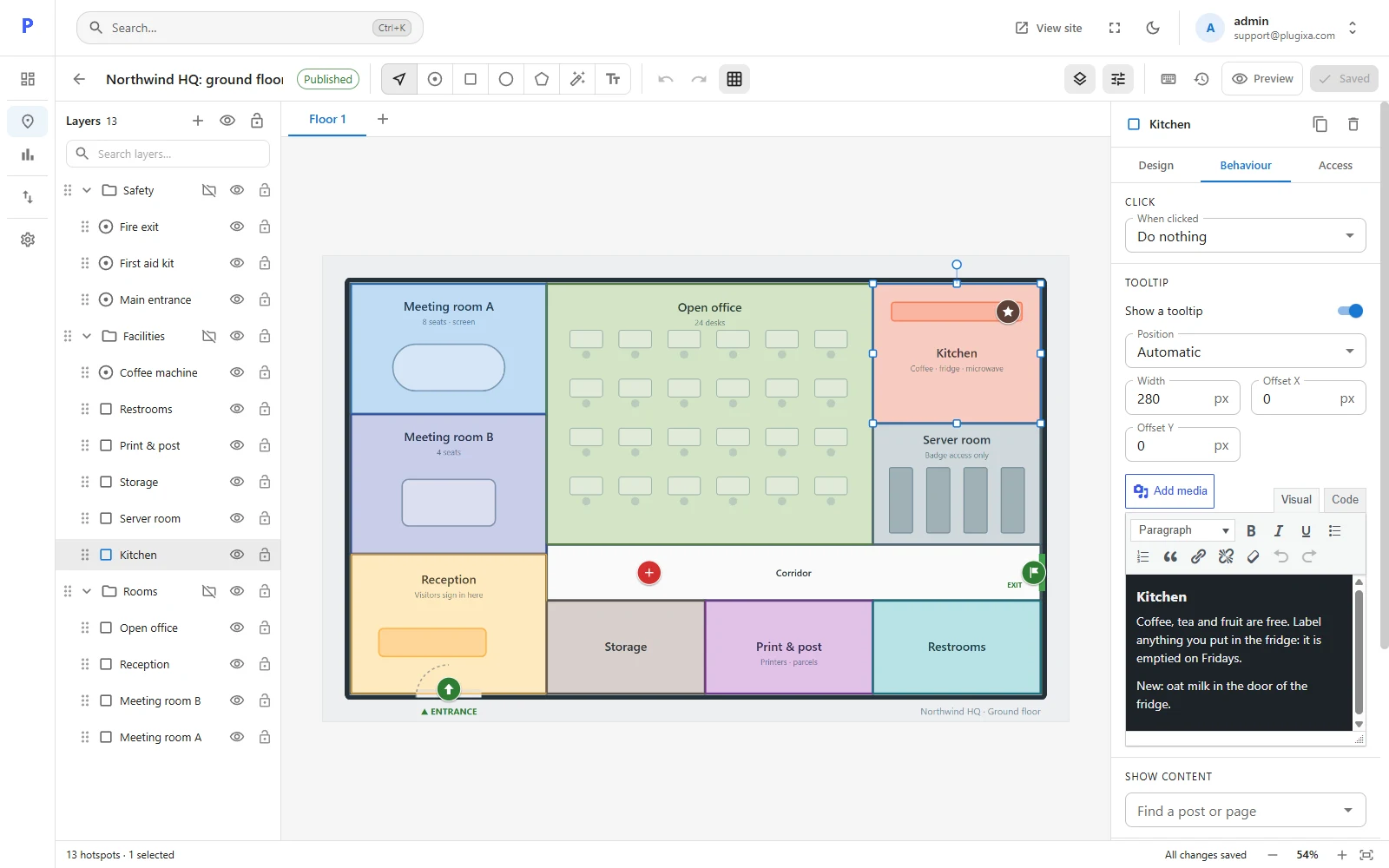
Plugixa Image Map ships in two editions:
- Free - the editor with five drawing tools, tooltips, links, layers and groups; zoom, full screen and a searchable list of hotspots for visitors; version history and autosave; export, import and an importer for Image Map Pro; a shortcode, a block and WP-CLI commands.
- Pro PRO - several floors in one map, hotspots that show only to some visitors or between two dates, tooltips filled from a post, page or product, your own picture icons and animations, a magic wand that outlines an area in one click, a spreadsheet import, and statistics.
The free edition is not a trial. See the complete Free vs Pro feature matrix.
Three decisions that shape everything else
| Decision | What it means for you |
|---|---|
| Hotspots are stored as percentages of the picture | A map scales with its image. It looks the same on a phone and on a wide screen, and you can swap in a sharper copy of the picture without redrawing anything. |
| The server draws the map, not the browser | The picture, every shape and every tooltip are in the page’s HTML. Search engines and screen readers read them, and the map is visible before any script has loaded. |
| Nothing a visitor sees can run code | Tooltips are cleaned like post content, links are checked, and there is no “run this script” action. A map imported from another site is cleaned the same way. |
Key concepts
| Term | What it is |
|---|---|
| Map | One picture and the hotspots drawn on it. It has a title, a status and a history. |
| Hotspot | A shape on the picture: a spot, rectangle, oval, polygon or text label. |
| Tooltip | The box that opens when a visitor points at or taps a hotspot. |
| Layer | A hotspot as it appears in the layers panel. Layers have an order, and can be hidden or locked. |
| Group | A folder of layers. Hide, lock or move the whole group at once. |
| Draft / Published | Visitors only see published maps. A draft prints nothing on the page. |
| Version | A copy of the map kept every time it is saved. Any version can be restored. |
| Floor PRO | A second picture, with its own hotspots, inside the same map. |
Getting started
| Section | Description |
|---|---|
| Getting Started | Install, make your first map and put it on a page |
| Installing and updating | Requirements, moving between Free and Pro, updates and removal |
| Dashboard | What you have and what changed last |
| Free vs Pro | The complete feature matrix |
Building a map
| Section | Description |
|---|---|
| All maps | The list: publish, duplicate, export, trash |
| The editor | The toolbar, the canvas and the two panels |
| Drawing hotspots | Spots, rectangles, ovals, polygons, text and the magic wand |
| Styling hotspots | Colours, borders, icons, animations |
| Tooltips | What a hotspot says and how the box behaves |
| Links and actions | What happens on a click |
| Layers and groups | Order, hide, lock and organise |
| Map settings | The picture, zoom, full screen and the location list |
| Preview | Try the map as a visitor, on three screen sizes |
| History and autosave | Versions, checkpoints and recovered work |
| Keyboard shortcuts | Every key the editor understands |
Showing a map
| Section | Description |
|---|---|
| Shortcode | [plugixa_image_map id="12"] |
| Block | The Image Map block in the block editor |
| Accessibility | Keyboard, screen readers and reduced motion |
Pro features
| Section | Description |
|---|---|
| Floors PRO | Several pictures in one map, switched with tabs |
| Conditions PRO | Show a hotspot to some visitors, or between two dates |
| Linked content PRO | A tooltip that shows a post, page or product |
| Spreadsheet import PRO | Turn a CSV file into a map |
| Statistics PRO | Views, tooltip opens and clicks, without cookies |
Tools and reference
| Section | Description |
|---|---|
| Import and export | Move maps between sites, and bring them over from Image Map Pro |
| Settings | Dates, list size, history length, script loading, uninstalling |
| Roles and permissions | Who may see, edit, export and delete |
| Hooks | PHP filters and actions, and the events the map sends in the browser |
| REST API | Every route |
| WP-CLI | List, export and import from the command line, with every option |
| Privacy and data | What is stored, and what leaves the site |
| Troubleshooting | The map does not show, and other common questions |