

Contents
On this page
Cache-first mode - Plugixa Multi Currency for WooCommerce
The free plugin renders pages in the shopper’s currency on the server, which needs a cache that keeps one copy per currency. Cache-first mode works the other way round: shop pages are cached once, in your store currency, for everybody, and the prices on them are switched to the shopper’s currency in the browser. Any page cache or CDN keeps its full hit rate: WP Rocket, LiteSpeed Cache, Cloudflare, Varnish or your host’s cache.
Turn it on
- Open Settings and the Page caching tab.
- Switch on My site uses a page cache: Shop pages are cached once in your store currency and prices are switched in the browser. Cart and checkout always show the exact amounts.
- Click Save.
- Empty your page cache once, so no page saved before the change is served.
Or let the Tools page do it for you: see Recommended cache setup.
How it works
- Catalog pages (the shop, categories, product pages) are rendered once, in your store currency, whatever the visitor picked. The cache serves that same page to everyone.
- Each price on the page is marked so a small script can find it.
- In the browser, the script reads the shopper’s currency cookie and asks your site for the prices of the products on the page, in that currency. It swaps them in, including variation prices when a shopper picks a variation.
- The cart, the checkout and My Account are never cached and always show the exact amounts in the shopper’s currency, calculated on the server.
The price answers are themselves cacheable, per currency, for 5 minutes. Up to 100 products are priced in one request, and only published, visible products are answered.
Search engines and visitors without JavaScript see your store currency on catalog pages, which is also what crawlers get in server mode.
The Tools page
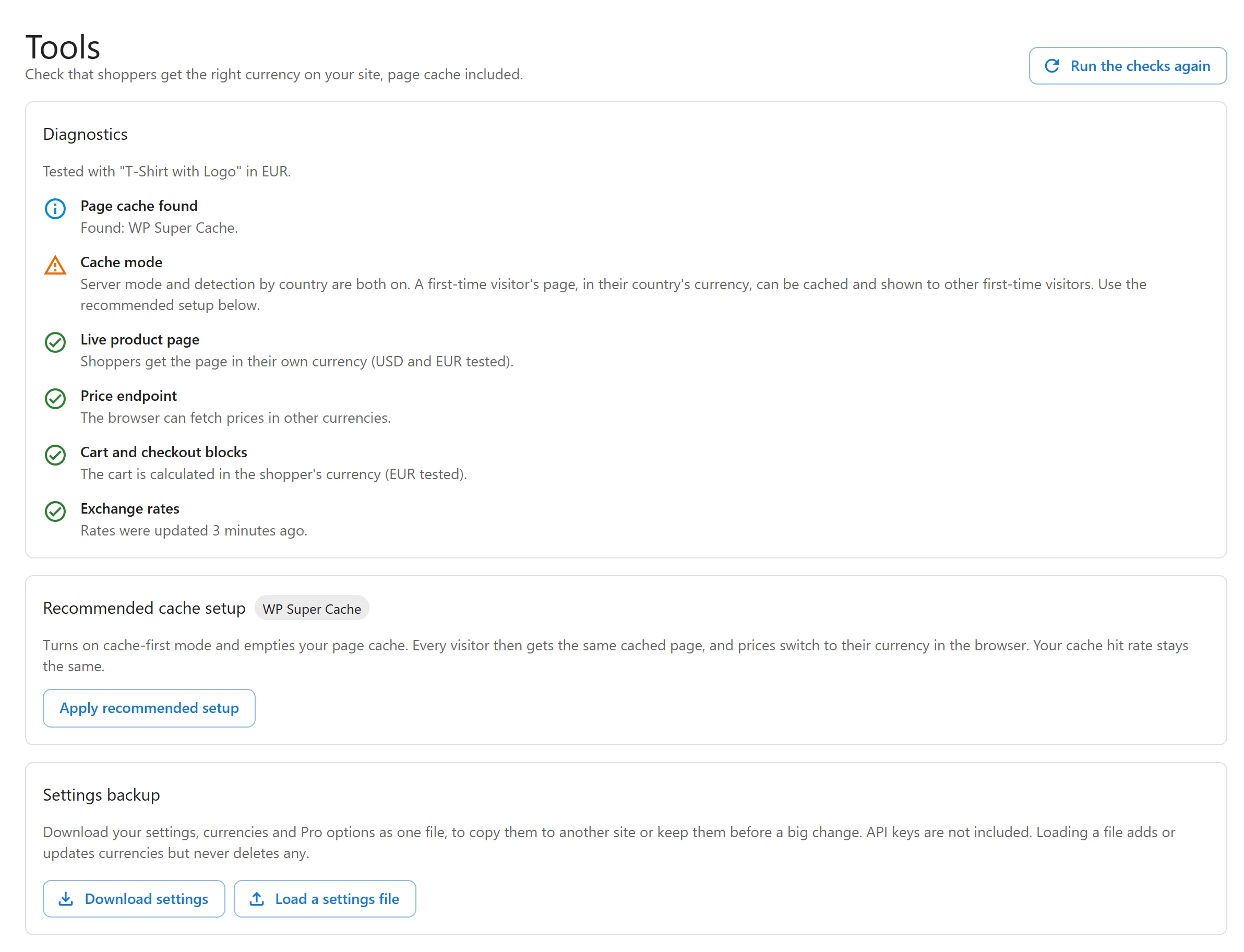
Open Plugixa Multi Currency > Tools: Check that shoppers get the right currency on your site, page cache included. The Diagnostics card runs live checks against your own site and shows each result:
| Check | What it tests |
|---|---|
| Page cache found | Which cache plugins are active, and cache headers sent by your host or CDN. |
| Cache mode | Whether the mode suits the cache found. For example, server mode with a cache that cannot keep one copy per currency is flagged. |
| Live product page | Loads a real product page as a shopper in your store currency and as one in another currency, and checks what each got. |
| Price endpoint | Whether the browser can fetch prices in other currencies, which cache-first mode needs. A security plugin or firewall that blocks the REST API for visitors is caught here. |
| Cart and checkout blocks | Whether the WooCommerce Store API calculates the cart in the shopper’s currency, and is not cached. |
| Exchange rates | When rates were last updated, and whether that update had errors. |
| WooPayments Multi-Currency is on | Shown when WooPayments would convert prices too. |
Click Run the checks again after a change. The page loads your site the way a shopper does, so some hosts block the test; it then says the test was skipped and why.
Recommended cache setup
The Recommended cache setup card lists the caches found on your site, marked In use, and CDN or hosting cache. Click Apply recommended setup for a cache: Turns on cache-first mode and empties your page cache. Every visitor then gets the same cached page, and prices switch to their currency in the browser. Your cache hit rate stays the same.
When it is done, it says Done. Cache-first mode is on., or which cache it emptied. For a cache the plugin cannot empty itself, it tells you what to do once by hand, for example Purge everything once in your Cloudflare dashboard.
Server mode or cache-first?
| Your site | Use |
|---|---|
| No page cache | Server mode (free). |
| WP Rocket, LiteSpeed Cache or WP Super Cache only | Server mode works, set up for you. Cache-first gives a better hit rate. |
| Cloudflare full-page cache, Varnish, a hosting cache, or another cache plugin | Cache-first mode. |
| Detection by country on, with any page cache | Cache-first mode, or WP Rocket in server mode. |
See Page caching for server mode.
Quick Links
Share