

Contents
On this page
Currency URLs - Plugixa Multi Currency for WooCommerce
By default a page has one address, and search engines see it in your store currency. With
currency URLs, each currency gets its own address: /shop/ shows US dollars and /eur/shop/
shows euros. Each address always shows one currency, so search engines can index the prices of
each market, and page caches need no cookie rules.
Open Settings and the Currency URLs tab.
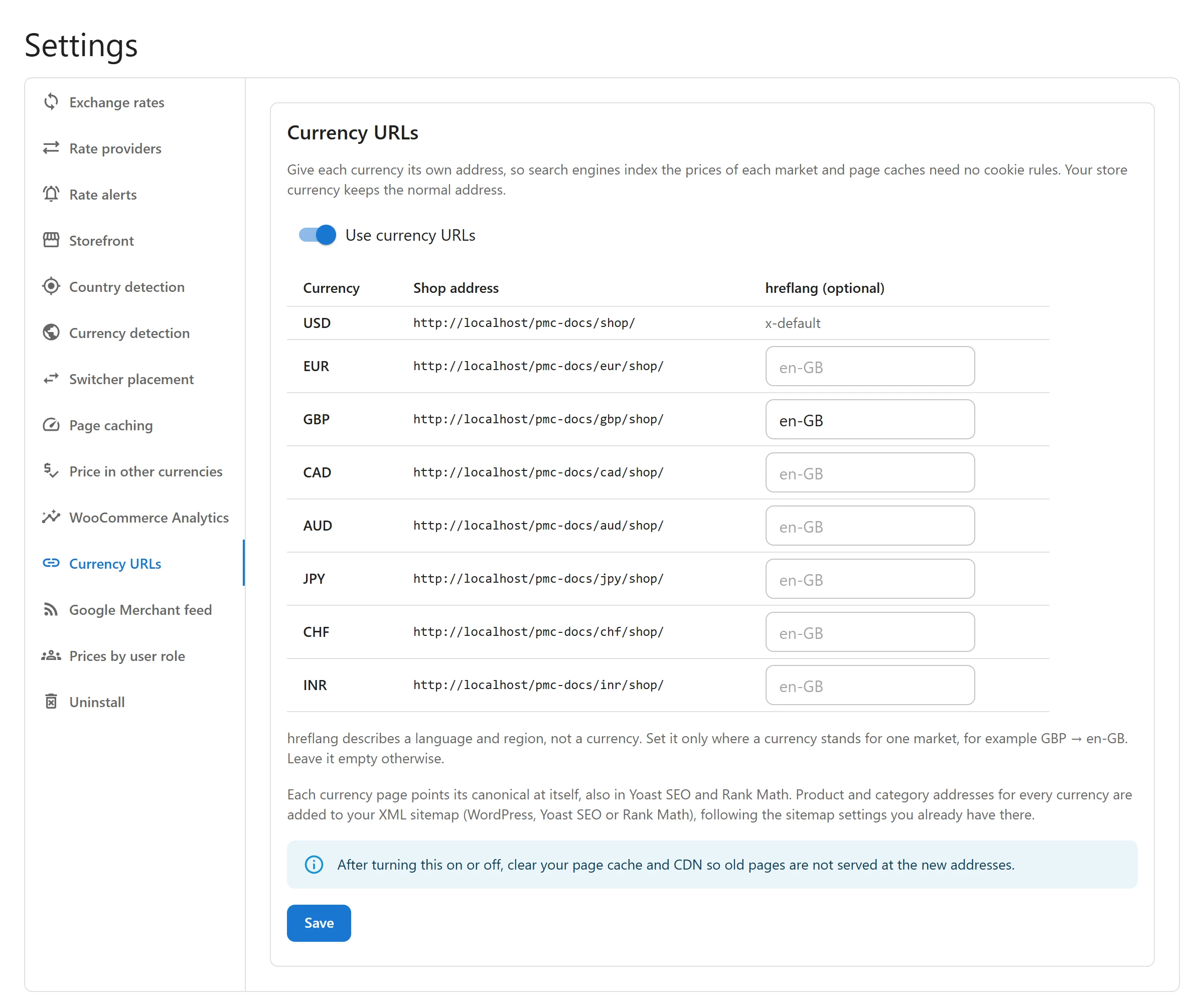
Turn it on
- Switch on Use currency URLs: Give each currency its own address, so search engines index the prices of each market and page caches need no cookie rules. Your store currency keeps the normal address.
- Check the Shop address examples the tab shows for your site.
- Click Save.
- Empty your page cache and CDN once, so old pages are not served at the new addresses.
Every enabled currency other than your store currency gets a prefix: its code in lower case, such
as /eur/, /gbp/ or /jpy/. Your store currency has no prefix. On a site installed in a
sub-folder, the prefix comes after the folder: /store/eur/shop/.
What shoppers see
- Every link on a page keeps the visitor’s currency: on
/eur/shop/, product, category and cart links all start with/eur/. - Picking a currency in the switcher goes to the same page at that currency’s address.
- A shopper who picked a currency earlier and opens a plain address is taken to their currency’s address.
- The cart and the checkout follow the currency of the address the shopper came from.
What search engines see
- Canonical: each currency address points its canonical at itself, because its prices differ. This also works in Yoast SEO and Rank Math, and on shop and category pages without an SEO plugin.
- Sitemaps: product and category addresses for every currency are added to your XML sitemap, in WordPress’s own sitemap, Yoast SEO or Rank Math, following the sitemap settings you already have there. Search engines then find the currency pages without having to crawl the plain ones first.
- Crawlers on a plain address still get your store currency.
hreflang (optional)
hreflang tells search engines which page is meant for which language and region. It describes a language and region, not a currency, so set it only where a currency stands for one market:
- In hreflang (optional), fill in a tag for a currency, for example
en-GBfor GBP. - Leave it empty for currencies that cover many markets, such as EUR or USD.
- Click Save.
Each page then gets an alternate link for every currency with a tag, plus an x-default link to
the store-currency address.
Before you turn it on
- Pages get new addresses for the other currencies; your existing addresses do not change. Your store-currency pages stay where they are.
- Empty your page cache and CDN after turning it on or off.
- With the setting off, the plugin no longer answers the prefixed addresses. Decide before
search engines have indexed the
/eur/pages, rather than turning it off again later.
Developers
plugixa_multi_currency_sitemap_currencies filters which currencies get sitemap entries, and
plugixa_multi_currency_sitemap_sources which post types and taxonomies are copied (default
product and product_cat). See Hooks and PHP helpers.
Quick Links
Share