

Contents
On this page
Currency statistics - Plugixa Multi Currency for WooCommerce
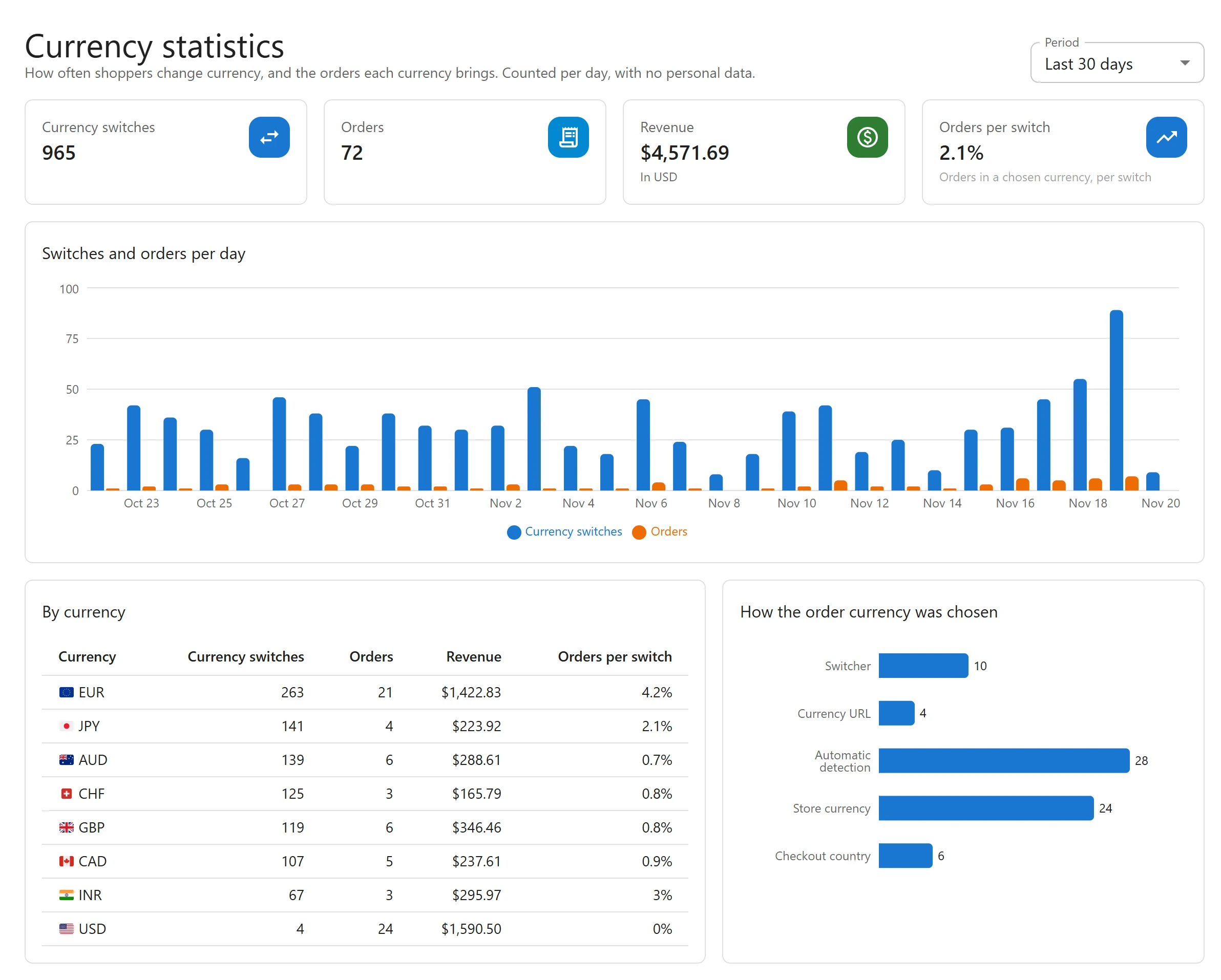
Currency statistics answer the questions behind a multi-currency shop: do shoppers use the switcher, which currencies sell, and does showing a currency lead to orders in it? Open Plugixa Multi Currency > Currency statistics, under Reports.
What is counted
- A switch is counted when a shopper’s currency actually changes. Picking the currency already shown counts nothing, and bots are never counted.
- An order is counted once, when it is placed, in its own currency, with its total in your store currency and how its currency was chosen.
Counters are kept per day, currency and source. No visitor, IP address, user or order number is stored.
The screen
Choose the Period: Last 7 days, Last 30 days (the default), Last 90 days or Last 365 days.
| Part | What it shows |
|---|---|
| Currency switches | How many times shoppers changed currency in the period. |
| Orders and Revenue | Orders placed in the period, and their revenue in your store currency. |
| Orders per switch | Orders in a chosen currency, per switch: a rough measure of how often a switch leads to an order. |
| Switches and orders per day | A chart of both, day by day. |
| By currency | For each currency: switches, orders and revenue. |
| How the order currency was chosen | Orders split by source. |
Sources
| Source | The order’s currency came from |
|---|---|
| Switcher | The shopper picked it in a switcher. |
| Currency URL | A currency address such as /eur/. See Currency URLs. |
| Checkout country | The country entered at checkout. See Country detection. |
| Automatic detection | The page language, the customer’s country or geolocation. |
| Store currency | Nothing: the shopper stayed in your store currency. |
Good to know
- Counting starts when the Pro app is active: there are no figures from before.
- Revenue here is counted when the order is placed. The dashboard’s revenue widgets count processing, completed and on-hold orders instead, so the two can differ. See Revenue reports.
- With page caching in cache-first mode, switches are still counted: the switch itself always reaches your site.
Quick Links
Share