

Contents
On this page
Rate providers - Plugixa Multi Currency for WooCommerce
The free plugin gets its rates from the European Central Bank, with Frankfurter as a backup. Pro adds six more providers, lets you choose the order they are tried in, and lets rates update more or less often than once a day.
Open Settings and the Rate providers tab.
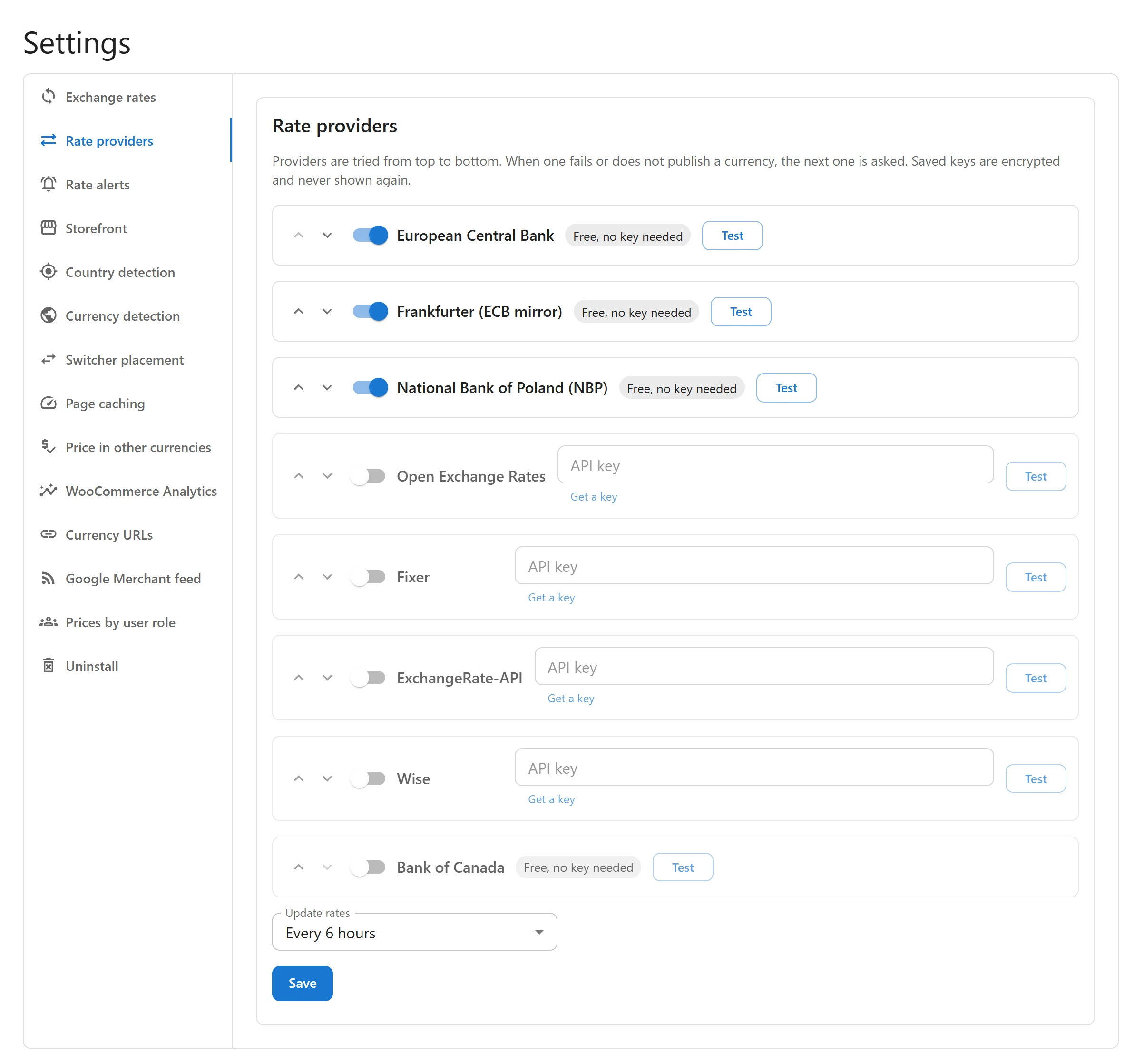
The providers
| Provider | Key | What it covers |
|---|---|---|
| European Central Bank | Free, no key needed | About 30 currencies, once a working day. |
| Frankfurter | Free, no key needed | The same ECB rates, from another server. |
| National Bank of Poland (NBP) | Free, no key needed | About 32 currencies every business day, including several the ECB does not publish, such as the Ukrainian hryvnia, the Chilean peso and the Vietnamese dong. |
| Bank of Canada | Free, no key needed | About 26 currencies every business day. |
| Open Exchange Rates | API key | Many currencies. Its free plan publishes against the US dollar only; the plugin works out cross rates for any store currency. |
| Fixer | API key | Many currencies. Its free plan publishes against the euro only; cross rates are worked out the same way. |
| ExchangeRate-API | API key | Rates against any store currency. |
| Wise | Personal API token | Wise’s mid-market rates, against your store currency. |
Central bank rates are published against the bank’s own currency, so the plugin always converts them to your store currency.
Failover order
Providers are tried from top to bottom. When one fails, or does not publish one of your currencies, the next one is asked for what is still missing. Put the provider you trust most at the top, and a free one below it as a backup.
- Switch on Enabled for the providers you want to use.
- Use Move up and Move down to set the order.
- Click Save.
API keys
For a provider that needs a key:
- Click Get a key to open the provider’s sign-up page, and create a key there.
- Paste it in API key and click Save. The field then shows Key saved.
- To change it, type a new key. To delete it, click Remove key.
Saved keys are encrypted and never shown again. If your server cannot encrypt (OpenSSL is missing), the tab warns you that keys will be stored as they are.
Keys are sent only to their own provider, when rates are fetched.
Test a provider
Click Test on a provider: Asks this provider now, with the saved key. The answer is Works for all your currencies., or Works. Not published: followed by the currencies that provider does not cover, or the provider’s own error, for example a wrong key.
How often rates update
Choose Update rates:
| Option | Use it when |
|---|---|
| Every 30 minutes | Prices should follow the market closely. |
| Every hour | |
| Every 6 hours | |
| Once a day | The default, and the same as the free plugin. |
| Once a week (prices stay put) | You want stable prices and accept a less current rate. |
The schedule only runs when Update rates automatically every day is on in Settings > Exchange rates. Most central banks publish once a working day, so updating more often only helps with the keyed providers.
Rates that look wrong
The free safety check still applies: a rate of zero, or a jump of more than 50% from the last ECB or Frankfurter rate, is refused. To be warned of smaller moves, or to approve them first, see Rate alerts and history.
Quick Links
Share