

Contents
Manual orders - Plugixa Multi Currency for WooCommerce
In wp-admin the plugin never converts anything, so an order you create by hand is normally in your store currency. Pro adds a currency picker to the order screen, so you can create an order for a customer in their own currency, for example a quote accepted by phone or an invoice for a B2B customer.
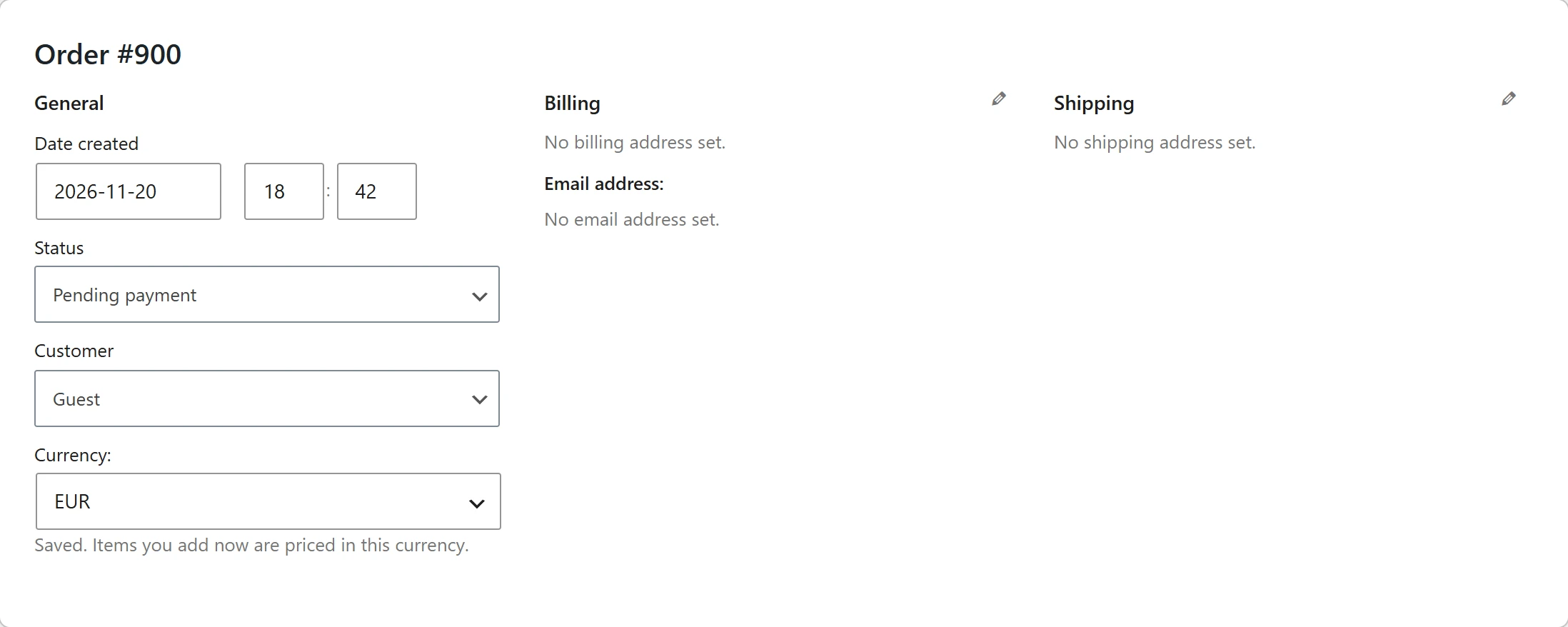
Create an order in another currency
- Go to WooCommerce > Orders and click Add order.
- Under the order’s status and customer, choose the Currency:. The choice is saved at once: Saved. Items you add now are priced in this currency.
- Click Add item(s) and add products, fees, shipping and coupons as usual. They are priced in the chosen currency, exactly as a shopper in that currency would see them.
- Click Recalculate, then Create.
Pick the currency before adding items. Prices use today’s rate, margin and rounding, and fixed prices per currency are used when the product has them.
Change the currency
The currency can only change while the order has no lines, so an order never mixes currencies. Once an item is added, the picker says Remove all items to change the currency. Remove the items, change the currency, and add them again.
The picker is shown on orders created in wp-admin that can still be edited. Orders placed by customers at checkout keep the currency they were placed in.
What is saved
When you save the order, the plugin saves the same data as for a checkout order: the rate, the conversion factor with the margin, and the totals in your store currency. The order then shows in the Currency column, the reports and the order export like any other. See Orders and refunds.
Good to know
- Coupons follow the order’s currency: a fixed coupon is converted, or uses its fixed amount for that currency. See Fixed shipping and coupons.
- Only users who can edit orders can change the currency.
Quick Links
Share