

Contents
On this page
Charm pricing - Plugixa Multi Currency for WooCommerce
A converted price such as 27.43 EUR looks converted. Charm pricing moves it onto a price ending you choose, such as 27.99 or 29.90, so it looks like a price you set yourself. Each currency has its own ending.
Charm endings are set on the currency’s form, in the Pro rules for panel below the free fields, and saved with the currency.
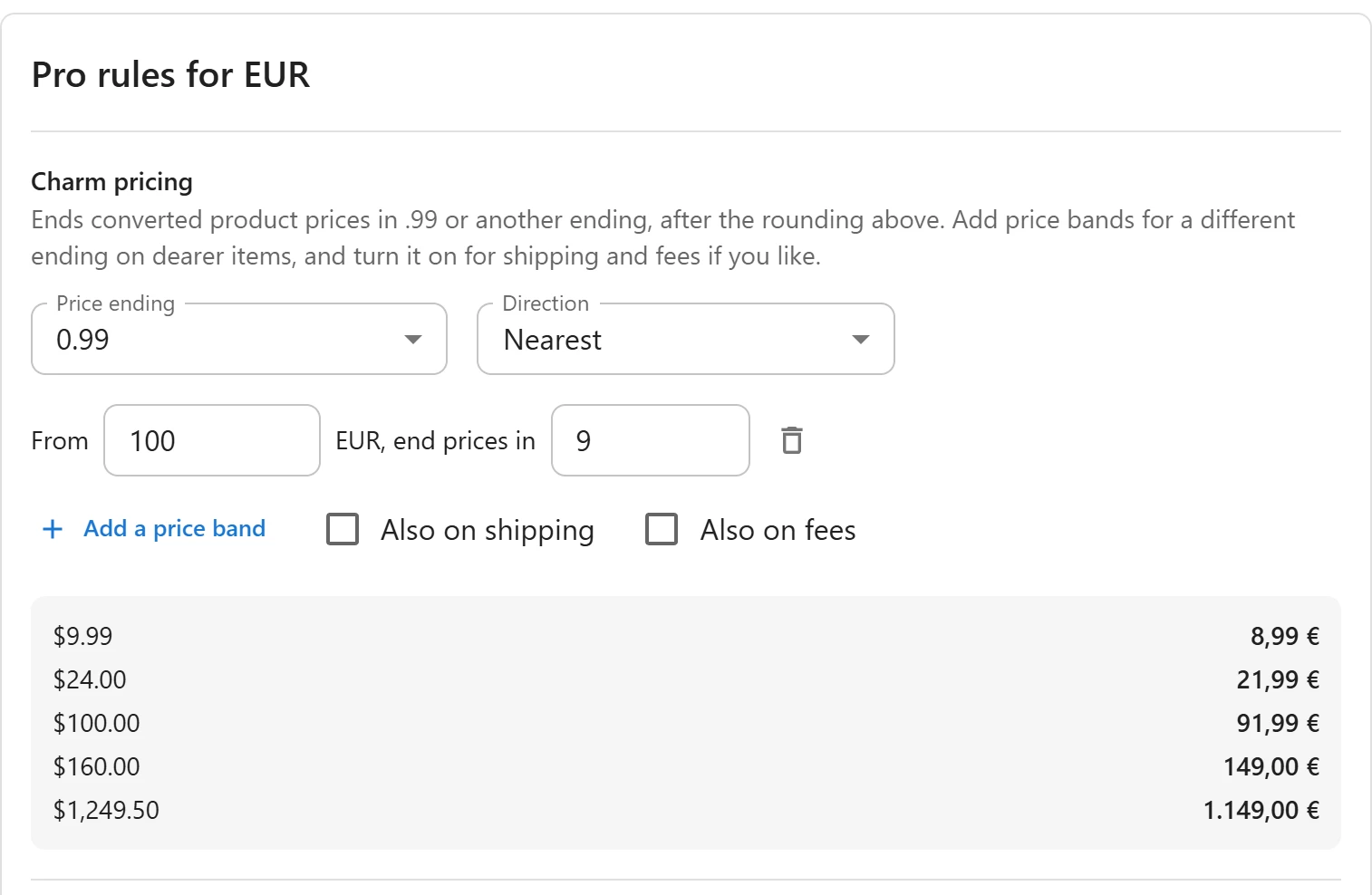
Set a price ending
- Open Currencies and click the currency.
- Scroll to Pro rules for the currency, section Charm pricing.
- Choose a Price ending: No charm ending,
0.99,0.95,0.90,0.49,9.90,9.99,99,990, or Custom… to type your own (for example0.89or4.99). - Choose the Direction: Nearest, Up or Down.
- Click Save.
The ending is applied after the currency’s rounding rule, to converted product prices.
How an ending works
An ending repeats at a fixed step: the next power of ten above it.
| Ending | Step | Prices it gives |
|---|---|---|
0.99 |
1 | 26.99, 27.99, 28.99 |
0.95 |
1 | 26.95, 27.95, 28.95 |
9.90 |
10 | 19.90, 29.90, 39.90 |
99 |
100 | 1,899, 1,999, 2,099 |
990 |
1000 | 1,990, 2,990, 3,990 |
The price moves to the nearest value with that ending, or always up, or always down, as the
Direction says. For example, with 0.99:
| Rounded price | Nearest | Up | Down |
|---|---|---|---|
| 27.43 | 26.99 | 27.99 | 26.99 |
| 27.60 | 27.99 | 27.99 | 26.99 |
A price below the first ending, such as 0.50 with 0.99, always goes up, never to zero.
Endings like 99 and 990 suit currencies with large numbers and no decimals, such as the yen
or the Indian rupee.
Price bands
Expensive items often look better with another ending, or none at all. Add bands:
- Click Add a price band.
- Enter Band starts at price, in the currency, for example
100. - Enter the Ending for this band, for example
9. Leave it empty for no charm ending from that price up.
The band with the highest start at or below the price wins; below every band, the main ending
applies. For example, a main ending of 0.99, a band from 100 with ending 9 and a band from
1000 with no ending give 24.99, 149 and 1,250.
Shipping and fees
By default only product prices get the ending. Tick Also on shipping or Also on fees to end converted shipping costs or cart fees the same way. Order totals and taxes never get an ending.
The preview
The panel shows five sample store prices converted with the rate, margin, rounding and charm ending, so you can check before saving.
What charm endings do not touch
- Fixed prices: a fixed price is used as typed.
- Your store currency: endings apply only to converted prices.
- Coupons, free-shipping minimums and order totals.
Quick Links
Share