

Contents
Custom fields - Plugixa Inventory
Every inventory has a dimension nobody else’s has. Custom fields are where yours goes, without a plugin fork.
Pro feature. Custom fields are part of Plugixa Inventory Pro. See the Free vs Pro matrix.
Three things can carry them
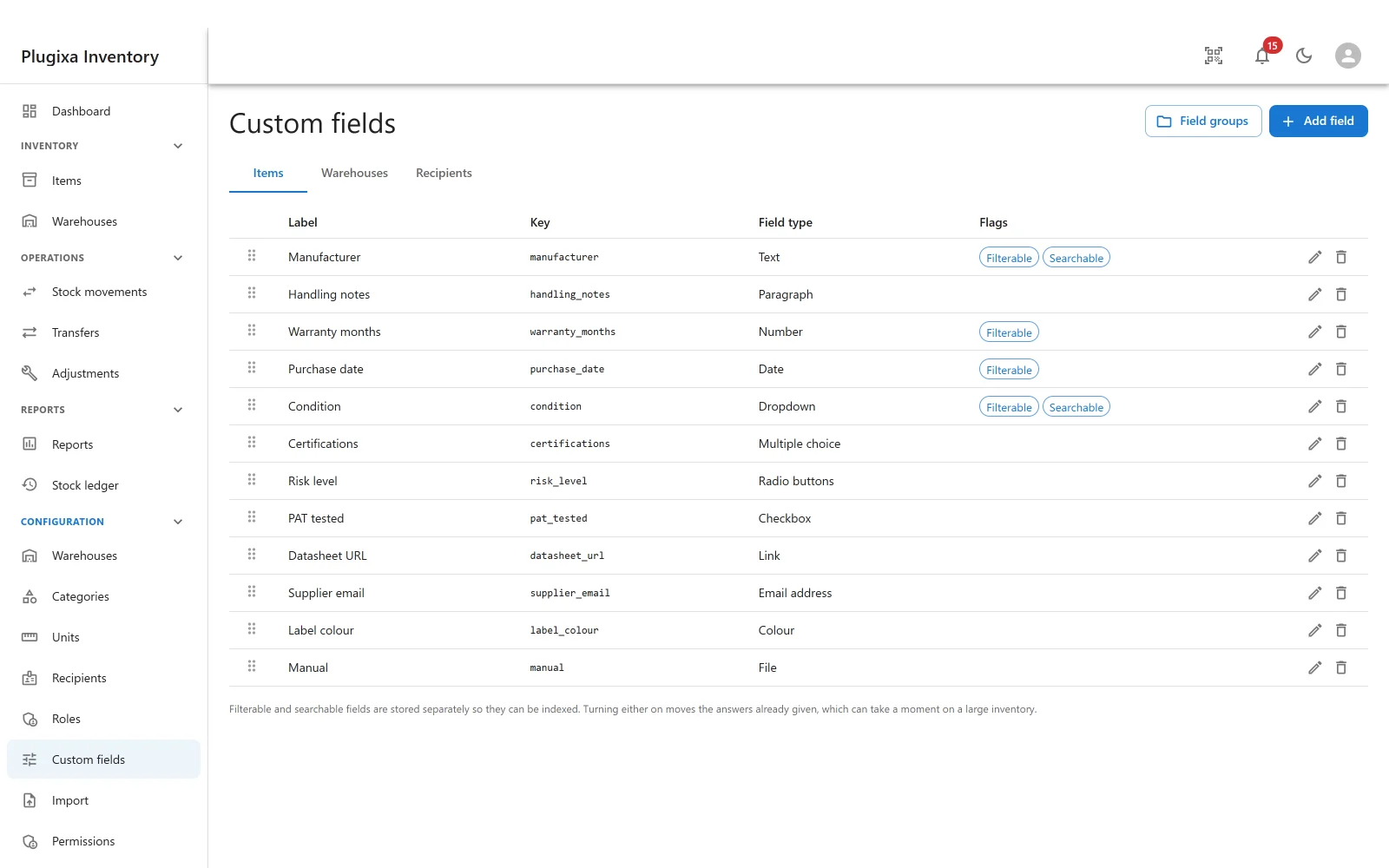
The tabs across the top are the three record types: Items, Warehouses and Recipients. A field belongs to one of them.
A warranty length is an item field. A gate code is a warehouse field. A cost centre is a recipient field. Keeping them apart is what stops the item form growing every column anybody ever wanted anywhere.
Twelve types
| Type | Holds |
|---|---|
| Text | One line |
| Paragraph | Several |
| Number | A number, compared as a number |
| Date | A date, compared as a date |
| Dropdown | One of a list you define |
| Multiple choice | Several from that list |
| Radio buttons | One of a list, all shown at once |
| Checkbox | On or off |
| Link | A URL |
| Email address | An address, validated as one |
| Colour | A colour |
| File | One or more media attachments |
Twelve, and deliberately exactly twelve: they match the system Plugixa Inventory was ported from, so a site migrating does not discover that the colour field it has used for three years has nowhere to land.
Groups and order
Field groups collect related fields into a section on the form, so an item with twenty custom fields is still a form somebody can read. The handle at the left of each row reorders them, and the order is the order on the form.
Filterable and searchable
Two flags, and the difference is worth understanding because it decides where the answer is stored.
- An ordinary field’s answer lives with the record, as JSON. Simple, and perfectly fast to read.
- A filterable or searchable field’s answer is stored separately, in a typed and indexed column, because you cannot index inside JSON.
Turning either flag on therefore moves the answers that have already been given, which can take a moment on a large inventory. The screen says so. It is a one-off, and afterwards the field appears in the filter drawer as an ordinary field rather than as a special case.
A filterable field is typed correctly for what it holds: a number filters as a number, a date as a date, a checkbox as a yes or no, and a dropdown as a choice.
What cannot be filtered, and why
Multiple choice and File offer no filterable flag. Both hold a list, and an equality filter over a stored list matches fragments of it while a text search over it matches worse. Offering a filter that quietly answers wrongly produces a bug report about your data, which is the most expensive kind. So it is not offered.
Paragraph and Multiple choice are likewise not searchable, for the same family of reasons.
On the free build
Answers already given are kept. The fields are simply not shown, and an item that carries custom field values still saves normally. Reinstall Pro and everything is where it was.
Troubleshooting
| Symptom | Usual cause |
|---|---|
| Custom fields is not in the menu | Pro module, or switched off in the App Manager. |
| A field does not appear on the form | It is on a different tab. A field belongs to items, warehouses or recipients. |
| Saving the filterable flag took a while | It moved every existing answer into an indexed column. Once only. |
| Multiple choice has no filterable flag | Correct. A filter over a stored list answers wrongly, so it is not offered. |
| The field is not in the filter drawer | It is not marked filterable. |
| Options are missing | Only dropdown, multiple choice and radio carry a list of options. |
| Fields are in the wrong order on the form | Drag the handle at the left of the row. |
| A key cannot be changed | The key identifies the answers already stored against it. |
What to do next
- Put them on records: Items.
- Narrow a list with one: Scanner and Search.
- Count in boxes as well: Units of Measurement PRO.