

Contents
Warehouse overview - Plugixa Inventory
The dashboard tells you about the whole business. This screen tells you about one location, which is the question somebody standing in that location actually has.
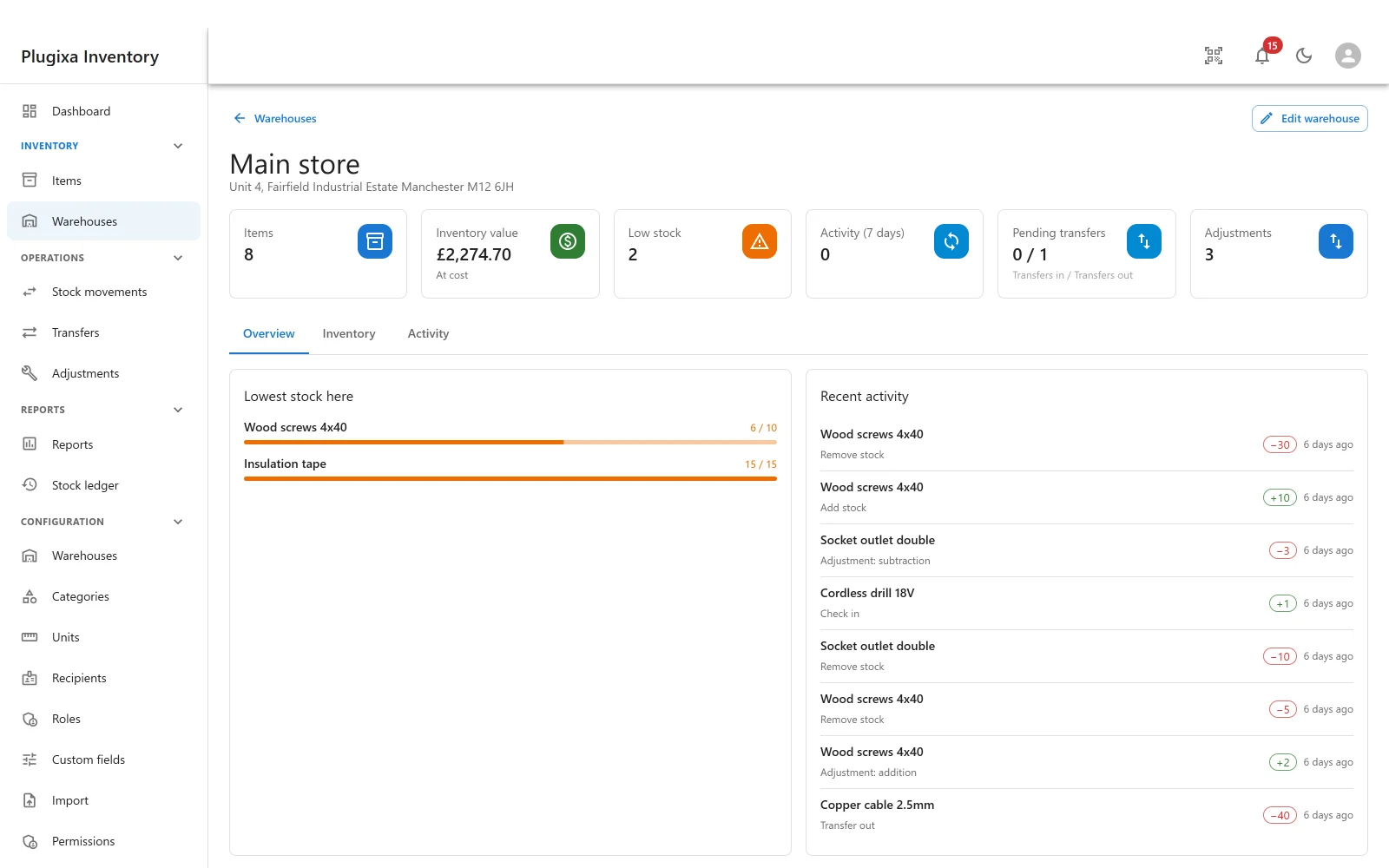
Open it from Inventory -> Warehouses by clicking a card, or from the arrow in its corner.
The top row
| Card | What it counts, here |
|---|---|
| Items | How many distinct items hold stock in this location |
| Inventory value | What they are worth, at cost |
| Low stock | How many are at or below their reorder level |
| Activity (7 days) | Movements finalised against this warehouse in the last week |
| Pending transfers | Draft transfers in and out, as in / out PRO |
| Adjustments | How many have been posted here PRO |
Every figure is scoped to this warehouse. The same item can be healthy in the main store and low in a van, and this is the screen that says so - a single global quantity cannot.
Overview
Lowest stock here ranks the items closest to running out, each with a bar
showing the quantity against its reorder level - 6 / 10 is six on hand against a
reorder level of ten. It is ordered by how close to the line they are, so the top
of the list is what to deal with first.
Recent activity is this location’s slice of the ledger: the item, what happened, how much, and when. A transfer out appears here as a transfer out, not as a removal, so the stock is traceable to where it went.
Inventory
The full list of what is held here, item by item, with the quantity in this location rather than the global total. This is the tab to use for a stock take, and the one to read before promising somebody the part is on the shelf.
Activity
The complete movement history for this warehouse, rather than the recent handful on the overview. It is the stock ledger filtered to one location, with the same append-only guarantee.
Pending transfers
Drafts only. A finalised transfer has already moved the stock and is in the ledger; what somebody standing in a warehouse needs from this tile is what is still coming, and what is still owed to somebody else. So the card counts draft transfers in each direction, and a finalised one drops off it.
The same drafts also protect the warehouse: a location at either end of a draft transfer cannot be trashed, even an empty one that a draft is about to move stock into.
Transfers are a Pro module. The tile is contributed by the module rather than built into this screen, so on a build without it the tile is simply absent rather than showing a permanent zero - which would be a different and much worse claim. The same is true of the adjustments tile. See Transfers PRO.
Troubleshooting
| Symptom | Usual cause |
|---|---|
| The value is lower than the dashboard’s | It should be. This is one location; the dashboard totals all of them. |
| An item is missing from Inventory | It holds no stock here. Zero in a location is not a row. |
| Lowest stock here is empty | Nothing is at or below its reorder level in this warehouse. |
| Low stock counts differ between two warehouses | Correct. Low is per item and warehouse, not global. |
| There is no pending transfers or adjustments tile | Both are Pro modules, and a tile is contributed by its module. Absent means not installed, not zero. |
| Activity is empty but items are held | Stock arrived before this window, or by an import. Check the ledger. |
What to do next
- Manage the locations themselves: Warehouses.
- Move stock between them: Transfers PRO.
- Correct a count: Adjustments PRO.
- See the whole picture: Dashboard.