

Contents
Warehouses - Plugixa Inventory
A warehouse is a place stock is actually held. Not a label on an item: a real location with its own quantities and its own valuation.
Stock belongs to a pair
This is the decision the rest of the plugin is built on. A quantity is held against an item and a warehouse together, so “how much is in the west depot” is a question with an answer.
The alternative - one item, one location, one number - nets ten in one place and none in another into a figure that is true of nowhere, and makes a transfer between two locations write two rows that cancel out. Stock here is keyed on the pair, so a transfer is a real movement of a real quantity from one place to another.
What a warehouse has
| Field | Why |
|---|---|
| Name | What people call it |
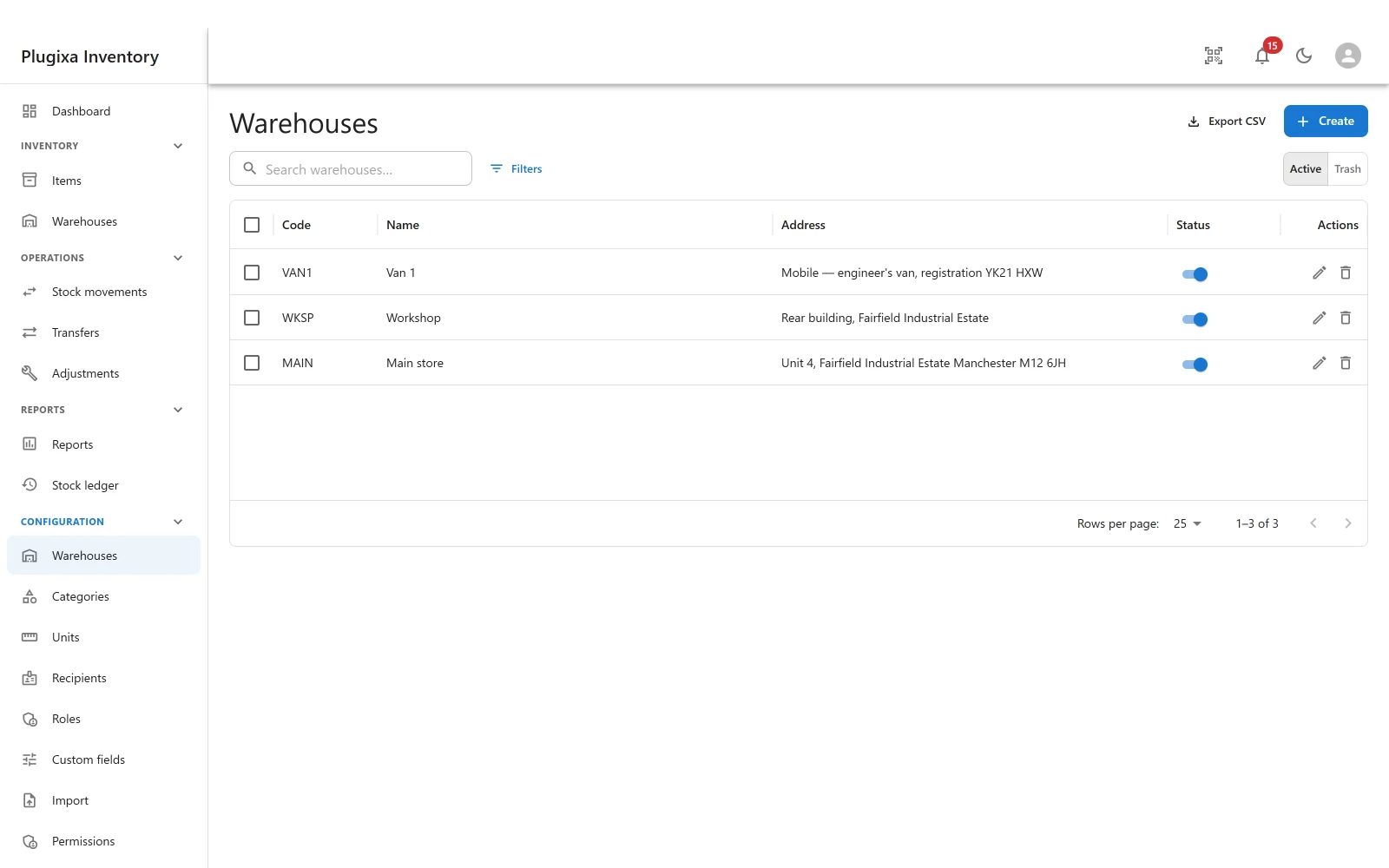
| Code | A short handle: MAIN, WKSP, VAN1. What a CSV import refers to |
| Address | Free text. A van’s registration is as valid as a postcode |
| Status | Published or unpublished |
Create the locations you actually have. A van is a warehouse. So is a shelf, if you want to know what is on it.
The card
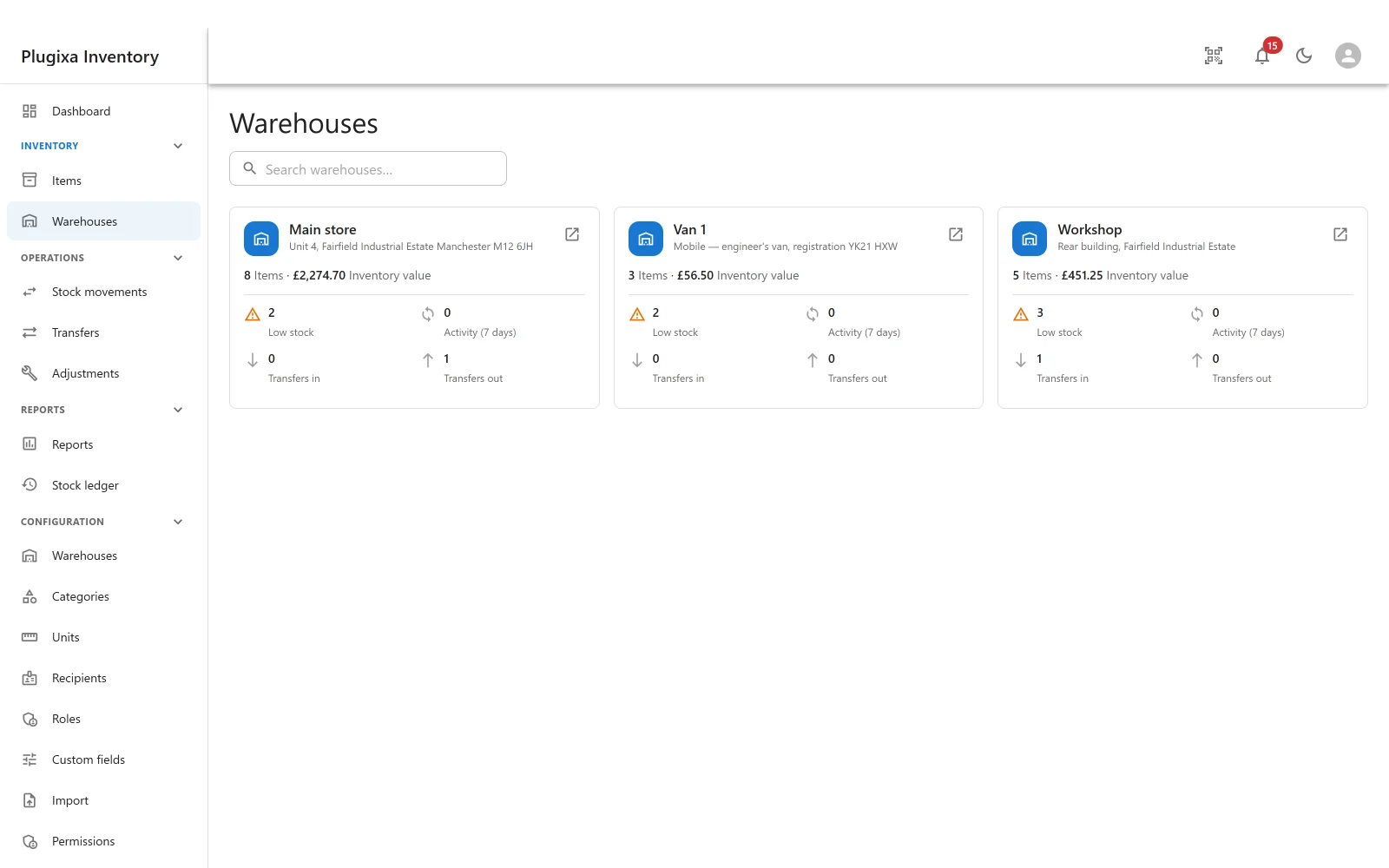
Each card is a small report: how many items are held there, what they are worth at cost, how many are low, how much has happened in the last seven days, and how many transfers are pending in each direction. Open one for the full warehouse overview.
Two places in the menu
Warehouses appear twice on purpose, and they are not the same screen.
- Inventory -> Warehouses is the operational view: the cards above, and the overview behind each one.
- Configuration -> Warehouses is the record list: create, edit, unpublish and trash.
What stops a warehouse being deleted
Stock on hand blocks it. History does not.
A warehouse that still holds something is holding a real quantity somebody is answerable for, and trashing it would make that quantity unreachable while every total still counted it. So the plugin refuses, and says: this warehouse still holds stock, transfer or remove it first.
A warehouse that merely appears in the ledger is finished with, and can be retired. Refusing that would mean no location could ever be closed, which is not a feature.
A draft transfer at either end blocks it too, and says how many. That covers the case stock alone cannot: an empty location a draft is about to move stock into, which holds nothing and would otherwise be deletable right up until the moment the transfer failed to finalise.
The fulfilment warehouse of the WooCommerce PRO integration cannot be trashed either: WooCommerce sells from this warehouse. Choose another one in the WooCommerce settings first.
To retire one that still holds stock: transfer the stock out (Transfers PRO), or remove it with a document, then trash the warehouse. Its ledger history stays.
Default warehouse
An item has a default warehouse, and it is only a suggestion for a new movement. It is not where the item’s stock is. The stock is wherever the finalised documents put it, and one item can be in every location at once.
Troubleshooting
| Symptom | Usual cause |
|---|---|
| “This warehouse still holds stock” | Correct. Transfer or remove the stock, then trash it. |
| A retired warehouse still shows in the ledger | It should. The ledger is history, and history does not change. |
| The value on the card is lower than expected | It is at cost, not at sale price. Items with an empty cost price fall back to the sale price. |
| A warehouse is not offered on a movement | It is unpublished. |
| Two locations show the same item | That is the point. Stock is per pair. |
| There are no transfers in and out figures on the card | Transfers are a Pro module, and the figures are contributed by it. Absent means not installed. |
| Transfers in and out both read zero | Nothing is in draft. The figures count drafts, because a finalised transfer has already moved. |
What to do next
- Look inside one: Warehouse Overview.
- Move stock between them: Transfers PRO.
- See how value is calculated: Valuation and Costing.