

Contents
The stock ledger - Plugixa Inventory
Every change to every quantity is written here, newest first, and nothing can edit or delete a row.
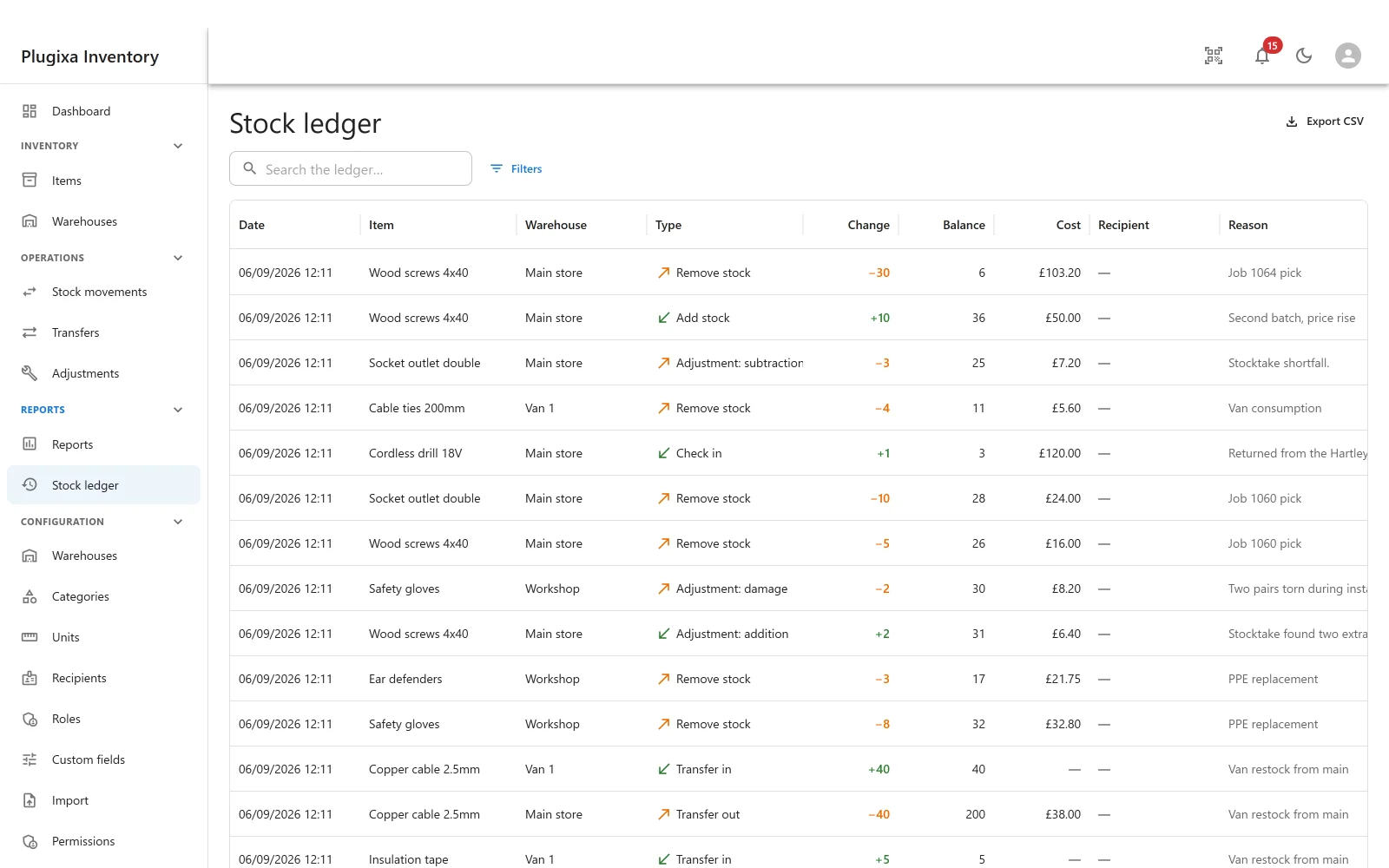
What a row records
Date, item, warehouse, the kind of change, the quantity, the stock level it resulted in, what it cost, who it went to, and why.
The resulting stock level is on the row on purpose. It means you can read a history and see what the system believed at each step, rather than having to add the column up yourself and hope.
Append-only, by construction
Not by policy, and not by a permission somebody could grant. By construction, in three places at once:
- No REST route exists to update or delete a ledger row.
- No admin screen offers it.
- A veto in the data layer refuses it even if code tried.
There is no setting to turn this off, and that is the point. A ledger somebody can edit is not an audit trail; it is a spreadsheet with extra steps.
On-hand is derived, not stored alongside
This is the decision the whole plugin rests on. The quantity you see for an item in a warehouse follows from the ledger rather than being kept next to it as a second, independent number.
Two numbers that are supposed to agree eventually will not. One number that is computed from the other cannot disagree with it.
Reconcile
Because “cannot disagree” is a claim, there is a check that tests it. It compares every on-hand quantity against what the ledger says it should be and reports anything that does not match.
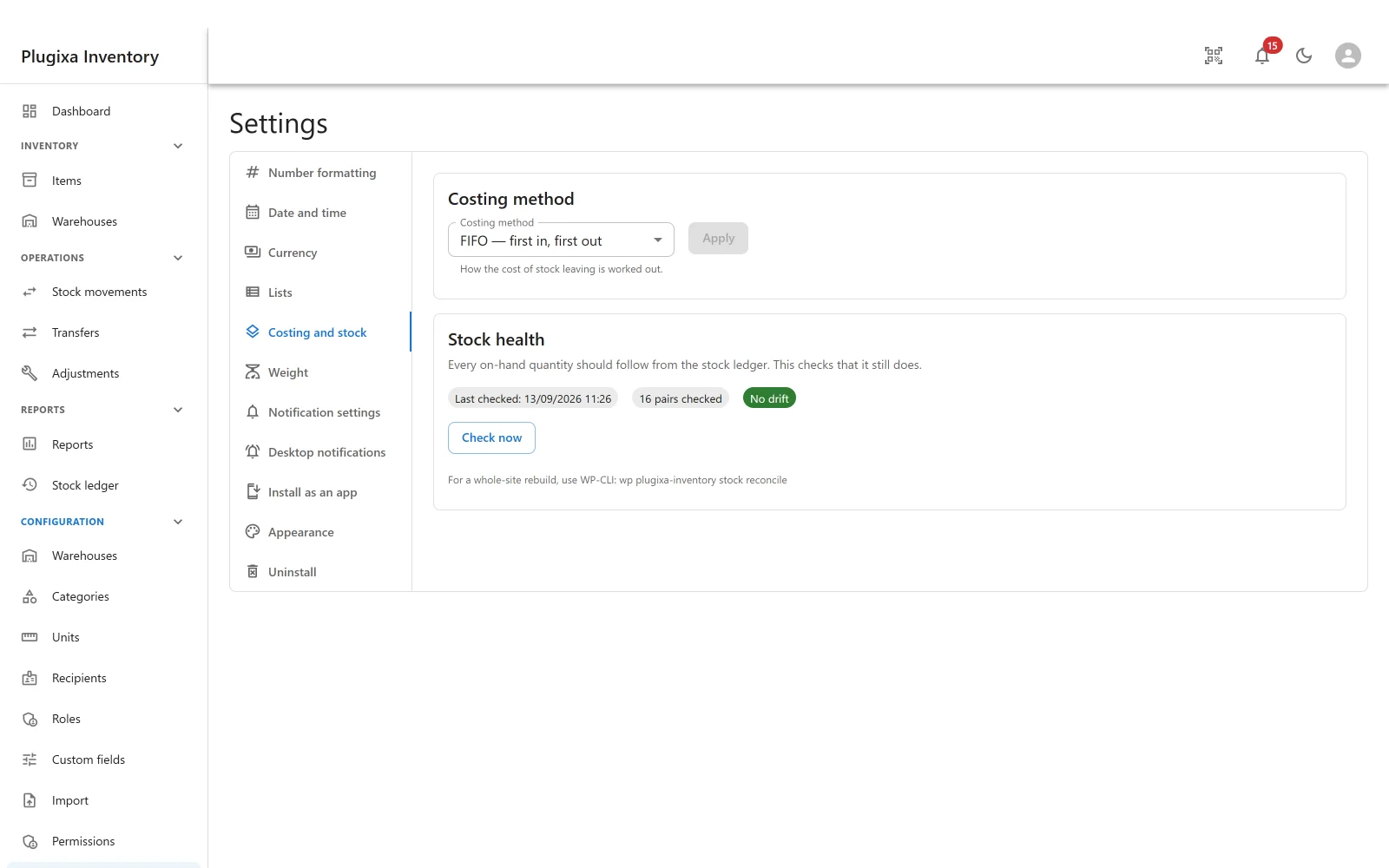
In the admin it is called Stock health, under Settings -> Costing and stock. It shows when it last ran, how many item and warehouse pairs it checked, and whether it found any drift, with a Check now button beside it.
| Where | When |
|---|---|
| Settings -> Costing and stock | On demand, whenever you want reassurance |
| A daily check | Automatically, reporting anything that disagrees |
| WP-CLI | wp plugixa-inventory stock reconcile, for a whole-site rebuild or a site too large for a browser request |
It reports first, and changes nothing on its own
A check that quietly fixes a disagreement destroys the evidence of how it happened, and the second time it happens you have nothing to look at. So the check reports findings and changes nothing, and says so: so many findings, nothing has been changed.
Correcting is a separate, deliberate act. Correct from the ledger rebuilds the quantities from the rows, and only when you press it.
Two things it will not rewrite, even then:
- Cost layers that disagree with the stock on hand are reported and never rewritten. Layers record which receipt paid for which removal, and that history cannot be recomputed from anything.
- Stock operations interrupted mid-write are counted and pointed at: if anything else looks wrong, they are where to start.
It also checks the per-item cached total against that item’s own stock rows, because a cache that has drifted is its own kind of finding.
See WP-CLI.
Correcting a mistake
Post a second, opposite document. See Stock Movements.
The correction appears in the ledger as its own row, dated, attributable and visible - which is what you want when somebody asks in six months why the figure changed.
Troubleshooting
| Symptom | Usual cause |
|---|---|
| A row is wrong and there is no Delete | Correct. Post an opposite document. |
| Stock health reports a difference | Do not correct the quantity by hand. Read the rows around the date it points at; something wrote outside the plugin, or a restore replayed part of the history. Then use Correct from the ledger. |
| It reported cost layers disagreeing | Layers are reported and never rewritten: which receipt paid for which removal cannot be recomputed. Read them. |
| The ledger is empty but items show stock | Stock was written by something other than a finalised document. Reconcile will say so. |
| A movement is missing from the ledger | Its document is still a draft. Drafts write nothing. |
| The list is very long | It is meant to be. Filter by item, warehouse or date. |
What to do next
- Where rows come from: Stock Movements.
- Run the check yourself: WP-CLI.
- What the quantities are worth: Valuation and Costing.