

Contents
Units of measurement - Plugixa Inventory
Not everything is counted in ones. Units let an item be held in boxes, metres, litres or kilograms, and let those relate to each other.
Pro feature. Units are part of Plugixa Inventory Pro. See the Free vs Pro matrix.
Base units and derived units
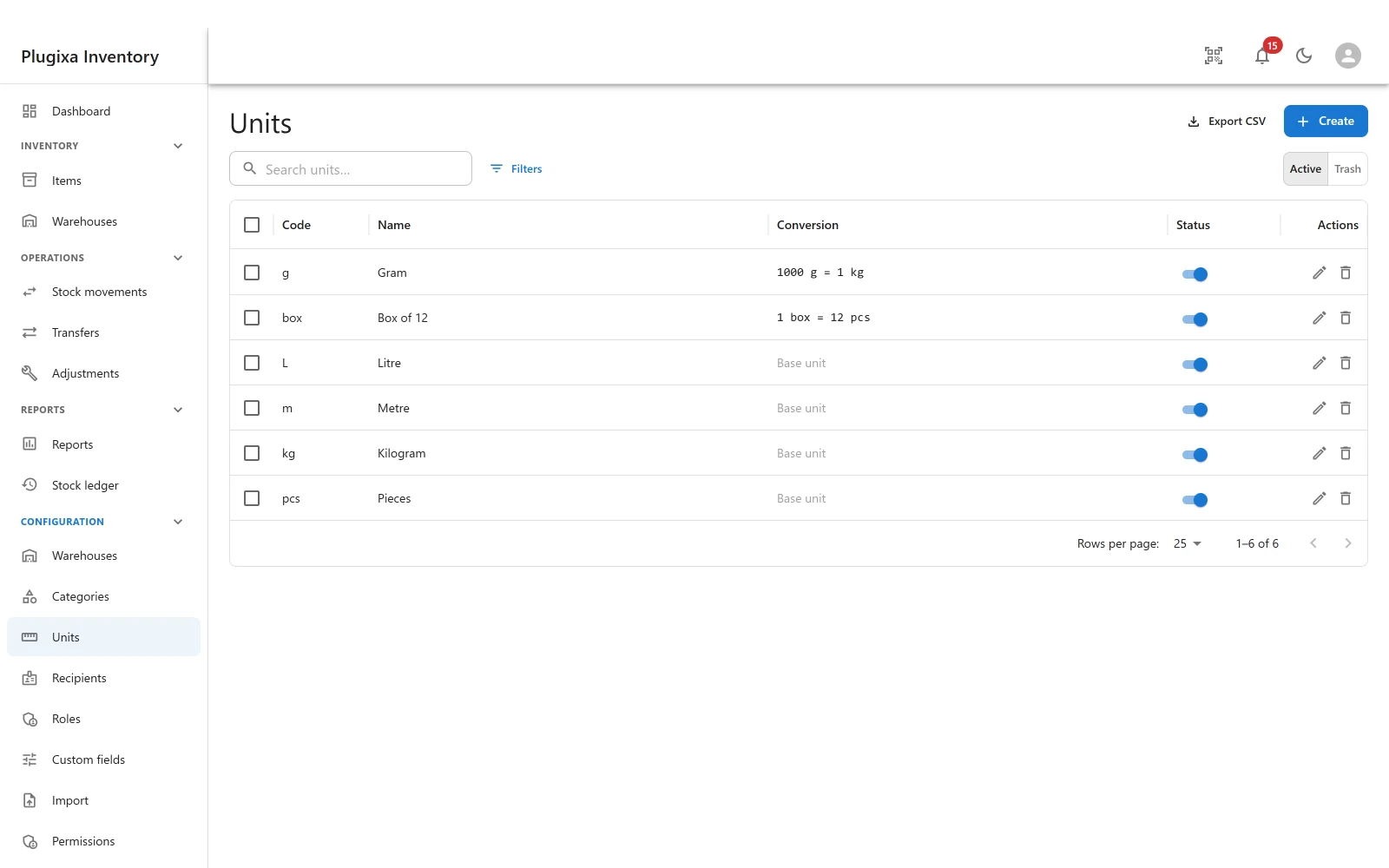
A base unit stands on its own. Pieces, kilograms, metres and litres are base units: there is nothing behind them.
A derived unit is defined against another one, with an operator and a number.
1 box = 12 pcs. 1000 g = 1 kg. The list shows the relationship in that form,
so a unit is readable without opening it.
| Field | Why |
|---|---|
| Code | Short, and what appears beside a quantity: pcs, kg, box |
| Name | The full word, for the form |
| Converts to | The unit this one is defined against. Empty makes it a base unit |
| Operator | *, /, + or - |
| Factor | The number the operator applies |
| Status | Published or unpublished |
Codes accept letters, digits, underscores, dashes, slashes and %, which covers
every unit anybody actually types.
Conversion is a chain
A unit converts to another unit, which may convert to another, and so on until a base unit is reached. Grams to kilograms to tonnes works because each step knows only its neighbour.
A cycle is refused before it is written. If A converts to B and you try to
make B convert back to A, the save is rejected. This is not fussiness: a
conversion chain is walked, so a cycle is not a slow query but an endless loop in
every piece of code that touches a quantity. The conversion walker defends itself
as well, but the right place to stop a cycle is before it reaches the database.
Multiply and divide also refuse a factor of zero, for the same reason: the result is either meaningless or destroys the quantity.
Weight is separate, and always normalised
An item’s weight is not the same thing as its unit. Weight is stored twice: as you typed it, and normalised to kilograms.
That second column is what makes a weight report possible. Storing a number and a unit side by side and then adding the raw column up puts grams and tonnes in the same sum and produces a figure that means nothing. Normalising at write time means a total is answerable.
On the free build
Items keep whatever unit they were given. The field is simply not shown, and - this is the part that matters - an item that was given a unit on the Pro build still saves on the free one. The item form only re-validates a reference you actually change, so a value the free build cannot even display is not something it refuses to leave alone.
Reinstall Pro and the units are still there, on the same items.
Troubleshooting
| Symptom | Usual cause |
|---|---|
| Units is not in the menu | Pro module, or switched off in the App Manager. |
| A conversion was refused | It would create a cycle. Follow the chain: something already converts back to this unit. |
| A factor of zero was refused | Multiplying or dividing by zero either means nothing or destroys the quantity. |
| The conversion column says “Base unit” | It converts to nothing. That is what a base unit is. |
| A code was refused | Letters, digits, dots, dashes, underscores, slashes and % only. |
A quantity reads 240.00 m where I expected pieces |
The item’s unit is metres. Change it on the item. |
| Units vanished after downgrading | They are still stored. The free build does not show the field. |
What to do next
- Assign one to an item: Items.
- Add your own data: Custom Fields PRO.
- Bring units in from a CSV: Import.