

Contents
Import - Plugixa Inventory
Import brings records in from a spreadsheet. Nothing is written until you have checked how the columns line up.
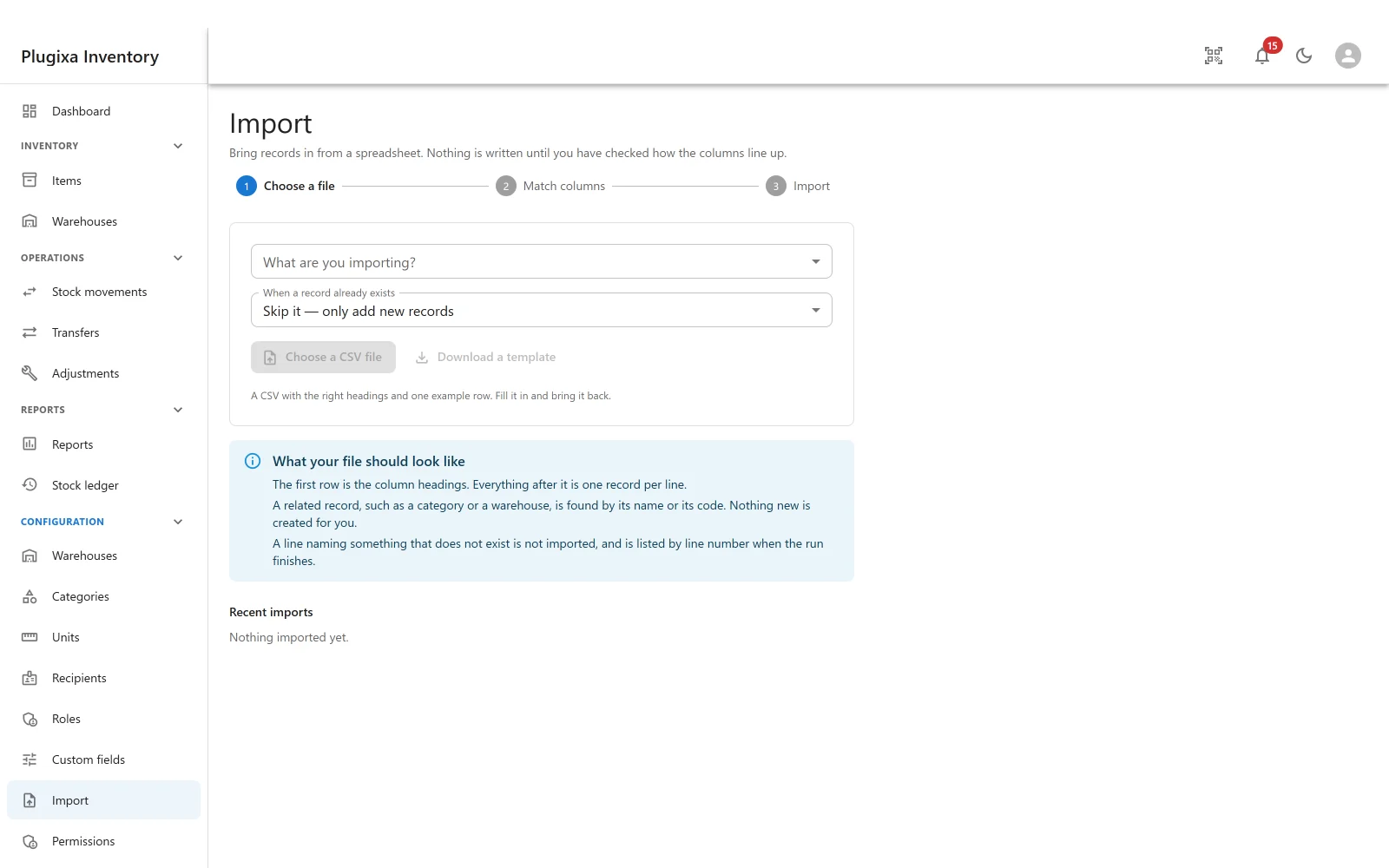
Three steps
| Step | What happens |
|---|---|
| 1 - Choose a file | Say what you are importing, how to treat records that already exist, and upload the CSV |
| 2 - Match columns | Line your headings up against the plugin’s fields. Nothing is written yet |
| 3 - Import | It runs, line by line, and reports what it did |
What you can import
Items, categories, warehouses, recipients, and units PRO. Each is recognised by its own natural key, which is how the importer knows a record is already here:
| Record | Recognised by |
|---|---|
| Item | SKU, or barcode when it has no SKU |
| Category | Code |
| Warehouse | Code |
| Unit | Code |
| Recipient | Email address |
When a record already exists
Three choices, and picking the right one is most of getting an import right:
- Skip it - only add new records. The safe default.
- Update it, and add the ones that are new.
- Update it - add nothing. For a price list refresh.
Both update modes need permission to edit records, and the screen says so if you do not have it.
What your file should look like
- The first row is the column headings. Everything after it is one record per line.
- A related record is found by its name or its code. Nothing new is created for you. A category the file names but the site does not have is not invented.
- A line naming something that does not exist is not imported, and is listed by line number when the run finishes.
That last rule is the one that saves the afternoon. A typo in a warehouse code produces a numbered list of lines to fix rather than a quietly mis-filed batch.
Download a template gives a CSV with the right headings and one example row.
Matching columns
The importer guesses the mapping from your headings and shows the guess, marked as a guess, with an example value from your file beside each column. Change anything it got wrong, set a column to Do not import, or Clear all and do it yourself.
It refuses to run when:
- A required field is unmapped. It names which.
- The natural key is unmapped in an update mode. Nothing can be matched without it, so map it or switch to only adding new records.
- A field is mapped twice, by two different columns. It names both and asks you to pick one.
Numbers are read using this site’s own thousands and decimal separators. A file exported on a machine with different conventions is the usual explanation for a quantity that arrives a thousand times too large.
Opening stock
This is the part worth reading twice, because it does more than fill a column.
On hand cannot be imported directly. It is set by stock movements, and the mapping screen says so, pointing you at Opening quantity instead.
Map Opening quantity, optionally Cost per unit, and choose the warehouse the stock lands in, and the import posts a real, finalised stock movement. It appears in the ledger, it moves the on-hand quantity, and correcting it later means a second document - exactly like stock entered by hand. Left unmapped, each line is valued at the item’s own cost price.
Opening stock is posted only for rows that create a new item, so running the same file twice will not double your stock.
While it runs
Progress is shown line by line, and the opening stock is posted afterwards with its own count.
Stop halts it. What has already been imported stays, and Resume picks up from the next line. Leaving the page stops it the same way, with a warning first. If the server stops making progress the run stops itself rather than asking forever.
Every run is listed under Recent imports with its status: not started, ready to import, unfinished, finished, stopped or reverted. An unfinished one can be resumed from there, unless the uploaded file has since been cleaned up, which the list says.
The result
Added, Updated, Skipped and Not imported, with every problem listed by line number and what went wrong. Download the problems as CSV gives you a file to fix and re-run.
If an opening stock document was left unfinalised, the result says so and names it, so it can be finalised or deleted rather than sitting there quietly.
Revert
An import can be undone from the list.
- Records it added are moved to the trash.
- Opening stock it posted is taken back out with a reversing stock movement - not deleted, because the ledger is append-only.
- An item that has since acquired stock history is unpublished instead of removed, because that history is part of the audit trail.
- Records it updated are not changed back.
The result tells you how many were trashed and how many were unpublished.
Troubleshooting
| Symptom | Usual cause |
|---|---|
| Categories or warehouses were not assigned | The file names one that does not exist. Nothing is created for you. |
| Quantities are a thousand times too large | The file uses different thousands and decimal separators from this site. |
| “Nothing can be matched without …” | An update mode needs the natural key mapped. Map it, or switch to only adding. |
| “… is mapped twice” | Two columns point at one field. Pick one. |
| On hand cannot be mapped | Correct. Map Opening quantity instead. |
| Stock doubled after re-running the file | It should not: opening stock is posted only for new items. Check whether the rows created new items. |
| The run cannot be resumed | The uploaded file has been cleaned up. Upload it again. |
| Revert did not undo an update | By design. Only added records and posted stock are reversed. |
| An item was unpublished rather than trashed on revert | It had stock history by then, which is part of the audit trail. |
What to do next
- Check what arrived: Items.
- See the opening stock: The Stock Ledger.
- Take a list back out: Export.